
meunier
Error with Set-PSULicense: The SSL connection could not be established
Hello Ruben,
this morning with no specific actions or modifications I succeeded installing the license.
set-psuLicense -Key $LicenseKey -Verbose -Debug *>&1
VERBOSE: Using computer name from variable. .
VERBOSE: Using App Token from Connect-PSUServer command.
VERBOSE: Using App Token for authentication.
VERBOSE: $PSUTrustCertificate:
VERBOSE: Using gRPC-Web.
VERBOSE: Using insecure channel call credentials.
Id : 1
LicenseText : XXXXXXXXXXXXXXXXXXXXXXXXXXXXXXXXXXXXXX
Licensee :
StartDate : 01/01/0001 00:00:00
EndDate : 01/01/0001 00:00:00
Seats : 0
Product :
Status :
Developer : False
ReadOnly : False
Source :
Module :
Online : False
ComputerName :
Version :
Site :
Type : PowerShellUniversalServer
SourceModule :
SourceModuleBase :
Get-PSULicense
Id : 1
LicenseText : XXXXXXXXXXXXXXXXXXXXXXXXXXXXXXXXXX
Licensee : Devolutions PowerShell Universal - Server
StartDate : 06/10/2026 00:00:00
EndDate : 12/10/2026 23:59:59
Seats : 1
Product : Devolutions PowerShell Universal - Server
Status : Trial
Developer : False
ReadOnly : False
Source :
Module :
Online : False
ComputerName :
Version : v2
Site :
Type : PowerShellUniversalTrial
SourceModule :
SourceModuleBase :
thanks
Error with Set-PSULicense: The SSL connection could not be established
Hello Ruben,
we are Windows 2019 server, Kristel web and Sql lite. I guess the license is an Online one, you can ask to Anthony from Customer Success Representative to confirm.
The license is a universal license trial key From Devolutions.
we are behind a proxy
[System.Net.WebRequest]::DefaultWebProxy = New-Object System.Net.WebProxy("http://our_proxy:8080")
[System.Net.WebRequest]::DefaultWebProxy.BypassProxyOnLocal = $true
[System.Net.WebRequest]::DefaultWebProxy
(Invoke-WebRequest -Uri devolutions.net -UseBasicParsing).StatusCode = 200
(Invoke-WebRequest -Uri quoting.devolutions.net -UseBasicParsing).StatusCode = error: (404) Not Found
(Invoke-WebRequest -Uri ironmansoftware.com -UseBasicParsing).StatusCode = 200
The license worked previously on this server but not anymore after reinstalling PSU last version.
Also quoting.devolutions.net is hold by quoting.devolutions.net.cdn.cloudflare.net. do we need "quoting.devolutions.net.cdn.cloudflare.net" accessible from the PSU server ?
thanks
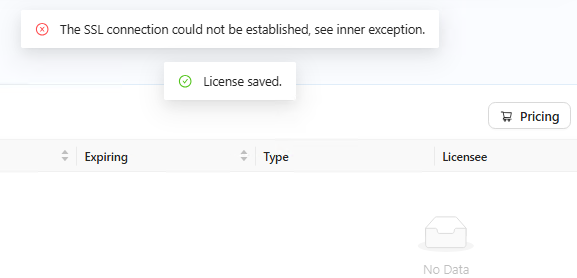
Error with Set-PSULicense: The SSL connection could not be established
Hello, running new PSU 2026.3.3
getting this error while pasting license or while running Set-PSULicense -key 'XXXXXXXXXXXXXXXXXXXXX'
Thanks to help me.
Set-PSULicense -key 'XXXXXXXXXXXXXXXXXXXXX'
Set-PSULicense: Status(StatusCode="Unknown", Detail="Exception was thrown by handler. HttpRequestException: The SSL connection could not be established, see inner exception. IOException: Received an unexpected EOF or 0 bytes from the transport stream.")
Get-PSUEndpoint : Status(StatusCode="Unavailable", Detail="Error starting gRPC call
PSU Server 2026.2.5
PSU Agent : 2026.2.5
can someone help me to figure out this please ?
thanks
Get-PSUComputer | Where-Object { $_.name -eq "SRV-AGENT" }
Id : 3
Name : SRV-AGENT
HeartBeat : 13/09/2026 12:18:32
Status : Online
GrpcPort : 0
LoadingInfo :
Maintenance : False
Deleted : False
LoginErrorMessage :
Tags :
HangfireServerId :
HangfireWorkerCounter : 0
Version : 2026.2.5
FileSyncTimestamp : 01/01/0001 00:00:00
ReadOnly : False
DeploymentVersion :
DeploymentName :
GitSettings :
GitBranch :
Type : Agent
GitSshKey :
EditMode : Gui
DataItems :
Get-PSUEventHubConnection -Active
Id : 28
UserName : PSU_AGENT_SRV-AGENT
RemoteIpAddress : IP
RemoteComputer : SRV-AGENT
EventHub : PSU_HUB_VP-IDSE-A01
Computer : PSU-SRV
Connected : 13/09/2026 12:18:32
Disconnected :
ConnectionId : BciHPrffvmk9iwy-bjfRPg
RemoteUserName : SRV-AGENT$
RemoteDomainName : DOMAIN
Version : 2026.2.5
RemoteIpv6Address : ::ffff:10.205.128.9
Description : PSU_AGENT_SRV-AGENT
do port 5000 to be opened on Agent and do PSU serveur able to contact the Agent from that port ?
Id : 3
Name : SRV-AGENT
HeartBeat : 13/09/2026 12:18:32
Status : Online
GrpcPort : 0
LoadingInfo :
Maintenance : False
Deleted : False
LoginErrorMessage :
Tags :
HangfireServerId :
HangfireWorkerCounter : 0
Version : 2026.2.5
FileSyncTimestamp : 01/01/0001 00:00:00
ReadOnly : False
DeploymentVersion :
DeploymentName :
GitSettings :
GitBranch :
Type : Agent
GitSshKey :
EditMode : Gui
DataItems :
Get-PSUEndpoint -ComputerName SRV
Get-PSUEndpoint : Status(StatusCode="Unavailable", Detail="Error starting gRPC call. HttpRequestException: An error occurred while sending the request. WebException: Unable to connect to the remote server SocketException: A connection attempt failed because the
connected party did not properly respond after a period of time, or established connection failed because connected host has failed to respond IP:5000", DebugException="System.Net.Http.HttpRequestException: An error occurred while sending the request.")
At line:1 char:1
+ Get-PSUEndpoint -ComputerName SRV-AGENT
+ ~~~~~~~~~~~~~~~~~~~~~~~~~~~~~~~~~~~~~~~~~
+ CategoryInfo : NotSpecified: (:) [Get-PSUEndpoint], RpcException
+ FullyQualifiedErrorId : Grpc.Core.RpcException,UniversalAutomation.GetEndpointCommand
PSU Server behind a proxy and Gallery to install Offline
Product: PowerShell Universal
Version: 5.6.5
Hello , 2 questions
What are the outbond ports to open to get/download PSU’s Gallery and the Urls ?
Is it possible to install Gallery offline if PSUnot connecter to Internet ?
The Reame.MD GitHub - ironmansoftware/gallery: Public gallery of modules for PowerShell Universal , is not clear for me, and publishPsGallery.ps1 seems not working
thanks
good news PSU joigned Devolutions!
PS C:#support\PowerShell Universal\gallery\gallery-main\gallery-main> dir
Directory: C:\#support\PowerShell Universal\gallery\gallery-main\gallery-mainMode LastWriteTime Length Name
d----- 29/09/2025 16:59 .github
d----- 29/09/2025 16:59 APIs
d----- 14/10/2025 17:00 Apps
d----- 29/09/2025 16:59 HealthChecks
d----- 14/10/2025 17:00 images
d----- 29/09/2025 16:59 LoggingTargets
d----- 29/09/2025 16:59 Roles
d----- 29/09/2025 16:59 Scripts
d----- 29/09/2025 16:59 Triggers
d----- 29/09/2025 16:59 Widgets
------ 04/09/2025 05:27 1078 LICENSE
-a---- 14/10/2025 17:15 424 publishPsGallery.ps1
------ 04/09/2025 05:27 4196 README.md
------ 04/09/2025 05:27 6 version.txt
PS C:#support\PowerShell Universal\gallery\gallery-main\gallery-main> .\publishPsGallery.ps1
PackageManagement\Install-Package : No match was found for the specified search criteria and module name ‘dbatools’. Try Get-PSRepository to see all available registered module repositories.
At C:\Program Files\WindowsPowerShell\Modules\PowerShellGet\1.0.0.1\PSModule.psm1:1809 char:21
… $null = PackageManagement\In@PSBoundParameterstall-Package @PSBoundParameters
~~~~~~~~~~~~~~~~~~~~~~~~~~~~~~~~~~~~~~~~~~~~~~~~~~~~CategoryInfo : ObjectNotFound: (Microsoft.Power…InstallPackage:InstallPackage) [Install-Package], Exception
FullyQualifiedErrorId : NoMatchFoundForCriteria,Microsoft.PowerShell.PackageManagement.Cmdlets.InstallPackage
PackageManagement\Install-Package : No match was found for the specified search criteria and module name ‘ImportExcel’. Try Get-PSRepository to see all available registered module repositories.
At C:\Program Files\WindowsPowerShell\Modules\PowerShellGet\1.0.0.1\PSModule.psm1:1809 char:21
… $null = PackageManagement\In@PSBoundParameterstall-Package @PSBoundParameters
~~~~~~~~~~~~~~~~~~~~~~~~~~~~~~~~~~~~~~~~~~~~~~~~~~~~CategoryInfo : ObjectNotFound: (Microsoft.Power…InstallPackage:InstallPackage) [Install-Package], Exception
FullyQualifiedErrorId : NoMatchFoundForCriteria,Microsoft.PowerShell.PackageManagement.Cmdlets.InstallPackage