Error with Set-PSULicense: The SSL connection could not be established
Error with Set-PSULicense: The SSL connection could not be established

Hello, running new PSU 2026.3.3
getting this error while pasting license or while running Set-PSULicense -key 'XXXXXXXXXXXXXXXXXXXXX'
Thanks to help me.
Set-PSULicense -key 'XXXXXXXXXXXXXXXXXXXXX'
Set-PSULicense: Status(StatusCode="Unknown", Detail="Exception was thrown by handler. HttpRequestException: The SSL connection could not be established, see inner exception. IOException: Received an unexpected EOF or 0 bytes from the transport stream.")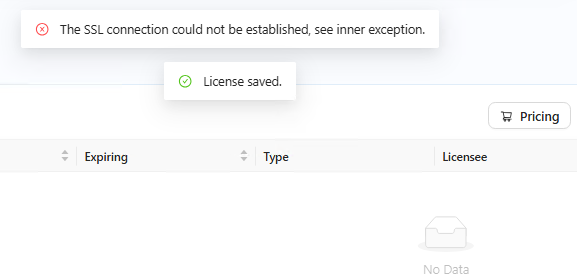
39eff1e8-9d3b-48d4-b392-52a166b0aed4.png
All Comments (6)
Hello @meunier
Thank you for reporting this.
Since the SSL error occurs both when adding the license through the UI and when using Set-PSULicense, I would first like to rule out an outbound connectivity, proxy, or TLS inspection issue from the PSU host.
Could you please confirm the following?
• What operating system and hosting method are you using, such as Windows Service, IIS, or Docker?
• Is this an online or offline license?
• Was the license originally issued by Ironman Software or Devolutions? Please do not post the license key.
• Does this server use an outbound proxy, SSL/TLS inspection, or HTTPS filtering?
• Was this license working previously on this server or on an earlier PSU version?
For online licenses, PSU needs outbound access to the appropriate licensing service. If possible, please also confirm whether the PSU server can establish an HTTPS connection to the corresponding licensing endpoint.
If the connection succeeds but PSU still reports the error, please share a sanitized excerpt of the PSU log covering the license installation attempt, including the exception and stack trace.
Because this is a public forum, please sanitize all evidence before posting. Remove credentials, tokens, license keys, cookies, private keys, full connection strings, email addresses, usernames, customer data, tenant or account identifiers, internal domains, hostnames, IP addresses, and private URLs. Please do not upload unredacted HAR files, memory dumps, database backups, or complete configuration files to this public thread.
References:
https://docs.devolutions.net/powershell-universal/licensing
Best regards,
Ruben Tapia
Hello Ruben,
we are Windows 2019 server, Kristel web and Sql lite. I guess the license is an Online one, you can ask to Anthony from Customer Success Representative to confirm.
The license is a universal license trial key From Devolutions.
we are behind a proxy
[System.Net.WebRequest]::DefaultWebProxy = New-Object System.Net.WebProxy("http://our_proxy:8080")
[System.Net.WebRequest]::DefaultWebProxy.BypassProxyOnLocal = $true
[System.Net.WebRequest]::DefaultWebProxy
(Invoke-WebRequest -Uri devolutions.net -UseBasicParsing).StatusCode = 200
(Invoke-WebRequest -Uri quoting.devolutions.net -UseBasicParsing).StatusCode = error: (404) Not Found
(Invoke-WebRequest -Uri ironmansoftware.com -UseBasicParsing).StatusCode = 200
The license worked previously on this server but not anymore after reinstalling PSU last version.
Also quoting.devolutions.net is hold by quoting.devolutions.net.cdn.cloudflare.net. do we need "quoting.devolutions.net.cdn.cloudflare.net" accessible from the PSU server ?
thanks
Hello @meunier
Thank you for the additional details. This helps narrow it down.
The HTTP 404 response from https://quoting.devolutions.net is actually useful here. It means that, from that interactive PowerShell session, DNS resolution, the proxy path, and the TLS connection progressed far enough to receive an HTTP response.
However, the following configuration:
[System.Net.WebRequest]::DefaultWebProxy = ...
only applies to the PowerShell process where you executed it. It does not confirm that the PowerShell Universal service itself is using the same proxy.
For a Devolutions-issued online license, PSU requires access to:
https://quoting.devolutions.net
Please check Settings > General in PSU and confirm whether the Proxy URI is configured there. PSU can also configure its proxy through Set-PSUSetting.
Regarding quoting.devolutions.net.cdn.cloudflare.net, the PSU documentation does not list that hostname as an additional licensing requirement. The documented requirement is access to quoting.devolutions.net, so I would not add the Cloudflare hostname separately based only on the DNS resolution.
Could you please check the PSU proxy configuration after the reinstall and retry the license?
If the proxy is already configured in PSU and the issue remains, please also let me know which PSU version was previously working. At that point, a sanitized System Log excerpt from the failed license attempt would also be useful.
Because this is a public forum, please sanitize all evidence before posting. Remove credentials, tokens, license keys, cookies, private keys, full connection strings, email addresses, usernames, customer data, tenant or account identifiers, internal domains, hostnames, IP addresses, and private URLs. Please do not upload unredacted HAR files, memory dumps, database backups, or complete configuration files to this public thread.
References:
https://docs.devolutions.net/powershell-universal/licensing
Best regards,
Ruben Tapia
Hello @meunier
Thank you for providing the logs. I reviewed them and found an important detail.
The Set-PSULicense diagnostic included in the logs is currently failing before it reaches the external Devolutions licensing service. The connection is being refused locally when the cmdlet attempts to communicate with the PSU instance on localhost:5000.
The logs also show that PSU had already stopped before that diagnostic was executed.
Please first make sure the PowerShell Universal service is running and confirm that the local PSU endpoint is reachable. Based on the logs, you can verify this with:
Test-NetConnection localhost -Port 5000
Once the local connection succeeds, please retry Set-PSULicense or the license operation from the PSU interface.
It is possible that restoring the local PSU connection will resolve the current Set-PSULicense failure. However, if you still receive the original "The SSL connection could not be established" / "unexpected EOF" error after PSU is running and the local endpoint is reachable, please note the exact timestamp and provide only the sanitized System Log entries around that attempt. That will allow us to determine whether the remaining failure is occurring during the external license validation.
Also, the ZIP currently attached contains environment-specific information. Since this is a public forum, I recommend removing that attachment and posting only the minimum sanitized log excerpt needed for troubleshooting.
Because this is a public forum, please sanitize all evidence before posting. Remove credentials, tokens, license keys, cookies, private keys, full connection strings, email addresses, usernames, customer data, tenant or account identifiers, internal domains, hostnames, IP addresses, and private URLs.
Please SEND logs to ruben.tapia@ironmansoftware.com
Best regards,
Ruben Tapia
Hello Ruben,
this morning with no specific actions or modifications I succeeded installing the license.
set-psuLicense -Key $LicenseKey -Verbose -Debug *>&1
VERBOSE: Using computer name from variable. .
VERBOSE: Using App Token from Connect-PSUServer command.
VERBOSE: Using App Token for authentication.
VERBOSE: $PSUTrustCertificate:
VERBOSE: Using gRPC-Web.
VERBOSE: Using insecure channel call credentials.
Id : 1
LicenseText : XXXXXXXXXXXXXXXXXXXXXXXXXXXXXXXXXXXXXX
Licensee :
StartDate : 01/01/0001 00:00:00
EndDate : 01/01/0001 00:00:00
Seats : 0
Product :
Status :
Developer : False
ReadOnly : False
Source :
Module :
Online : False
ComputerName :
Version :
Site :
Type : PowerShellUniversalServer
SourceModule :
SourceModuleBase :
Get-PSULicense
Id : 1
LicenseText : XXXXXXXXXXXXXXXXXXXXXXXXXXXXXXXXXX
Licensee : Devolutions PowerShell Universal - Server
StartDate : 06/10/2026 00:00:00
EndDate : 12/10/2026 23:59:59
Seats : 1
Product : Devolutions PowerShell Universal - Server
Status : Trial
Developer : False
ReadOnly : False
Source :
Module :
Online : False
ComputerName :
Version : v2
Site :
Type : PowerShellUniversalTrial
SourceModule :
SourceModuleBase :
thanks
Hello,
Thank you for the details and the error message.
The error means the secure connection to the licensing service was closed before it finished.
That usually comes from a firewall, proxy, or SSL inspection device on the network path.
The Set-PSULicense command with -Key checks the key online, so the server must reach the Devolutions licensing site over HTTPS.
The address listed in our documentation is quoting.devolutions.net on port 443.
Please run these commands on the PSU server, using the same account as the PowerShell Universal service.
Test-NetConnection quoting.devolutions.net -Port 443
curl.exe -v https://quoting.devolutions.net
If the test fails, please ask your network team to allow that address, or set the proxy under Settings, General in PowerShell Universal.
If the server has no internet access, an offline license file is the better option.
You can add the file in the admin console under Settings, Licenses, Add License.
You can also place the full license text in the PSULICENSE environment variable and restart the service.
Licensing details are here: https://docs.devolutions.net/powershell-universal/licensing
Please let us know the result of the test, and whether the server uses a proxy.
If it still fails, please send the latest PowerShell Universal system log from the time of the error.
Best regards,
Patrick Ouimet