
garryo
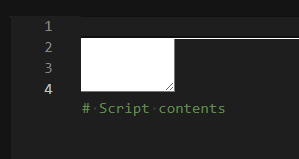
White text box in code windows
I have fixed this. Appears to have been the browser cache. I'm using Edge and just used the Ctrl+F5. Worked like a charm.
White text box in code windows
I just updated my PSU server to the latest version. Now when I edit a script the code window contains this white text box. It is messing with the line numbers and super annoying as nothing lines up. Any idea on how to get rid of it?
General setup and configuration questions
Hi Coconuts,
Thanks for the tips and the code. That is exactly the sort of thing I was looking for, appreciate you sharing
I also just installed the vscode extensions as you suggested.
As I’m just starting out there is a lot to take in. I’m just working through the doco now but I’m sort of limited to working on this in my spare time at nights so my leaning is going as fast as I’d like it
Cheers
Garry
General setup and configuration questions
Hey Matthias,
Thanks for the feedback!
Cheers
Garry
General setup and configuration questions
Hi Insomniacc,
Thanks for the feedback..lots to digest.
I’m can see the potential of PSU so excited to learn it.
Do you have any good links to examples of creating apps?
Thanks
Garry
General setup and configuration questions
Product: PowerShell Universal
Version: 1.4.6
Hello,
Like most IT departments, we have a number of scheduled tasks that check various things that then end up as an email report. Looking to replace those tasks with PSU and provide a way to give people the ability to run adhoc scripts etc.
I’ve just started using PowerShell Universal (PSU) however I’m struggling to understand a few things and was wondering if someone could point me in the right direction.
So far I’ve been able to create some basic scripts and get the output on a page by setting the “Portal output” to a table in the script settings. However how do I do the same for scheduled tasks?
Also, when the results from a script are outputted to the page, the object’s property names are changed, i.e. if my results has a property called “ComputerName”, it shows as “Computer Name”. It seems to do this for all property names. Is there any way to stop this or adjust the behavior?
The default Portal page is set to “Services”. Is there any way to customize this page? or set a different page as default?
Widets, what are they and how do I use them? How do they differ from scripts? When I create a page there is an option to add a widget but everything I try just results in nothing being saved and a blank page.
APIs - I understand what an API is but I’m not understanding why I would use them in the context of PSU? If I can run scripts and scheduled tasks why do I need an API? Is this just to allow an external service to trigger a script / code? I’d be curious to know how are people are using them and under what context?
I’m finding the documentation a challenge. I’ve been watching videos etc, however, everything seems to be out of date. I watched one video from about 12 months ago talking about setting up a Dashboard but when I look at my PSU, there are no dashboards?!
How do I go about having pages appear in the left hand menu as links to pages? I’d like to organise pages / dashboards based on their services; AD, Azure, Exchange, etc is this possible?
What is everyone doing for your naming conventions to organise scripts, pages, etc?
Any help is greatly appreciated.
Thanks
Garry