
tt_gopsu
Agent 2026.3.3 can no longer import the Universal Module
Side note: module versions 5.6.12 and 2026.2.3 both fail with this error.
Agent 2026.3.3 can no longer import the Universal Module
Since Agent 2026.3.3 importing the Universal Module fails with
Method 'ClearTimedOutSessionsAsync' in type 'UniversalDashboard.Services.SessionManager' from assembly 'UniversalDashboard, Version=1.0.0.0, Culture=neutral, PublicKeyToken=null' does not have an implementation.
Importing the module in a "normal" PowerShell session works fine as well as I don't see issues in the Server, only the agent seems to break upon importing.
Roles/Permissions assignment not working
Hi Ruben,
thank you for the update!
BR
Roles/Permissions assignment not working
So I created a new tag, checked "Display in Portal", assigned the group to the tag and assigned it as an additional tag to the scripts. Now they show up!
Honestly, the documentation is not helpful at all in this regard. That an assigned tag overrules any other permissions set, does not seem to be documented anywhere...
Roles/Permissions assignment not working
Hello Ruben,
Thank you for your investigation so far.
I think I have found the reason for this. I added the role to another script in the same folder and it immediately showed up in the portal. Also adding the role to another script in another folder worked fine.
However, the difference between those is that the two scripts in question have a Tag assigned! And when adding the role to another script that also has the same Tag assigned, it also does not show up in the portal.
So I'm guessing this is by design.
As I do not want to show the user all the scripts that have the Tag, I will now need to find a workaround for this.
BR,
Thomas
Roles/Permissions assignment not working
Hi Ruben, thank you, I will send you the details. BR, Thomas
Roles/Permissions assignment not working
@deroppi thank you for this - so you basically created your own Portal?
Ruben - thank you for your response.
* Your exact PowerShell Universal version and build. --> 2026.1.6
* Does this behavior affect every member of the AD group mapped to the `execute` role, or only certain users? --> all of them
* For one affected user, can you confirm which PSU roles are effectively assigned after Windows SSO authentication?
This is rather interesting - in order to obtain this information, I created a script outputting $UAJob to Json. For the user to be able to execute the script, I had to assign "All" - immediately the script was displayed in the Portal.
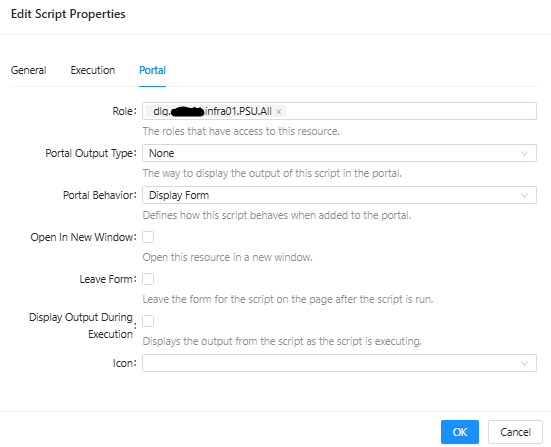
Here are the relevant parts of the $UAJob output. This is interesting, as obviously the AD groups are assigned correctly, however only the first one (dlg.******.infra01.PSU.All) seems to have any effect:
"Identity":  {
                     "Id":  72,
                     "Name":  "******\\ts77184",
                     "Source":  "Git",
                     "RoleName":  null,
                     "Roles":  null,
                     "CredentialVault":  null,
                     "Password":  null,
                     "LocalAccount":  false,
                     "OldPassword":  null,
                     "Settings":  null,
                     "Theme":  "light",
                     "JobColumns":  null,
                     "JobStatuses":  null,
                     "PasswordLastSet":  null,
                     "System":  false,
                     "ExcludedScripts":  null,
                     "SelectedScripts":  null,
                     "DevolutionsAccount":  false
                 },
[...]
"Roles":  "dlg.******.infra01.PSU.All,dlg.******.infra01.PSU.******Infrastructure**.execute",
[...]
"ReadPermission":  "automation.scripts.Get-PSUVars.ps1/read",
As an additional test, if possible, please temporarily assign the same `execute` role directly to a test Identity in PSU rather than obtaining it through the Windows SSO group mapping. Then sign out, sign back in, and check whether the assigned script becomes visible in the Portal.
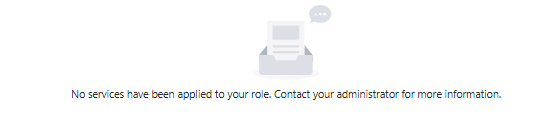
So I assigned to role directly to the Identity, which leads to nothing being displayed in the portal anymore:
* After changing the role assignment, does signing out completely and signing back in change the result? --> No, also signing off from the Workstation, Private Mode, ... does not change anything.
If you can also share the relevant sanitized definitions for the broad role and the `execute` role, that would help. We do not need the complete configuration. --> (I'm guessing what you mean is the relevant portions of the roles.ps1?)
New-PSURole -Name "dlg.******.infra01.PSU.All" -Description "Permissions for all users" -ClaimType "http://schemas.microsoft.com/ws/2008/06/identity/claims/groupsid" -ClaimValue "S-*-*-**-**********-********-**********-******" -DefaultRoute "/portal" -Priority 99
New-PSURole -Name "dlg.******.infra01.PSU.******Infrastructure**.execute" -Description "Users allowed to execute reporting Scripts in ****** Infrastructure (**) Folder" -ClaimType "http://schemas.micrsooft.com/ws/2008/06/identity/claims/groupsid" -ClaimValue "S-*-*-**-**********-********-**********-******" -DefaultRoute "/portal" -Priority 99
I also did some tests with other users:
"Identity":  {
	 "Id":  73,
	 "Name":  "******\\*******",
	 "Source":  "Git",
	 "RoleName":  null,
	 "Roles":  null,
	 "CredentialVault":  null,
	 "Password":  null,
	 "LocalAccount":  false,
	 "OldPassword":  null,
	 "Settings":  null,
	 "Theme":  null,
	 "JobColumns":  null,
	 "JobStatuses":  null,
	 "PasswordLastSet":  null,
	 "System":  false,
	 "ExcludedScripts":  null,
	 "SelectedScripts":  null,
	 "DevolutionsAccount":  false
 },
[...]
"Roles":  "dlg.******.infra01.PSU.All,dlg.******.infra01.PSU.Operator,Operator",
[...]
"ReadPermission":  "automation.scripts.Get-PSUVars.ps1/read",
--> is able the execute the script in the Portal, has "Operator" permissions in the Admin console
"Identity":  {
	 "Id":  26,
	 "Name":  "******\\**********",
	 "Source":  "Git",
	 "RoleName":  null,
	 "Roles":  null,
	 "CredentialVault":  null,
	 "Password":  null,
	 "LocalAccount":  false,
	 "OldPassword":  null,
	 "Settings":  "{\"AppCodeByDefault\":false,\"ScriptListView\":null,\"SchedulesListView\":null,\"EditorSettings\":{\"ShowLineNumbers\":true,\"ShowWhitespace\":false,\"DisableAnalyzer\":false,\"Minimap\":false,\"Theme\":null},\"PageSize\":100,\"HideModuleHomePageCard\":false}",
	 "Theme":  null,
	 "JobColumns":  [
						"Id",
						"ScriptFullPath",
						"Status",
						"StatusDescription",
						"EndTime"
					],
	 "JobStatuses":  null,
	 "PasswordLastSet":  null,
	 "System":  false,
	 "ExcludedScripts":  [

						 ],
	 "SelectedScripts":  null,
	 "DevolutionsAccount":  false
 },
[...]
"Roles":  "dlg.******.infra01.PSU.admin,Administrator,dlg.******.infra01.PSU.All",
[...]
"ReadPermission":  "automation.scripts.Get-PSUVars.ps1/read",
--> is able to execute the script in the portal, has Admin permissions in the Admin Console
Should we open a support case on this matter?
Roles/Permissions assignment not working
We are using Windows SSO Sign-in setup as explained in Windows SSO | Devolutions PowerShell Universal | Product guides & reference (Kestrel)
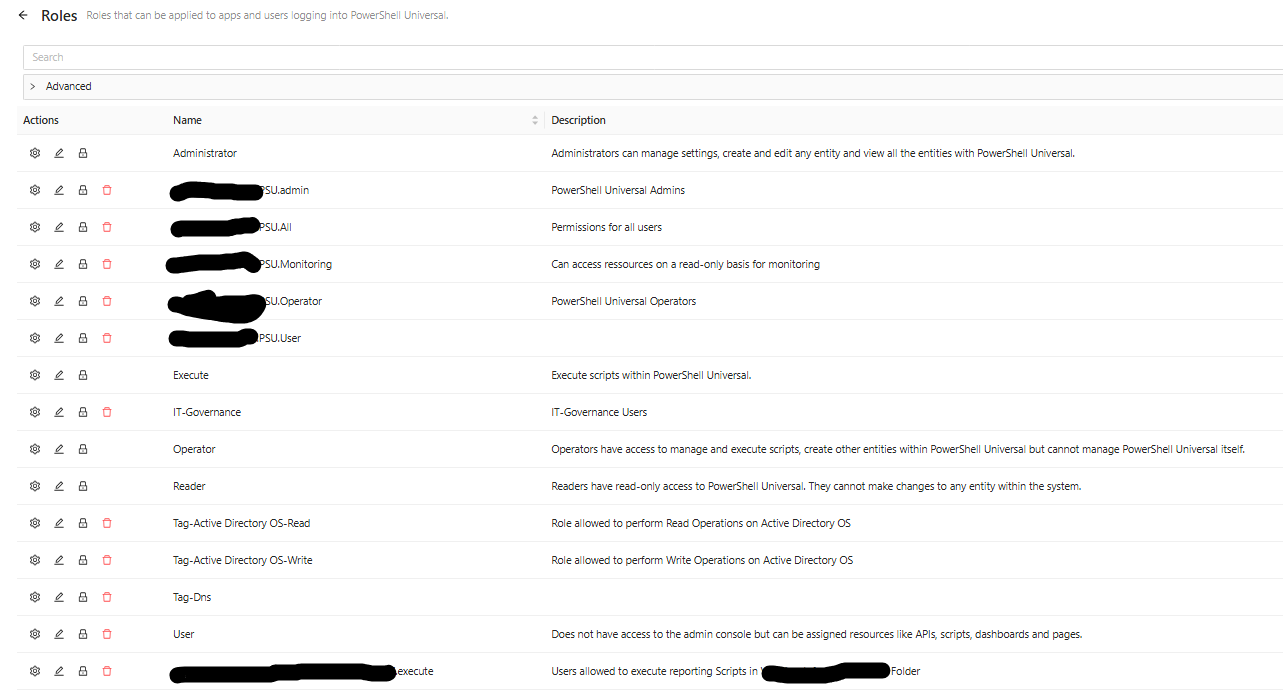
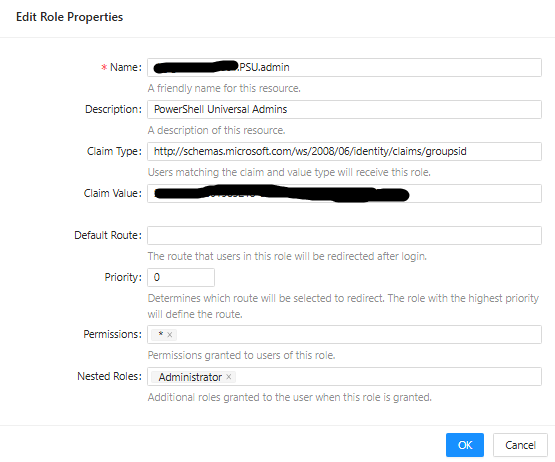
We have a role for each AD-Group with the Default groups (Administrator, User, ...) defined as nested group.
E.g. for the Admins:
So far this was working fine as we did not have "deeper" permissions other than the admins and the "All" group. (The "All" group basically has access to a single App accessible via the Portal).
The App is assigned using the "Security" tab:
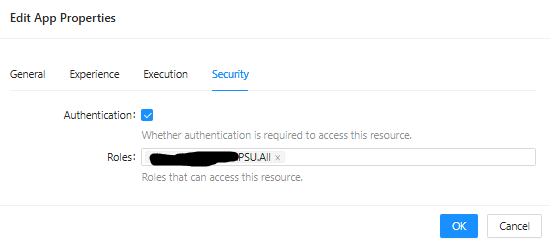
Now we tried giving permissions to the "execute" group (bottom of the screenprint) to some of the scripts, in order for users to manually start these scripts from the Portal.
But so far it does not work - the scripts are not displayed in the portal, only the app accessible to all users.
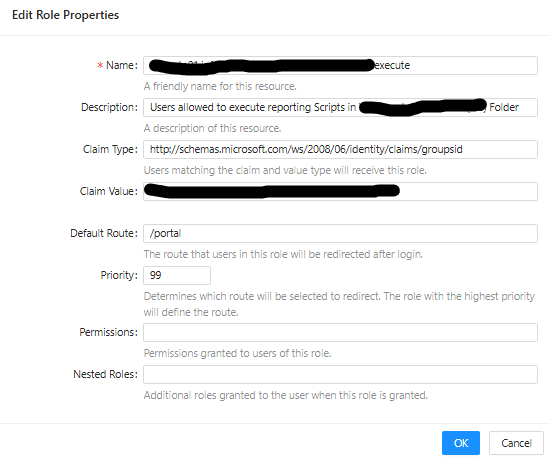
Assignment of the script to the Role:
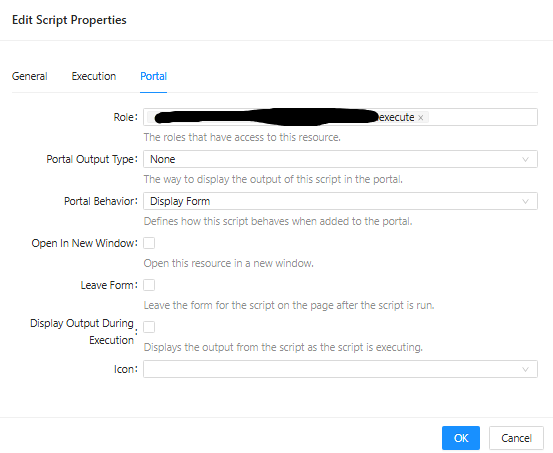
Also assigning the permissions using the "Permissions" page does not work.

I suspect that PSU evaluates the AD groups based on the order defined in permissions.ps1 and only the first group matching is applied and as "Domain Users" is member of the "All" group, everything after the "All" group never is evaluated...
Maybe someone can confirm this and if this is the case - how can we achieve the desired result?
Agent/EventHub issues
Thank you @Jesse.Peden for your reply, however the issue with the SSL error also happens when using Get-PSUEventHubConnection. I see that you have "SkipCertificateCheck" = $true for your Send-PSUEvent, however this should not be necessary for my setup as I have a valid certificate (and you have no such parameter specified when you call Get-PSUEventHubConnection?).
Interestingly, Get-PSUEventHubConnection, as all PSU-Commandlets, do work when I just open a PowerShell 7 console window and use -UseDefaultCredentials.
But: Send-PSUEventdoes still not work this way
PS > $EHConnection = @(Get-PSUEventHubConnection -Hub "Agent-Dns" -Active -UseDefaultCredentials)
PS > $EHConnection

Id               : 3
UserName         : PSU-Agent-Dns
RemoteIpAddress  : ::ffff:98.765.43.21
RemoteComputer   : myPSUServer
EventHub         : Agent-Dns
Computer         : myPSUServer
Connected        : 10.06.2025 09:13:37
Disconnected     :
ConnectionId     : rJK_7SmDvUBF-f41cz7Seg
RemoteUserName   : myGmsa$
RemoteDomainName : myDomain
Version          : 5.5.4

PS > $WebRequest = Send-PSUEvent -Hub "Agent-Dns"  -ConnectionID $EHConnection.ConnectionID -Command "Invoke-WebRequest" -UseDefaultCredentials -Parameters @{
       "SkipCertificateCheck" = $true
       "Uri" = "https://myPSUServer"
     }
Send-PSUEvent: Status(StatusCode="Unknown", Detail="Exception was thrown by handler. IOException: Connection 'rJK_7SmDvUBF-f41cz7Seg' does not exist.")Agent/EventHub issues
Product: PowerShell Universal
Version: 5.5.4
I’m trying to replicate the example from the video at PowerShell Universal v5 - PowerShell Universal Agents
I have installed the Agent on the same machine as I have the requirement to use gMSA for everything but with different users, so I figured that using the agent is actually the best way to achieve that.
I am using HTTPS with a valid certificate (not self-signed!) for the PSU Server - this is my agent.json
{
    "Connections": [
        {
            "Url": "https://myPSUServer.example.com",
            "Hub": "Agent-Dns",
            "AppToken": "...",
        }
    ],
	"Universal": {
		"Agent": {
		  "Tags": [ "DNS" ]
		}
    }
}
So far I have succeeded in creating an Event Hub and the agent seems to be connected to the PSU Server.
However, when I try to run my EventHub.ps1:
Invoke-PSUCommand -Hub "Agent-Dns" -Command "Out-File" -Parameters @{
    FilePath = "D:\work\test.txt"
    InputObject = "Hello, World!"
}
using “Run Script” in the Integrated environment, I get an error:
The SSL connection could not be established, see inner exception.
at <ScriptBlock>, D:\UniversalAutomation\Repository\DevTest\70889\EventHub.ps1: line 1
at <ScriptBlock>, <No file>: line 1
I tried changing the connection to HTTP only using -ComputerName "http://myPSUServer", but here I also get an error:
Unauthenticated. Specify an app token, credentials, use default credentials or enable permissive security model.
at <ScriptBlock>, D:\UniversalAutomation\Repository\DevTest\70889\EventHub.ps1: line 1
at <ScriptBlock>, <No file>: line 1
I also created a Token, stored it as secret variable and tried passing it via the -AppToken parameter, but the result unfortunately is the same (I have verified that the token is actually read from the variable).
I have added
  "Api": {
	  "SecurityModel": "Permissive"
  }
to my appsettings.json, however that does not seem to have any effect.
I am thinking that there must be some major difference in how the Verb-PSUSomething commands behave in my installation as in all the examples I find there is no real need to specify the ComputerName and authentication parameters?
Cannot create Integer variables
This seems to be fine in 5.5.4
Cannot create Integer variables
Yes, “I can work around by using New-PSUVariable for now, […]”
Still, this should also work in the UI?
Cannot create Integer variables
Product: PowerShell Universal
Version: 5.3.2
I am fairly new to PowerShell Universal, so this is my first attempt to do this. I was able to create strings, credentials and secrets, but cannot create “simple” integer variables.
I click on “Create Variable” and the first thing I do is change the Type to “Integer” and immediately this error pops up. The error also pops up if I input some integer value into the text box first and then change the value.
I can work around by using New-PSUVariable for now, still would like to know if I do something wrong…

I was able to extract the error message from the DOM:
“An error occured. Unable to set property ‘type’ on object of type ‘AntDesign.Input`1[[System.Int32, System.Private.CoreLib, Version=8.0.0.0, Culture=neutral, PublicKeyToken=7cec85d7bea7798e]]’. The error was: Unable to cast object of type ‘System.String’ to type ‘AntDesign.InputType’.”