
Nocturn
Devolutions PowerShell Universal Version 2026.3.4.0 (October 27, 2026)
No 2026.3.4-azure build on: https://hub.docker.com/r/devolutions/powershell-universal/tags ?
New-UDForm -OnValidate never enables Submit when the form contains a New-UDCheckBox
Confirmed fixed in: 2026.3.3.0
New-UDForm -OnValidate never enables Submit when the form contains a New-UDCheckBox
Hello Patrick,
Thanks. I will wait for the fix.
I have update to 2026.3.1 (docker: 2026.3.1-azure) , was not fixed there.
New-UDForm -OnValidate never enables Submit when the form contains a New-UDCheckBox
After upgrading to 2026.3.0, any New-UDForm that uses -OnValidate and contains a New-UDCheckBox leaves its Submit button permanently disabled.
Typing valid input, reloading the page and restarting the app make no difference. The same form without the checkbox works normally.
-OnValidate appears never to run in the broken case: a Show-UDToast placed at the top of the validator never fires, and reading the value with Get-UDElement instead of $EventData makes no difference.
The checkbox's -Checked state doesn't matter, and it reproduces with a single checkbox.
The two forms below are identical except that Test B has one extra line — the checkbox.
Type three or more characters into each: Test A enables Submit, Test B never does.
Environment: PowerShell Universal 2026.3.0, Linux container.
New-UDRow {

    New-UDColumn -LargeSize 6 -Content {
        New-UDCard -Title "Test A - textbox only" -Content {
            New-UDForm -Content {
                New-UDTextbox -Id 'TestA' -Label 'Type at least 3 characters' -FullWidth
            } -OnValidate {
                if ($EventData.TestA.Length -lt 3) {
                    New-UDFormValidationResult -ValidationError "Enter at least 3 characters"
                } else {
                    New-UDFormValidationResult -Valid
                }
            } -OnSubmit {
                Show-UDToast -Message "Test A submitted: '$($EventData.TestA)'" -Duration 4000 -Position topRight
            }
        }
    }

    New-UDColumn -LargeSize 6 -Content {
        New-UDCard -Title "Test B - same form plus a checkbox" -Content {
            New-UDForm -Content {
                New-UDTextbox -Id 'TestB' -Label 'Type at least 3 characters' -FullWidth
                New-UDCheckBox -Id 'TestBCheck' -Label 'A checkbox' -Checked $true
            } -OnValidate {
                if ($EventData.TestB.Length -lt 3) {
                    New-UDFormValidationResult -ValidationError "Enter at least 3 characters"
                } else {
                    New-UDFormValidationResult -Valid
                }
            } -OnSubmit {
                Show-UDToast -Message "Test B submitted: '$($EventData.TestB)'" -Duration 4000 -Position topRight
            }
        }
    }

}PowerShell Universal Community Call - June 2026
The Changelog button does not resolve (page not found) on:
https://powershelluniversal.devolutions.net/downloads
But we can get it from the forum announcement :)
Azure WebApp, SQL and Github
@Adam Driscoll
My Azure Webapp is now on PSU docker version 5.6.11-azure
I understand the Repository owner should now be fixed, however I still get the owner error.
LibGit2Sharp.LibGit2SharpException: repository path '/home/Repository' is not owned by current user at LibGit2Sharp.Core.Ensure.HandleError(Int32 result) in /_/LibGit2Sharp/Core/Ensure.cs:line 154 at LibGit2Sharp.Core.Ensure.ZeroResult(Int32 result) in /_/LibGit2Sharp/Core/Ensure.cs:line 172 at LibGit2Sharp.Core.Proxy.git_repository_open(String path) in /_/LibGit2Sharp/Core/Proxy.cs:line 2560 at LibGit2Sharp.Repository..ctor(String path, RepositoryOptions options, RepositoryRequiredParameter requiredParameter) in /_/LibGit2Sharp/Repository.cs:line 159 at LibGit2Sharp.Repository..ctor(String path) in /_/LibGit2Sharp/Repository.cs:line 70 at PowerShellUniversal.Git.GitService.FetchAsync() in D:\a\powershell-universal\powershell-universal\src\PowerShellUniversal.Git\GitService.cs:line 868 at Universal.Server.Pages.Settings.Git.ChangeBranchSelect.FetchAsync() in D:\a\powershell-universal\powershell-universal\src\Universal.Server\Pages\Settings\Git\ChangeBranchSelect.razor:line 35I can see the .gitconfig file in the /home directory.
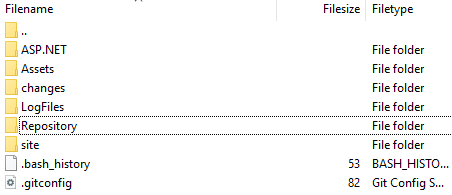
it contains:
[safe]
directory = *
directory = *
directory = *
directory = *
directory = *
There is also /home/repository/.git folder, automatically created after adding the git config so that seems good.
My goal is to store and sync with Azure Devops.
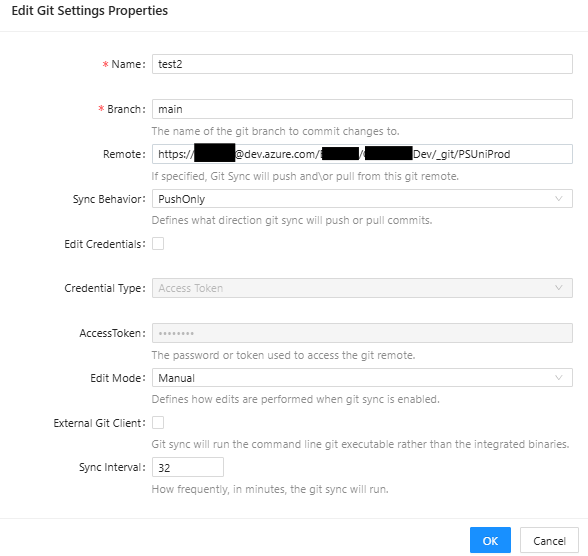
I have a fixed Enviromental Variable: NodeName , so it keeps a consistant computer name.
In addition the Logging has about 20 of these Errors every day:
[12/9/2025 4:09:46 PM] [Error] [ModuleDiscovery-PowerShell 7] Error (PowerShell 7) - Status(StatusCode="Unknown", Detail="Exception was thrown by handler.", DebugException="Grpc.Core.Internal.CoreErrorDetailException: {"created":"@1765289386.847593774","description":"Error received from peer ipv4:127.0.0.1:43353","file":"/var/local/git/grpc/src/core/lib/surface/call.cc","file_line":953,"grpc_message":"Exception was thrown by handler.","grpc_status":2}") Hope you can help.
Connect-AzAccount not working in PSU 5.6.7
I also have the same issue but I use the Connect-AzAccount with the -Identity.
Almost always after my powershell universal dashboard starts, it cannot connect to the AZ account, I need to restart the app.
My keyvault connection also throws errors, I have to reload the app and it works again.
So I created a sort of startup script that tries connect-azaccount and the keyvault a few times after container start.
This all might have something to do with the Az.KeyVault module, runspaces, disable context autosave.
Table not loading with long running query
I have solved it for now with Parallel processing, which sped up the query time considerably.
Table not loading with long running query
I have a long running API call that takes about 8 minutes to load.
I do some processing in a hashtable.
After that I put the data in a new-udtable.
Right now the table is not loading anymore.
After the API call finishes the Table does not display.
There are about 1400 rows that are returned, however when I limit that to about 800 the data is displayed again. ($mailAccounts | Sort-Object | Select-Object -First 800)
Looking at the CPU and memory it is all well within tolerances.
I do not check this every time I pull a new docker image, but it was working (a few versions) before.
I tried new-uddatagrid as well instead of new-udtable, but it is not working either.
what could be the cause of this?
Edited:
For 800 rows my JSON payload is about 700kB.
So I tried switching to a server-side table instead of the client-side table, and loading all the rows.
That is not working either, the table does not load.
Product: PowerShell Universal
Version: 5.5.4
Azure webapp, linux containerMigration/Docker
There is documentation for docker on the link below:
There are docker images available on: https://hub.docker.com/r/ironmansoftware/universal
The Kubernetes part you need to figure out for yourself, and experience there is needed.
But there is a great article here:
So you need to invest time in learning Kubernetes if you no experience with it yet.
Azure WebApp, SQL and Github
If you could raise an issue that would be great.
Using git from the WebApp is something we want to use.
We are licensed.
Thanks.
Azure WebApp, SQL and Github
Using the documentation here and here, I was able to setup a Container WebApp in Azure with SQL.
I tried configuring Git integration by setting up a free github account, creating a private repository and a Personal Access Token like the documentation states.
I have tried it with a username and password too but I keep getting the same error every which way:
repository path '/home/Repository' is not owned by current user (Computer: 3fe57e07a9c5)The config is stored correctly in the Azure SQL Database.
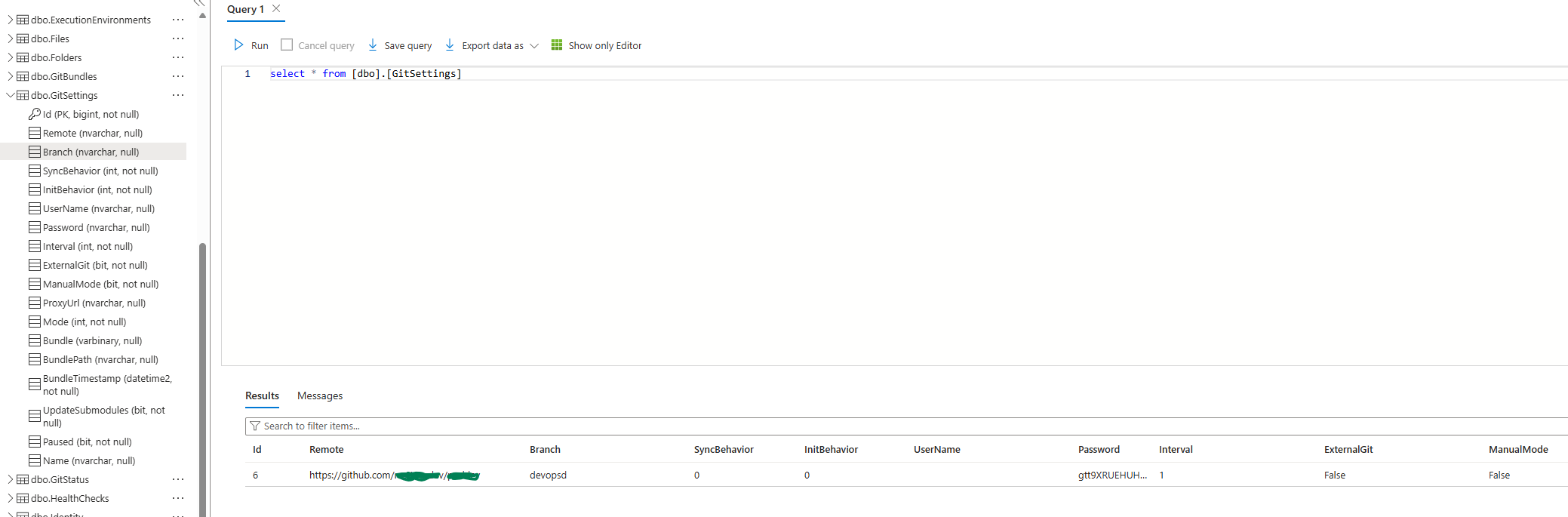
Where am I going wrong?
Product: PowerShell Universal
Version: 5.4.3ButtonGroup in Form not working
Submitted a Bug #3765
ButtonGroup in Form not working
When displaying a button inside a form in a model, the dropdown of the buttongroup does not work. Not sure if it is the UDModal or the UDForm.
Example Code
New-UDButtonGroup -Content {
    New-UDButtonGroupItem -Text 'Delete' -Icon (New-UDIcon -Icon 'trash') -ShowLoading -OnClick {
       Start-Sleep -Seconds 5
    }
    New-UDButtonGroupItem -Text 'Copy'  -Icon (New-UDIcon -Icon 'copy')
}

New-UDButton -Text "Add to Form" -Icon (New-UDIcon -Icon plus) -OnClick {
    Show-UDModal -Persistent -FullWidth -MaxWidth 'md' -Content {
        New-UDForm -Content {
            New-UDButtonGroup -Content {
                New-UDButtonGroupItem -Text 'Delete' -Icon (New-UDIcon -Icon 'trash') -ShowLoading -OnClick {
                   Start-Sleep -Seconds 5
                }
                New-UDButtonGroupItem -Text 'I am hidden'  -Icon (New-UDIcon -Icon 'copy')
            }
        }-OnSubmit {

        }-OnCancel {
            Hide-UDModal
        }
    }
}
Product: PowerShell Universal
Version: 5.0.6Custom Table Property Error in v5 OnRowExpand
Confirmed fixed in 5.0.6
Custom Table Property Error in v5 OnRowExpand
I cannot use a Custom TableProperty with -OnRender anymore inside of -OnRowExpand
Example Code (works in v4 but not in v5) -New-UDTableColumn -Property 'NoneExistent' -OnRender
$Data = @(
    @{Dessert = 'Frozen yoghurt'; Calories = 159; Fat = 6.0; Carbs = 24; Protein = 4.0}
    @{Dessert = 'Ice cream sandwich'; Calories = 159; Fat = 6.0; Carbs = 24; Protein = 4.0}
    @{Dessert = 'Eclair'; Calories = 159; Fat = 6.0; Carbs = 24; Protein = 4.0}
    @{Dessert = 'Cupcake'; Calories = 159; Fat = 6.0; Carbs = 24; Protein = 4.0}
    @{Dessert = 'Gingerbread'; Calories = 159; Fat = 6.0; Carbs = 24; Protein = 4.0}
)

New-UDTable -Data $Data -ShowSearch -Columns @(
    New-UDTableColumn -Property 'Dessert'
    New-UDTableColumn -Property 'Calories'
) -OnRowExpand {
    New-UDPaper -Content{
        New-UDRow{
            New-UDColumn -LargeSize 6 -ExtraLargeSize 6 -Content {
                New-UDCard -Content{
                New-UDCardHeader -Title "Calories, Fats, Carbs and Protein"
                New-UDTable -Data $EventData -Columns @(
                        New-UDTableColumn -Property 'Fat' -Style @{'width' = "5%"}
                        New-UDTableColumn -Property 'Carbs' -Style @{'width' = "5%"}
                        New-UDTableColumn -Property 'Protein' -Style @{'width' = "5%"}
                        New-UDTableColumn -Property 'NoneExistent' -OnRender {
                            'Something'
                        }
                   )
                }#End Card
            }#End Column
        }#End Row
    }#End Paper
}
Error
One or more errors occurred

Error getting value from 'Description' on 'System.Management.Automation.PSSnapInInfo'.
Product: PowerShell Universal
Version: 5.0.5Nivochart in v5
Fixed in 5.0.5 confirmed.
Nivochart in v5
In Powershell Universal version 5 it seems that NivoCharts are not yet properly functioning. The OnClick function is not working, see example code:
    $Data = 1..10 | ForEach-Object {
        $item = Get-Random -Max 1000
        [PSCustomObject]@{
            Name = "Test$item"
            Value = $item
        }
    }
    New-UDNivoChart -Id 'autoRefreshingNivoBar' -Bar -Keys "value" -IndexBy 'name' -Data $Data -Height 500 -Width 1000 -OnClick{
        Show-UDModal -Content {
             New-UDHtml -Markup "Hello Nivo Chart"
        }
    }
In addition it doesn’t seems to want to use Theme’s anymore like it did in the v4, it throws errors. Example code:
$ThemeN = @{
    textColor = '#2d5856'
    tooltip = @{
        container = @{
            #background = 'Green'
            color = 'Black'
        }
    }
    axis = @{
        ticks = @{
            line = @{
                #stroke = '#e5b80b'
            }
        }
    }
    labels = @{
        text = @{
            fill = '#2d5856'
        }
    }
}
Product: PowerShell Universal
Version: 5.0.2Upgrade Error V4 to V5
I grabbed the latest 5.0.2 and deleted the appsettings.json from C:\ProgramData\PowerShellUniversal.
Made an entire VM backup, just to be save.
Then I ran the Setup file again, went trough the wizard on default Server settings. A new appsettings.json was generated and now it works!
The new generated appsettings.json file looks like this:
{
  "Kestrel": {
    "Endpoints": {
      "HTTP": {
        "Url": "http://*:5000"
      }
    }
  },
  "Plugins": [
    "SQLite"
  ],
  "Data": {
    "RepositoryPath": "%ProgramData%\\UniversalAutomation\\Repository",
    "ConnectionString": "Data Source=%ProgramData%\\UniversalAutomation\\database.db"
  },
  "Mode": "Server",
  "PSUTelemetry": false
}Upgrade Error V4 to V5
Here it is.
{
  "Kestrel": {
    "Endpoints": {
      "HTTP": {
        "Url": "http://*:5000"
      }
    }
  },
  "Plugins": [
     "SQLite"
  ],
  "Data": {
    "RepositoryPath": "%ProgramData%\\UniversalAutomation\\Repository",
    "ConnectionString": "%ProgramData%\\UniversalAutomation\\database.db"
  }
}Upgrade Error V4 to V5
I followed the steps. Upgrading the database and editing the appsettings.json.
However there is still an error starting the service:
Application: Universal.Server.exe
CoreCLR Version: 8.0.824.36612
.NET Version: 8.0.8
Description: The process was terminated due to an unhandled exception.
Exception Info: System.ArgumentException: Format of the initialization string does not conform to specification starting at index 0.
   at System.Data.Common.DbConnectionOptions.GetKeyValuePair(String connectionString, Int32 currentPosition, StringBuilder buffer, Boolean useOdbcRules, String& keyname, String& keyvalue)
   at System.Data.Common.DbConnectionOptions.ParseInternal(Dictionary`2 parsetable, String connectionString, Boolean buildChain, Dictionary`2 synonyms, Boolean firstKey)
   at System.Data.Common.DbConnectionOptions..ctor(String connectionString, Dictionary`2 synonyms, Boolean useOdbcRules)
   at System.Data.Common.DbConnectionStringBuilder.set_ConnectionString(String value)
   at Microsoft.Data.Sqlite.SqliteConnectionStringBuilder..ctor(String connectionString)
   at Microsoft.Data.Sqlite.SqliteConnectionFactory.GetPoolGroup(String connectionString)
   at Microsoft.Data.Sqlite.SqliteConnection.set_ConnectionString(String value)
   at Microsoft.Data.Sqlite.SqliteConnection..ctor(String connectionString)
   at Microsoft.EntityFrameworkCore.Sqlite.Storage.Internal.SqliteRelationalConnection.CreateDbConnection()
   at Microsoft.EntityFrameworkCore.Storage.RelationalConnection.get_DbConnection()
   at Microsoft.EntityFrameworkCore.Storage.RelationalCommand.CreateDbCommand(RelationalCommandParameterObject parameterObject, Guid commandId, DbCommandMethod commandMethod)
   at Microsoft.EntityFrameworkCore.Storage.RelationalCommand.ExecuteNonQueryAsync(RelationalCommandParameterObject parameterObject, CancellationToken cancellationToken)
   at Microsoft.EntityFrameworkCore.RelationalDatabaseFacadeExtensions.ExecuteSqlRawAsync(DatabaseFacade databaseFacade, String sql, IEnumerable`1 parameters, CancellationToken cancellationToken)
   at PowerShellUniversal.SQLite.DatabaseFeature.InitializeDatabase(IConfiguration configuration) in C:\actions-runner\_work\universal\universal\src\PowerShellUniversal.SQLite\Plugin.cs:line 53
   at Universal.Server.Services.SystemPluginService..ctor(IConfiguration configuration) in C:\actions-runner\_work\universal\universal\src\Universal.Server\Services\SystemPluginService.cs:line 55
   at Universal.Server.Startup.ConfigureServices(IServiceCollection services) in C:\actions-runner\_work\universal\universal\src\Universal.Server\Startup.cs:line 65
   at System.RuntimeMethodHandle.InvokeMethod(Object target, Void** arguments, Signature sig, Boolean isConstructor)
   at System.Reflection.MethodBaseInvoker.InvokeDirectByRefWithFewArgs(Object obj, Span`1 copyOfArgs, BindingFlags invokeAttr)
   at System.Reflection.MethodBaseInvoker.InvokeWithOneArg(Object obj, BindingFlags invokeAttr, Binder binder, Object[] parameters, CultureInfo culture)
   at Microsoft.AspNetCore.Hosting.ConfigureServicesBuilder.InvokeCore(Object instance, IServiceCollection services)
   at Microsoft.AspNetCore.Hosting.GenericWebHostBuilder.UseStartup(Type startupType, HostBuilderContext context, IServiceCollection services, Object instance)
   at Microsoft.AspNetCore.Hosting.GenericWebHostBuilder.<>c__DisplayClass7_0.<UseStartup>b__0(HostBuilderContext context, IServiceCollection services)
   at Microsoft.Extensions.Hosting.HostBuilder.InitializeServiceProvider()
   at Microsoft.Extensions.Hosting.HostBuilder.Build()
at Universal.Server.Program.Main(String[] args) in C:\actions-runner\_work\universal\universal\src\Universal.Server\Program.cs:line 34Upgrade Error V4 to V5
This is in my appsettings.json:
{
  "Kestrel": {
    "Endpoints": {
      "HTTP": {
        "Url": "http://*:5000"
      }
    }
  },
  "Plugins": [
    "UniversalAutomation.LiteDBv5"
  ],
  "Data": {
    "RepositoryPath": "%ProgramData%\\UniversalAutomation\\Repository",
    "ConnectionString": "%ProgramData%\\UniversalAutomation\\database.db"
  }
}
I will follow:
SQLite is the default persistence method. You will need to perform a manual conversion from LiteDB before installing version 5.
Upgrade Error V4 to V5
When upgrading with the MSI on Windows Server 2019 Standard to PowerShell Universal v5.0.1. , it refuses to start the Powershell Service. There are sufficient privileges.
Errors from the EventLog:
Application: Universal.Server.exe
CoreCLR Version: 8.0.824.36612
.NET Version: 8.0.8
Description: The process was terminated due to an unhandled exception.
Exception Info: System.Exception: No database plugins found.
   at Universal.Server.Services.SystemPluginService..ctor(IConfiguration configuration) in C:\actions-runner\_work\universal\universal\src\Universal.Server\Services\SystemPluginService.cs:line 51
   at Universal.Server.Startup.ConfigureServices(IServiceCollection services) in C:\actions-runner\_work\universal\universal\src\Universal.Server\Startup.cs:line 65
   at System.RuntimeMethodHandle.InvokeMethod(Object target, Void** arguments, Signature sig, Boolean isConstructor)
   at System.Reflection.MethodBaseInvoker.InvokeDirectByRefWithFewArgs(Object obj, Span`1 copyOfArgs, BindingFlags invokeAttr)
   at System.Reflection.MethodBaseInvoker.InvokeWithOneArg(Object obj, BindingFlags invokeAttr, Binder binder, Object[] parameters, CultureInfo culture)
   at Microsoft.AspNetCore.Hosting.ConfigureServicesBuilder.InvokeCore(Object instance, IServiceCollection services)
   at Microsoft.AspNetCore.Hosting.GenericWebHostBuilder.UseStartup(Type startupType, HostBuilderContext context, IServiceCollection services, Object instance)
   at Microsoft.AspNetCore.Hosting.GenericWebHostBuilder.<>c__DisplayClass7_0.<UseStartup>b__0(HostBuilderContext context, IServiceCollection services)
   at Microsoft.Extensions.Hosting.HostBuilder.InitializeServiceProvider()
   at Microsoft.Extensions.Hosting.HostBuilder.Build()
   at Universal.Server.Program.Main(String[] args) in C:\actions-runner\_work\universal\universal\src\Universal.Server\Program.cs:line 34
Anyone know how I can fix this?
Product: PowerShell Universal
Version: 4.2.2.1