Upgrade Error V4 to V5
When upgrading with the MSI on Windows Server 2019 Standard to PowerShell Universal v5.0.1. , it refuses to start the Powershell Service. There are sufficient privileges.
Errors from the EventLog:
Application: Universal.Server.exe
CoreCLR Version: 8.0.824.36612
.NET Version: 8.0.8
Description: The process was terminated due to an unhandled exception.
Exception Info: System.Exception: No database plugins found.
   at Universal.Server.Services.SystemPluginService..ctor(IConfiguration configuration) in C:\actions-runner\_work\universal\universal\src\Universal.Server\Services\SystemPluginService.cs:line 51
   at Universal.Server.Startup.ConfigureServices(IServiceCollection services) in C:\actions-runner\_work\universal\universal\src\Universal.Server\Startup.cs:line 65
   at System.RuntimeMethodHandle.InvokeMethod(Object target, Void** arguments, Signature sig, Boolean isConstructor)
   at System.Reflection.MethodBaseInvoker.InvokeDirectByRefWithFewArgs(Object obj, Span`1 copyOfArgs, BindingFlags invokeAttr)
   at System.Reflection.MethodBaseInvoker.InvokeWithOneArg(Object obj, BindingFlags invokeAttr, Binder binder, Object[] parameters, CultureInfo culture)
   at Microsoft.AspNetCore.Hosting.ConfigureServicesBuilder.InvokeCore(Object instance, IServiceCollection services)
   at Microsoft.AspNetCore.Hosting.GenericWebHostBuilder.UseStartup(Type startupType, HostBuilderContext context, IServiceCollection services, Object instance)
   at Microsoft.AspNetCore.Hosting.GenericWebHostBuilder.<>c__DisplayClass7_0.<UseStartup>b__0(HostBuilderContext context, IServiceCollection services)
   at Microsoft.Extensions.Hosting.HostBuilder.InitializeServiceProvider()
   at Microsoft.Extensions.Hosting.HostBuilder.Build()
   at Universal.Server.Program.Main(String[] args) in C:\actions-runner\_work\universal\universal\src\Universal.Server\Program.cs:line 34
Anyone know how I can fix this?
Product: PowerShell Universal
Version: 4.2.2.1
Recommended Answer
- I grabbed the latest 5.0.2 and deleted the appsettings.json from C:\ProgramData\PowerShellUniversal.
- Made an entire VM backup, just to be save.
- Then I ran the Setup file again, went trough the wizard on default Server settings. A new appsettings.json was generated and now it works!
The new generated appsettings.json file looks like this:
{
  "Kestrel": {
    "Endpoints": {
      "HTTP": {
        "Url": "http://*:5000"
      }
    }
  },
  "Plugins": [
    "SQLite"
  ],
  "Data": {
    "RepositoryPath": "%ProgramData%\\UniversalAutomation\\Repository",
    "ConnectionString": "Data Source=%ProgramData%\\UniversalAutomation\\database.db"
  },
  "Mode": "Server",
  "PSUTelemetry": false
}All Comments (10)

I have same problem. Ok for upgrade version on V4, but same problem of privileges for the installation of V5.0.1 on the same server.
Can you check %ProgramData%\PowerShellUniversal\appsettings.json to see if the is a Plugins section that has LiteDB listed?
This is the default in v5.
  "Plugins": [
    "SQLite"
  ],
Info about this change.
docs.powershelluniversal.com
Adam Driscoll
PowerShell Expert and Software Architect at Devolutions
This is in my appsettings.json:
{
  "Kestrel": {
    "Endpoints": {
      "HTTP": {
        "Url": "http://*:5000"
      }
    }
  },
  "Plugins": [
    "UniversalAutomation.LiteDBv5"
  ],
  "Data": {
    "RepositoryPath": "%ProgramData%\\UniversalAutomation\\Repository",
    "ConnectionString": "%ProgramData%\\UniversalAutomation\\database.db"
  }
}
I will follow:
SQLite is the default persistence method. You will need to perform a manual conversion from LiteDB before installing version 5.
Upgrading | PowerShell Universal
I followed the steps. Upgrading the database and editing the appsettings.json.
However there is still an error starting the service:
Application: Universal.Server.exe
CoreCLR Version: 8.0.824.36612
.NET Version: 8.0.8
Description: The process was terminated due to an unhandled exception.
Exception Info: System.ArgumentException: Format of the initialization string does not conform to specification starting at index 0.
   at System.Data.Common.DbConnectionOptions.GetKeyValuePair(String connectionString, Int32 currentPosition, StringBuilder buffer, Boolean useOdbcRules, String& keyname, String& keyvalue)
   at System.Data.Common.DbConnectionOptions.ParseInternal(Dictionary`2 parsetable, String connectionString, Boolean buildChain, Dictionary`2 synonyms, Boolean firstKey)
   at System.Data.Common.DbConnectionOptions..ctor(String connectionString, Dictionary`2 synonyms, Boolean useOdbcRules)
   at System.Data.Common.DbConnectionStringBuilder.set_ConnectionString(String value)
   at Microsoft.Data.Sqlite.SqliteConnectionStringBuilder..ctor(String connectionString)
   at Microsoft.Data.Sqlite.SqliteConnectionFactory.GetPoolGroup(String connectionString)
   at Microsoft.Data.Sqlite.SqliteConnection.set_ConnectionString(String value)
   at Microsoft.Data.Sqlite.SqliteConnection..ctor(String connectionString)
   at Microsoft.EntityFrameworkCore.Sqlite.Storage.Internal.SqliteRelationalConnection.CreateDbConnection()
   at Microsoft.EntityFrameworkCore.Storage.RelationalConnection.get_DbConnection()
   at Microsoft.EntityFrameworkCore.Storage.RelationalCommand.CreateDbCommand(RelationalCommandParameterObject parameterObject, Guid commandId, DbCommandMethod commandMethod)
   at Microsoft.EntityFrameworkCore.Storage.RelationalCommand.ExecuteNonQueryAsync(RelationalCommandParameterObject parameterObject, CancellationToken cancellationToken)
   at Microsoft.EntityFrameworkCore.RelationalDatabaseFacadeExtensions.ExecuteSqlRawAsync(DatabaseFacade databaseFacade, String sql, IEnumerable`1 parameters, CancellationToken cancellationToken)
   at PowerShellUniversal.SQLite.DatabaseFeature.InitializeDatabase(IConfiguration configuration) in C:\actions-runner\_work\universal\universal\src\PowerShellUniversal.SQLite\Plugin.cs:line 53
   at Universal.Server.Services.SystemPluginService..ctor(IConfiguration configuration) in C:\actions-runner\_work\universal\universal\src\Universal.Server\Services\SystemPluginService.cs:line 55
   at Universal.Server.Startup.ConfigureServices(IServiceCollection services) in C:\actions-runner\_work\universal\universal\src\Universal.Server\Startup.cs:line 65
   at System.RuntimeMethodHandle.InvokeMethod(Object target, Void** arguments, Signature sig, Boolean isConstructor)
   at System.Reflection.MethodBaseInvoker.InvokeDirectByRefWithFewArgs(Object obj, Span`1 copyOfArgs, BindingFlags invokeAttr)
   at System.Reflection.MethodBaseInvoker.InvokeWithOneArg(Object obj, BindingFlags invokeAttr, Binder binder, Object[] parameters, CultureInfo culture)
   at Microsoft.AspNetCore.Hosting.ConfigureServicesBuilder.InvokeCore(Object instance, IServiceCollection services)
   at Microsoft.AspNetCore.Hosting.GenericWebHostBuilder.UseStartup(Type startupType, HostBuilderContext context, IServiceCollection services, Object instance)
   at Microsoft.AspNetCore.Hosting.GenericWebHostBuilder.<>c__DisplayClass7_0.<UseStartup>b__0(HostBuilderContext context, IServiceCollection services)
   at Microsoft.Extensions.Hosting.HostBuilder.InitializeServiceProvider()
   at Microsoft.Extensions.Hosting.HostBuilder.Build()
   at Universal.Server.Program.Main(String[] args) in C:\actions-runner\_work\universal\universal\src\Universal.Server\Program.cs:line 34
Can you share your updated appsettings file? It seems like the connection string isn’t quite right.
Adam Driscoll
PowerShell Expert and Software Architect at Devolutions
Hello,
I am also having a similar/same issue. I followed the steps outlined and upgrade the db file from LiteDB to SQLite.
Hopefully I can format all of this correctly, sorry if I don’t.
Error:
2024-08-27 15:53:56.800 -07:00 [FTL] Fatal error starting PowerShell Universal.
System.ArgumentException: Format of the initialization string does not conform to specification starting at index 0.
at System.Data.Common.DbConnectionOptions.GetKeyValuePair(String connectionString, Int32 currentPosition, StringBuilder buffer, Boolean useOdbcRules, String& keyname, String& keyvalue)
at System.Data.Common.DbConnectionOptions.ParseInternal(Dictionary2 parsetable, String connectionString, Boolean buildChain, Dictionary2 synonyms, Boolean firstKey)
at System.Data.Common.DbConnectionOptions…ctor(String connectionString, Dictionary2 synonyms, Boolean useOdbcRules) at System.Data.Common.DbConnectionStringBuilder.set_ConnectionString(String value) at Microsoft.Data.Sqlite.SqliteConnectionStringBuilder..ctor(String connectionString) at Microsoft.Data.Sqlite.SqliteConnectionFactory.GetPoolGroup(String connectionString) at Microsoft.Data.Sqlite.SqliteConnection.set_ConnectionString(String value) at Microsoft.Data.Sqlite.SqliteConnection..ctor(String connectionString) at Microsoft.EntityFrameworkCore.Sqlite.Storage.Internal.SqliteRelationalConnection.CreateDbConnection() at Microsoft.EntityFrameworkCore.Storage.RelationalConnection.get_DbConnection() at Microsoft.EntityFrameworkCore.Storage.RelationalCommand.CreateDbCommand(RelationalCommandParameterObject parameterObject, Guid commandId, DbCommandMethod commandMethod) at Microsoft.EntityFrameworkCore.Storage.RelationalCommand.ExecuteNonQueryAsync(RelationalCommandParameterObject parameterObject, CancellationToken cancellationToken) at Microsoft.EntityFrameworkCore.RelationalDatabaseFacadeExtensions.ExecuteSqlRawAsync(DatabaseFacade databaseFacade, String sql, IEnumerable1 parameters, CancellationToken cancellationToken)
at PowerShellUniversal.SQLite.DatabaseFeature.InitializeDatabase(IConfiguration configuration) in C:\actions-runner_work\universal\universal\src\PowerShellUniversal.SQLite\Plugin.cs:line 53
at Universal.Server.Services.SystemPluginService…ctor(IConfiguration configuration) in C:\actions-runner_work\universal\universal\src\Universal.Server\Services\SystemPluginService.cs:line 55
at Universal.Server.Startup.ConfigureServices(IServiceCollection services) in C:\actions-runner_work\universal\universal\src\Universal.Server\Startup.cs:line 65
at System.RuntimeMethodHandle.InvokeMethod(Object target, Void** arguments, Signature sig, Boolean isConstructor)
at System.Reflection.MethodBaseInvoker.InvokeDirectByRefWithFewArgs(Object obj, Span`1 copyOfArgs, BindingFlags invokeAttr)
at System.Reflection.MethodBaseInvoker.InvokeWithOneArg(Object obj, BindingFlags invokeAttr, Binder binder, Object parameters, CultureInfo culture)
at Microsoft.AspNetCore.Hosting.ConfigureServicesBuilder.InvokeCore(Object instance, IServiceCollection services)
at Microsoft.AspNetCore.Hosting.GenericWebHostBuilder.UseStartup(Type startupType, HostBuilderContext context, IServiceCollection services, Object instance)
at Microsoft.AspNetCore.Hosting.GenericWebHostBuilder.<>c__DisplayClass7_0.b__0(HostBuilderContext context, IServiceCollection services)
at Microsoft.Extensions.Hosting.HostBuilder.InitializeServiceProvider()
at Microsoft.Extensions.Hosting.HostBuilder.Build()
at Universal.Server.Program.Main(String args) in C:\actions-runner_work\universal\universal\src\Universal.Server\Program.cs:line 34
C:\ProgramData\PowerShellUniversal\appsettings.json:
{
“Kestrel”: {
“Endpoints”: {
“HTTP”: {
“Url”: “http://*:443”
}
}
},
“Plugins”: [
“SQLite”
],
“Data”: {
“RepositoryPath”: “%ProgramData%\UniversalAutomation\Repository”,
“ConnectionString”: “%ProgramData%\UniversalAutomation\database.db”
}
}
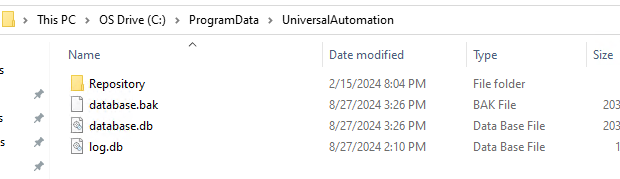
d422324c7b864a6390f5adbd648521664e678644.png
I can’t get the formatting to show correctly for the appsettings.json so here is an image.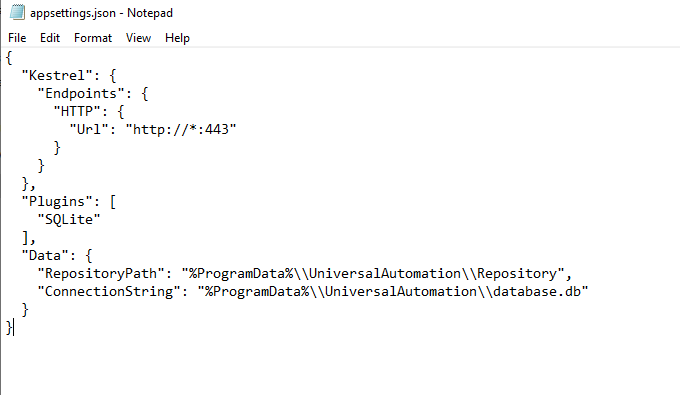
c9ae2249a31a3b2384f08376a06bfe888c5eb9aa.png
I upgraded my PSU from 4.2.12 to the latest 4.x, and then running the psudb.exe from 5.0.2, I am getting the following error which I may have been getting before but didn’t see it.
I think this is related to github issue 3663, which was marked as fixed in 5.0.2
github.com/ironmansoftware/powershell-universal
Unhandled exception. System.InvalidOperationException: The instance of entity type ‘AppToken’ cannot be tracked because another instance with the same key value for {‘Id’} is already being tracked. When attaching existing entities, ensure that only one entity instance with a given key value is attached. Consider using ‘DbContextOptionsBuilder.EnableSensitiveDataLogging’ to see the conflicting key values.
Here it is.
{
  "Kestrel": {
    "Endpoints": {
      "HTTP": {
        "Url": "http://*:5000"
      }
    }
  },
  "Plugins": [
     "SQLite"
  ],
  "Data": {
    "RepositoryPath": "%ProgramData%\\UniversalAutomation\\Repository",
    "ConnectionString": "%ProgramData%\\UniversalAutomation\\database.db"
  }
}- I grabbed the latest 5.0.2 and deleted the appsettings.json from C:\ProgramData\PowerShellUniversal.
- Made an entire VM backup, just to be save.
- Then I ran the Setup file again, went trough the wizard on default Server settings. A new appsettings.json was generated and now it works!
The new generated appsettings.json file looks like this:
{
  "Kestrel": {
    "Endpoints": {
      "HTTP": {
        "Url": "http://*:5000"
      }
    }
  },
  "Plugins": [
    "SQLite"
  ],
  "Data": {
    "RepositoryPath": "%ProgramData%\\UniversalAutomation\\Repository",
    "ConnectionString": "Data Source=%ProgramData%\\UniversalAutomation\\database.db"
  },
  "Mode": "Server",
  "PSUTelemetry": false
}