
bricejordanboyer
Extend CyberArk Dashboard to Support Full Credential Binding Scenarios
Hello Devolutions Team,
I would like to submit a feature request regarding the CyberArk integration in Remote Desktop Manager.
Context :
In our environment, we need to use CyberArk PVWA entries in RDM to bind accounts to connections.
However, this approach has an important limitation:
Binding a CyberArk account via a PVWA credential entry :
Works well for RDP (PSM-based sessions)
But it does not fully support other use cases, particularly:
Web connectors (non-HTML5)
Other connection types requiring structured credential binding
As a result, we are forced to rely on PVWA entry configuration for binding, which is not flexible enough to cover all connection scenarios.
At the same time, the CyberArk Dashboard provides a much better experience for browsing and selecting accounts—but it cannot be used today to persistently bind credentials to entries.
Problem :
There is currently no unified way in RDM to:
Select a CyberArk account
Bind it to an entry
Reuse it consistently across all connection types (RDP, Web, others)
This creates a split usage model:
PVWA entries for binding (limited)
Dashboard for browsing (non-persistent)
Feature Request :
We would like to see the CyberArk Dashboard enhanced to support full credential binding capabilities, so it becomes the single interface for all use cases.
Key idea :
Allow selecting a CyberArk account from the Dashboard and binding it directly to RDM entries, regardless of connection type.
Suggested UX :
From an entry or folder (primary use case)
Right-click on an entry (or folder)
Select:
“Select credentials from CyberArk Dashboard”
This would:
Open the CyberArk Dashboard selector
Allow choosing an account
Automatically bind it as a PVWA-linked credential
Bulk support (important) :
If applied to a folder, the binding would:
Apply to all child entries
Enable large-scale updates
Expected Outcome :
Remove dependency on PVWA entry configuration for binding
Enable consistent credential usage across:
RDP (PSM)
Web connectors (including non-HTML5 scenarios)
Other connection types
Make the CyberArk Dashboard the central interface for both discovery and binding
Benefits :
Unified workflow (discover → bind → use)
Better support for real-world CyberArk usage
Reduced manual configuration effort, and manual account selection
Improved efficiency when managing multiple entries
Better alignment with environments not relying on HTML5
Please find attached a screenshot illustrating how credential binding is currently performed manually through PVWA entries :
Thank you !
CyberArk Connectors in RDM: No clear error when Dashboard session is missing (Example : PSM-RDP on double-click)
Hello,
Thanks for that !
We will test it and get back to you if necessary!
CyberArk Connectors in RDM: No clear error when Dashboard session is missing (Example : PSM-RDP on double-click)
Hello Devolutions Support,
I would like to request an enhancement regarding the CyberArk integration in Remote Desktop Manager.
Example :
- Connection type: RDP entry
- Entry settings: Advanced -> CyberArk
- “Connect on double click” = Yes
- “Preferred component” = PSM-RDP
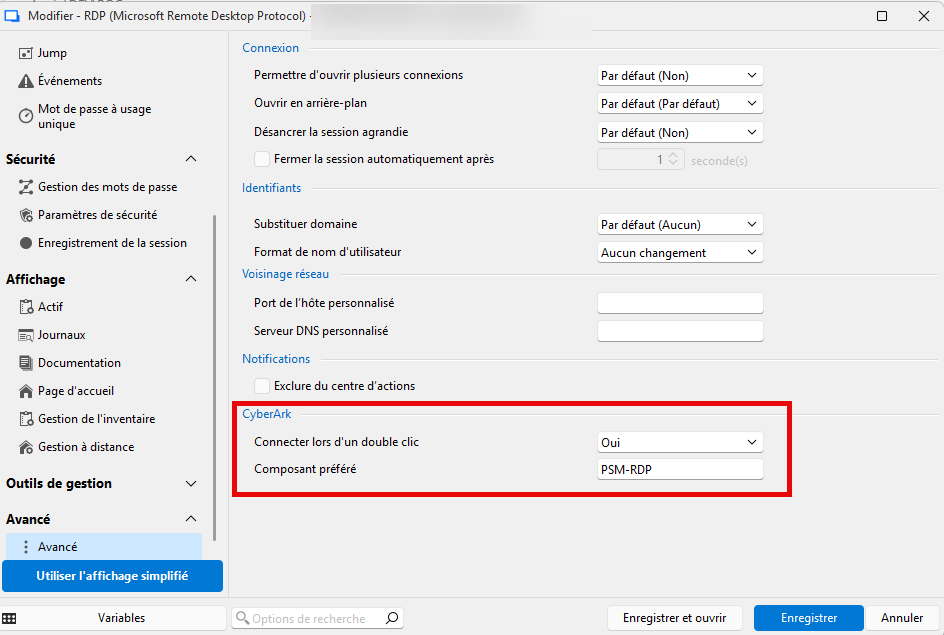
Issue
If the CyberArk Dashboard (in RDM) is not connected/logged in, double-clicking the RDP entry triggers a generic Microsoft RDP error message (e.g., “Remote Desktop can’t connect…” / “Remote access to the server is not enabled…”). This message is misleading because the real cause is that RDM is not authenticated/connected to CyberArk, so it cannot properly initiate the PSM-RDP flow.
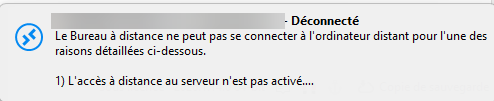
Steps to reproduce
1) Ensure the CyberArk Dashboard in RDM is disconnected (not logged in).
2) On an RDP entry, set Advanced -> CyberArk:
- Connect on double click = Yes
- Preferred component = PSM-RDP
3) Double-click the entry.
Actual result
- RDM shows a generic RDP connectivity error (Windows/RDP), which suggests network/RDP configuration issues.
Expected result
- RDM should detect that the CyberArk Dashboard is not connected and display a clear message such as:
“You are not connected to the CyberArk Dashboard. Please connect/login to CyberArk before starting this session.”
Attachments
- I attached screenshots showing the entry configuration and the misleading error message.
Environment
- RDM version: [2026.1.14.0 and 2026.1.19.0]
- CyberArk integration/plugin version : PVWA 14.2
- CyberArk component: PSM-RDP but same issue with Web connector
Could you please confirm if this behavior is expected today, and if an improvement like the above could be considered in a future release?
Thank you,
Brice Boyer
Entrée CyberArk PVWA Credentials
Bonjour,
Je n'ai pas trouvé le moyen de voir l'on est connecté à une entrée CyberArk PVWA Credentials comme celle ci-dessous.
Une fois connecté à cette entrée, il n'y a pas moyen de voir que nous sommes connecté ou non (visuellement).
Serait-il possible d'ajouter quelque chose pour cela ?
Juste un indicateur visuel ou peut être changer la couleur du logo ou mettre en surbrillance l'entrée ?
Merci pour votre aide !
