CyberArk Connectors in RDM: No clear error when Dashboard session is missing (Example : PSM-RDP on double-click)
CyberArk Connectors in RDM: No clear error when Dashboard session is missing (Example : PSM-RDP on double-click)
1 vote

Hello Devolutions Support,
I would like to request an enhancement regarding the CyberArk integration in Remote Desktop Manager.
Example :
- Connection type: RDP entry
- Entry settings: Advanced -> CyberArk
- “Connect on double click” = Yes
- “Preferred component” = PSM-RDP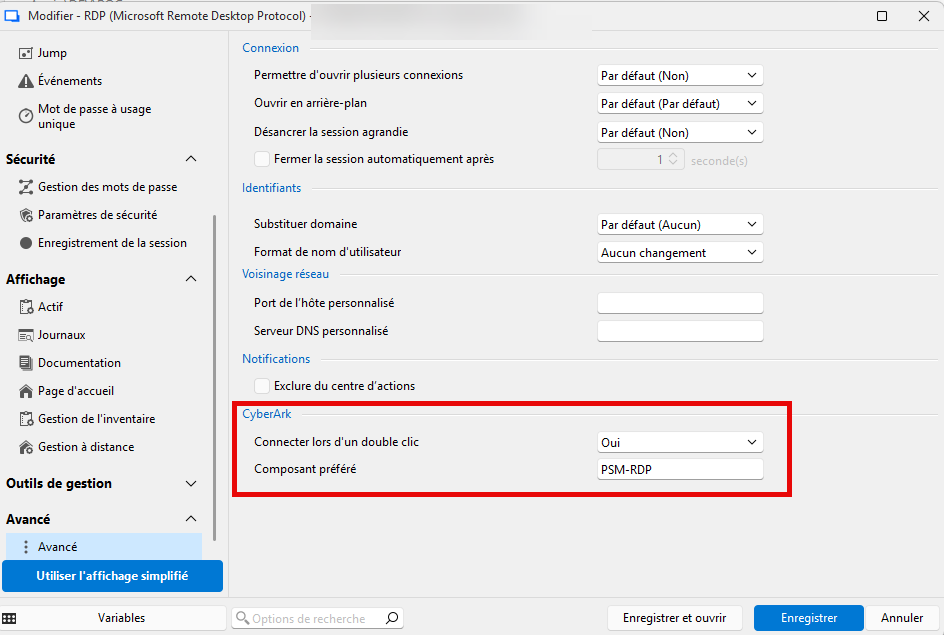
Issue
If the CyberArk Dashboard (in RDM) is not connected/logged in, double-clicking the RDP entry triggers a generic Microsoft RDP error message (e.g., “Remote Desktop can’t connect…” / “Remote access to the server is not enabled…”). This message is misleading because the real cause is that RDM is not authenticated/connected to CyberArk, so it cannot properly initiate the PSM-RDP flow.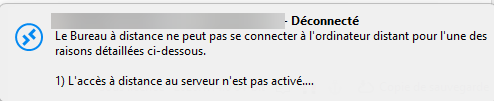
Steps to reproduce
1) Ensure the CyberArk Dashboard in RDM is disconnected (not logged in).
2) On an RDP entry, set Advanced -> CyberArk:
- Connect on double click = Yes
- Preferred component = PSM-RDP
3) Double-click the entry.
Actual result
- RDM shows a generic RDP connectivity error (Windows/RDP), which suggests network/RDP configuration issues.
Expected result
- RDM should detect that the CyberArk Dashboard is not connected and display a clear message such as:
“You are not connected to the CyberArk Dashboard. Please connect/login to CyberArk before starting this session.”
Attachments
- I attached screenshots showing the entry configuration and the misleading error message.
Environment
- RDM version: [2026.1.14.0 and 2026.1.19.0]
- CyberArk integration/plugin version : PVWA 14.2
- CyberArk component: PSM-RDP but same issue with Web connector
Could you please confirm if this behavior is expected today, and if an improvement like the above could be considered in a future release?
Thank you,
Brice Boyer
2026-05-05_15-30-32.png
2026-05-05_15-27-30.png
All Comments (3)
Hi Brice,
Thank you for the feedback.
I'll open a ticket to see how we can improve the error flow when the dashboard isn’t connected.
That said, I also wanted to mention that we’ve introduced a newer approach to this workflow, which aims to reduce (or even eliminate) some of the pain points you’re encountering with the current method. You can now link your RDP sessions to a CyberArk credential set for PSM connection. With this approach, you don’t need to have the dashboard open when double-clicking on RDP sessions.
Regards
Jonathan Lafontaine
Hello,
Thank you for being so patient!
I am pleased to inform you that the issue has been resolved in version 2026.2.3.0 of Remote Desktop Manager. As of now, the latest version 2026.2.3.0 is only available in Beta.
We strongly recommend upgrading in a Staging environment before installing this version in the production environment.
https://devolutions.net/remote-desktop-manager/download/
The full 2026.2 release (non-beta version) will be available in June.
If you have any further questions, please don't hesitate to let us know.
Best regards,
Maxim Robert
Hello,
Thanks for that !
We will test it and get back to you if necessary!