
oliveroberholzer
High CPU usage after Update tor Version 2026.1.12.0
Hi
I've tested the new version 2026.1.16 on our W365 Client.
RDM works without any issues. Also the W365 Client. There is no Network Connection errors anymore.
From my side, thanks.
Oliver
High CPU usage after Update tor Version 2026.1.12.0
Hello
Thanks everyone in this thread for your patience. I've analyzed the data that @oliveroberholzer sent and found a smoking gun for the cause of this. I'll implement a fix ASAP and get that in the next release, and update you once that's available (it should not be too long).
In the meantime I'm afraid I don't have any workaround. I can tell you that this appears to be because we are triggering a bug in the Yubico SDK for a feature that optimistically tries to detect if you have an attached Yubikey. It would be really helpful if we can find any commonality between the users in this thread because I don't know exactly what the cause of the bug is, and I cannot reproduce it, I only have a way to work around it. Things like: do you have a smartcard attached on your client device? Do you redirect smartcards to the host running RDM? Things like that.
In the meantime, please don't hesitate with further questions or comments
Kind regards
@Richard Markiewicz
Hi Richard
we do not have any smart cards or YubiKeys connected on our side.
Please let me know if you need any additional information from us.
Kind regards,
Oliver
High CPU usage after Update tor Version 2026.1.12.0
Hello
The next step is to generate diagnostic information as in the second part of my post. Please let me know if you have some questions.
Kind regards,
@Richard Markiewicz
Hi Richard
I've created the dump as you requested.
How can I send you this data?
Regards,
Oliver
High CPU usage after Update tor Version 2026.1.12.0
Hi
I worked with Windows 365 all day. Remote Desktop Manager was always open in the background with a session. I had no problems all day.
After I closed (sleep) the Windows 365 session and reopened it, the problem with high CPU usage occurred.
The CPU usage of Remote Desktop Manager constantly fluctuates between 40 and 70%.
As a side effect, Windows 365 keeps losing its network connection and closing the session.
When Remote Desktop Manager is closed, the Windows 365 client recovers.
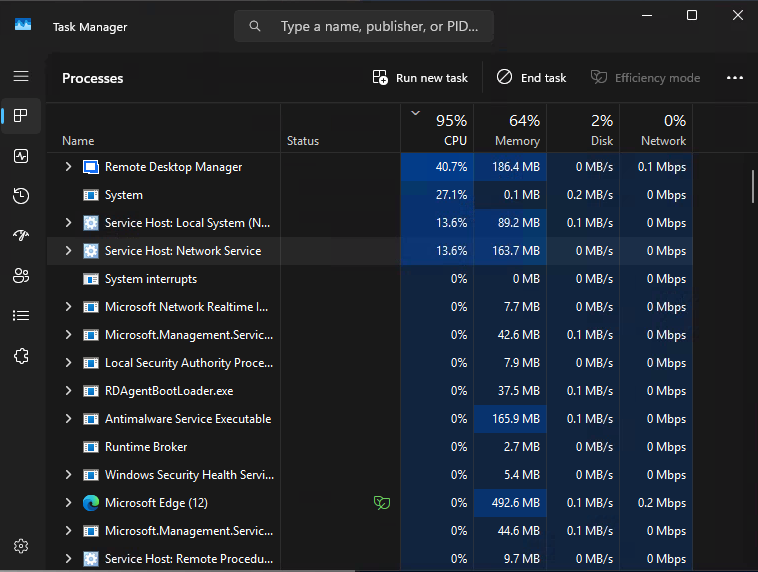
I adjusted the settings according to your suggestion, but the error occurred again.
I my case, I can reproduce the failure now.
Kind regards,
Oliver
High CPU usage after Update tor Version 2026.1.12.0
Hi
We've noticed that since the update, Remote Desktop Manager's CPU usage is significantly higher.
This is resulting in network interruptions on our Windows 365 clients when using Remote Desktop Manager.
Is anything known about this?
Regards,
Oliver