
david_peterson
User Vault + User Specific Settings
Hello David,
Thanks for the detailed follow-up, that’s a useful finding.
The difference comes from how user-specific settings are stored. Each override is linked to the internal ID of the vault and entry it applies to. When a vault is exported and imported into a new, empty database, the entries are created again with new IDs. The imported user-specific settings then point to entries that no longer exist, so they don’t show up. A restored copy of the original database keeps all the IDs, which is why the import works there.
So continuing from a copy of the original database is the right approach for your migration. Each user exports and imports their user vault and user-specific settings once after switching to Windows authentication.
Unless you have more questions, I’ll close this case. You can reply here anytime to reopen it.
Best regards,
@Carl Marien
No further questions, thanks for your response and explaination. I figured it was probably related to entry IDs (both for the user account and the vault) in the database but wanted to confirm there was no (easy) way to migrate via a new DB.
User Vault + User Specific Settings
User-specific settings: in File > My Account Settings > User-specific settings List, click Export while connected with the old account. Then click Import in the same place with the new account. This works with SQL Server workspaces, not only Devolutions Server. It’s done per vault, so repeat it for each vault where the user has overrides.
@Carl Marien
Thanks for getting back to me. I've found places where this works and where it doesn't.
My issue was (still is) where I tried to import User-Specific with a new database where the Vault was based on an export from the old Vault then imported into a fresh, new, empty db. Then user vaults were imported (successfully). The User Specific settings still don't import, however.
In a situation that does work:
I'd imported a copy of the full, original DB from a backup (original is still functional). I still needed to perform an export/import of each user vault as staff are converted from SQL users to WIndows Auth users. I found here that export-import user-specific settings actually imports properly. Seems like there's something on the DB backend going on. I'm sure we'll be fine with continuing on a copy of the original DB, I was just exploring whether a cleaner migration was possible where the original sql accounts didn't have to be migrated.
Thanks for your reply!
User Vault + User Specific Settings
I'm migrating my Workspace (DB) from one server to another. Our existing environment has us using SQL authentication but I'd like to just move to Windows Authentication. The problem I keep running into is seamless migration of user settings.
I've been able to migrate the workspace (either restoring a backed-up DB or Export/Import Workspace Vault) without issue. In either case, however, I'm seeing that each user must manually export their own user vault from the old DB + SQL Server account and Import the user vault into their account after logging in as Windows current user. That part is annoying but what's worse is that there is no way to export and import the user specific settings list from the old user account to the new user account. Well, there is a feature to do this but documentation says it only works with Devolutions Server (which we're not planning to use at this time).
Linking the DB account to the Windows account doesn't seem to allow sharing of settings/credentials/user vaults either. Is there a way to just change the account type from a SQL user to a Windows user while keeping all the user settings intact? I'm trying to minimize inconvenience for my team.
I'd be happy to just run a DB query to do this, just not sure how deep all the user settings go.
Using version 2026.2.20
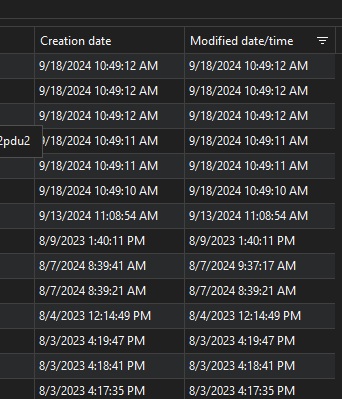
Modified date, sort order not usable.
Can we get the sort order in modified date/time to sort by epoch time instead of literal?
If not, can the date settings be switched to YYYY/MM/DD HH:mm:ss? The way this is displayed right now is unusable.
This was seen under File > User Specific Settings List (example image attached)
Keeper requirements
My organization has purchased Keeper Password Manager. We are having a difficult time getting it to work with RDM. It appears that RDM possibly uses and relies on Keeper's Commander SDK, which is not turned on in our organization. Can you confirm?