
GradonSilverton
"Tools > Credentials" Not Working
I tried this numerous ways.
1) Using a Command Prompt Opened as my standard user.
I entered "runas /user: DOMAIN\ADMIN_ACCOUNT "mmc.exe eventvwr.msc".
Received "RUNAS ERROR: Unable to run - mmc.exe eventvwr.msc 740: The requested operation requires elevation." as the error.
2) Using a Command Prompt Opened as my standard user.
I entered "runas /user: DOMAIN\ADMIN_ACCOUNT "cmd".
I then entered "eventvwr.msc".
Event Viewer ran without issue
3) Using an Administrator Command Prompt Opened as my standard user with Right Click "Run As Administrator".
I entered "runas /user: DOMAIN\ADMIN_ACCOUNT "mmc.exe eventvwr.msc".
Received "RUNAS ERROR: Unable to run - mmc.exe eventvwr.msc 740: The requested operation requires elevation." as the error.
Andy
"Tools > Credentials" Not Working
You didn't really clarify what you wanted me to do... but I ran the following command and the program opened as a "Trial Version" as opposed to my licensed version:
runas /user: DOMAIN\ADMIN_ACCOUNT "C:\Program Files (x86)\Devolutions\Remote Desktop Manager\RemoteDesktopManager.exe"
*Note: there is no space after "/user:" & "DOMAIN" in the command. I separated b/c the board automatically turned that into a smiley face.*
Andy
edited by GradonSilverton on 11/4/2013
"Tools > Credentials" Not Working
Open "Remote Desktop Manager" using the Run As? Or open the individual MMC tools using a Run As?
"Tools > Credentials" Not Working
Gotten nothing back for a week and a half now. What else can we look at?
Andy
"Tools > Credentials" Not Working
I'm uploading a screen shot of how I attempt to connect.
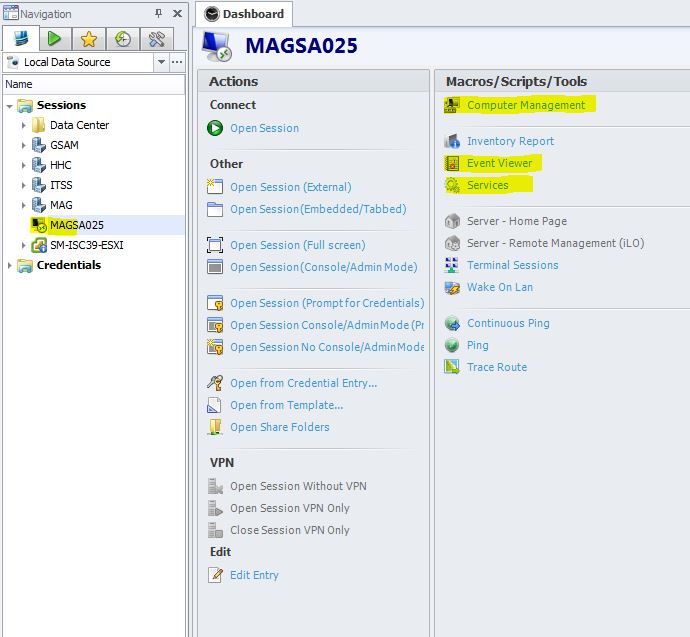
"Tools > Credentials" Not Working
Yes. I just checked by running "services.msc" as my admin account and has no issues connecting to the remote server.
Andy
edited by GradonSilverton on 10/24/2013
"Tools > Credentials" Not Working
I run RDM on my workstation using my non-admin account and have credentials setup using the repository for the RDP sessions with no issues. When I try to run a tool (Examples: Computer management, Event Viewer, Etc.), I get the "Access is Denied" response from Windows. I've configured the Credentials under the Tools Tab as both Custom & Repository and still get the same error. When looking at my Task Manager Processes, the programs are run using my windows logged on credentials (non-admin). From everythings I can find, setting the credentials under the Tools Tab should allow the Tools to run as that user. Am I correct in this, missing something, or is there an issue?
Windows 7 SP 1 x64
RDM Enterprise: v9.0.3.0
Andy