
marcandreloiselle
Automatically Refresh Web add-on
Excellent, thanks for the update. Have a nice day.
Add workspace in mobile app when Biometric lock is force
Hello,
We force the biometric lock and when users add a workspace "Devolutions Hub Business", after entering the address, they received a red error message "The server has the 'Force Biometric Lock' setting enabled. Therefore, you are required to use the 'Biometric Lock' on your app" with just the option to close the message.
After this, the user don't know what to do. It should be great if the app just go to the parameters section where the user can activate the Biometric Lock.
Thanks. Have a nice day,
Marc-Andre

Attachments directly editable from Devolutions Password Manager and webpage
Attachments directly editable from Devolutions Password Manager and webpage
Hello Maxime,
I've attached the pictures directly from attachments section. Thanks.
Attachments directly editable from Devolutions Password Manager and webpage
Hello David,
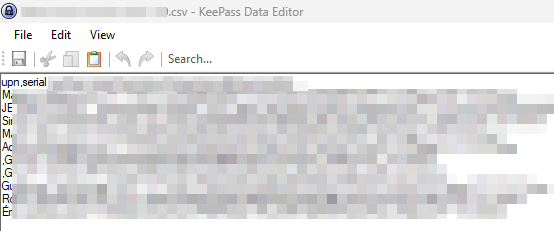
Yes, I've tried it for txt and csv files. Here's screenshots of what it likes in Keypass. For example, I search for an entry and in advanced tab, I can click the file and open as below:

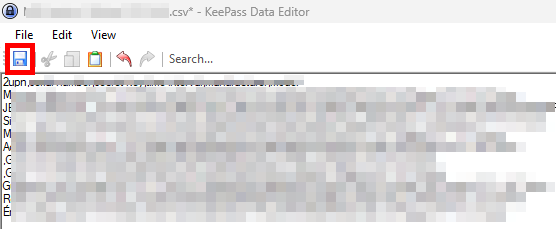
Directly here, I can edit the content and click the save button at the end.

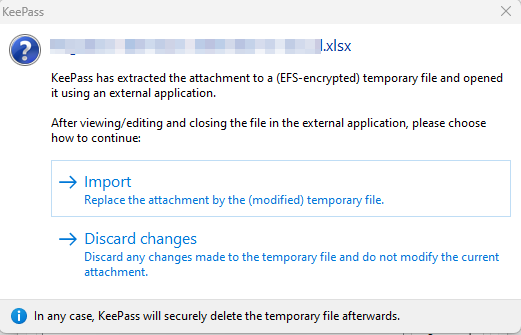
It also works for other type of documents as Keypass extract it to EFS encrypted temporary file and allow us to import it back after modification, as shown below with an Excel file example:

Thanks for your time. Have a nice day,
Marc-Andre
Attachments directly editable from Devolutions Password Manager and webpage
Hello,
We were using keypass previously and it was possible to directly open a csv file attachment and edit it in keypass (without the need to download it and save it back).
It would be great if at least workspace and webpage (and also web extension if possible) could be able to do this. Thanks. Marc-Andre
Devolutions Cloud web extension show attachments
Thanks for adding this to your roadmap, I'll look forward for this. About the actual inactivity setting, is it possible that it's just a logout time for the web page and web extension? It doesn't seem to do anything in workspace...
Enforce master password and auto lock
Hello Sébastien,
Thanks for the feedback. I've activated the enforce biometric. About inactivity app lock (auto lock and background lock), it would be great if you can add a task to your roadmap to include this setting in the Hub Administration for all users.
About the inactivity logout time that is actually available, it will log out the user after x minutes? If yes, we use the SSO with encryption service, so this parameter would not take effect?
Thanks for info. Have a nice day
Enforce master password and auto lock
Hello Sébastien,
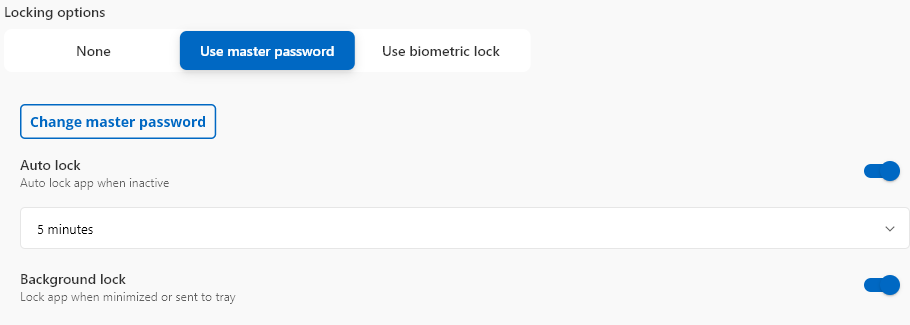
Just to be sure, if I enable "Enforce biometric lock" in administration/system settings/RDM and companion tools, it would do the same thing as if I configure in workspace in the gear icon/security and privacy, the "Use master password"? About the inactivity, there's 2 parameters "Auto lock" after x minutes and "Background lock" in workspace app that will lock the app ask for a master key. The option that you talk about in Hub administration will do what exactly? Where do I configure this? Thanks for info.
Devolutions Cloud web extension show attachments
Hello Olivier,
Yes, exactly. For the moment, there's no option to see attachments tab like in Workspace desktop app or webpage and it would be great to be able to see it in the web extension. Thanks.
Devolutions Cloud web extension show attachments
In the web extension for Devolutions Hub Business, I'm unable to show attachments, it doesn't seem to have any option to do so. I'm able with workspace and web page. It would be useful that web extension has this option.
Thanks. Have a nice day.
Marc-Andre
Enforce master password and auto lock
Workspace only. Thanks.
Automatically Refresh Web add-on
Hello Olivier,
Exactly. Many times, they forget to click refresh and they tell there's a problem with the add-on. Have a nice day.
Enforce master password and auto lock
Hello,
Please, is it possible to add an option to enforce master password for all users?
For the moment in administration/system settings/RDM and companion tools, there's an option to “Enforce biometric lock”, but nothing to « Enforce master password » for all users. Furthermore, it seems that there's no admin option to auto-lock after x minutes of inactivity or when app is in background for all users.
Thanks for your time. Have a nice day,
Marc-Andre
Automatically Refresh Web add-on
Please, do you have a follow-up about this. I also see this kind of behavior and it's one of the biggest complaint of our users. Thanks.
Multiple URLs for same website entry
Thanks, amazing! I'll use this option instead. Please, can you tell me if there's a place that describes the different options available here (default, host, starts with, etc.)? Have a nice day.
Multiple URLs for same website entry

Multiple URLs for same website entry
The feature request is to be able to add "secondary" URLs to an entry, so that the browser extension will be able to find it. Here's why it would be interesting.
For some website entries, we must access a site that redirects to a login. After logged in, the site redirect to the "original URL". For example, we use HP wireless.
We must access the site https://common.cloud.hpe.com/. This site redirects (if we're not already logged in) to https://auth.hpe.com/
The browser extension doesn't detect the site, because the entry is for https://common.cloud.hpe.com/ and not https://auth.hpe.com/
If I change the entry for https://auth.hpe.com/, it's found by the browser extension, but if I use the "fill" option, I receive an authentication error. If I copy the username, paste it and copy the password and paste it, I'm correctly log in. But I'm not directly bring to the management website (https://common.cloud.hpe.com/).
Yes, I know that I can go to the entry, put the "main" website https://common.cloud.hpe.com/ and click the 3 vertical dots and "add sub entry". From here, I've choose host type "host configured", credentials "inherited" and website, the secondary website (https://auth.hpe.com/).
But it seems more simpler to me if there was an option to just add directly the secondary website URLs. Furthermore, this way, it would not create 2 entries for the same "access" (see attached file).
Thanks for your time. Have a nice day,
Marc-Andre