Enforce master password and auto lock
0 vote

Hello,
Please, is it possible to add an option to enforce master password for all users?
For the moment in administration/system settings/RDM and companion tools, there's an option to “Enforce biometric lock”, but nothing to « Enforce master password » for all users. Furthermore, it seems that there's no admin option to auto-lock after x minutes of inactivity or when app is in background for all users.
Thanks for your time. Have a nice day,
Marc-Andre
All Comments (8)
Hello,
Just to be sure, are you using RDM or Workspace or both?
Thank you, have a good day!
Maxime Morin
Workspace only. Thanks.
Hi, currently there is no way to 'force' these settings for users. I will add these to our roadmap and keep you updated on the completion.
Thank you,
Sébastien Aubin
Product manager - Password Management
Hello,
The "Enforce biometric lock" setting also works for the Master Password. We would just need to change the label in the Hub Business administration to make it clearer. Once activated, it will perform the intended function.
Regarding inactivity, we have a setting for that in the Hub administration. The Workspace application will follow this setting, but it will only lock the workspace, not the entire application.
Would this meet your needs, or would you prefer a setting that locks the entire application?
If you need further information on activating this inactivity setting, just let me know, and I will guide you through it.
Thank you,
Sébastien Aubin
Product manager - Password Management
Hello Sébastien,
Just to be sure, if I enable "Enforce biometric lock" in administration/system settings/RDM and companion tools, it would do the same thing as if I configure in workspace in the gear icon/security and privacy, the "Use master password"? About the inactivity, there's 2 parameters "Auto lock" after x minutes and "Background lock" in workspace app that will lock the app ask for a master key. The option that you talk about in Hub administration will do what exactly? Where do I configure this? Thanks for info.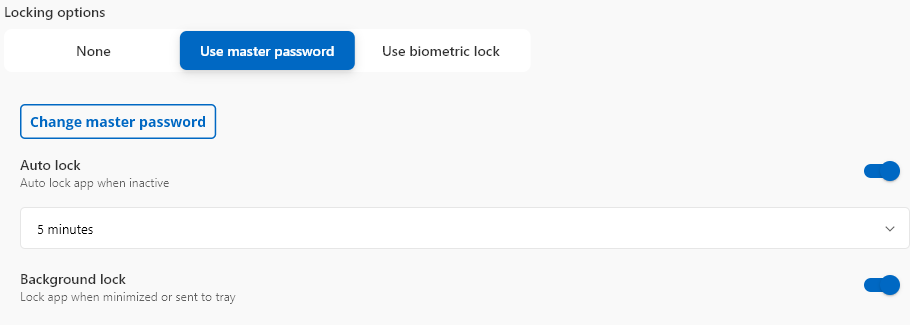
7ba52d04-6966-419a-a163-05b01d5b225b.png
Hi,
If you activate the option "Enforce Biometric lock" as shown here: 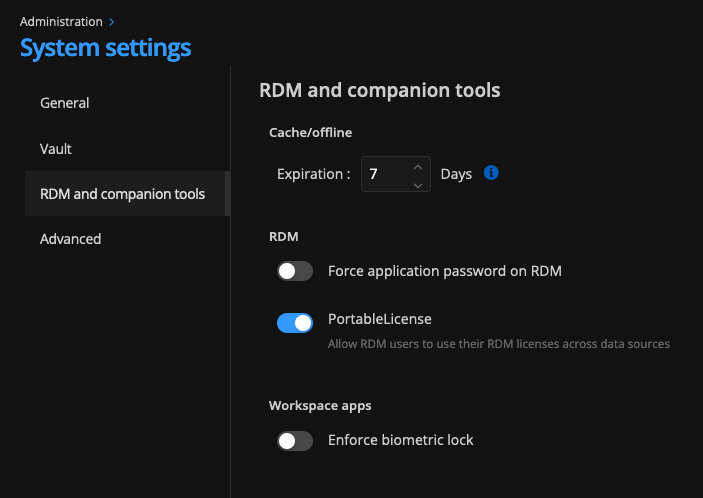
It will ask all the connected users on this Hub to have at least a master password or the biometric lock on the app.
For the inactivity logout time, you have to setup the option here: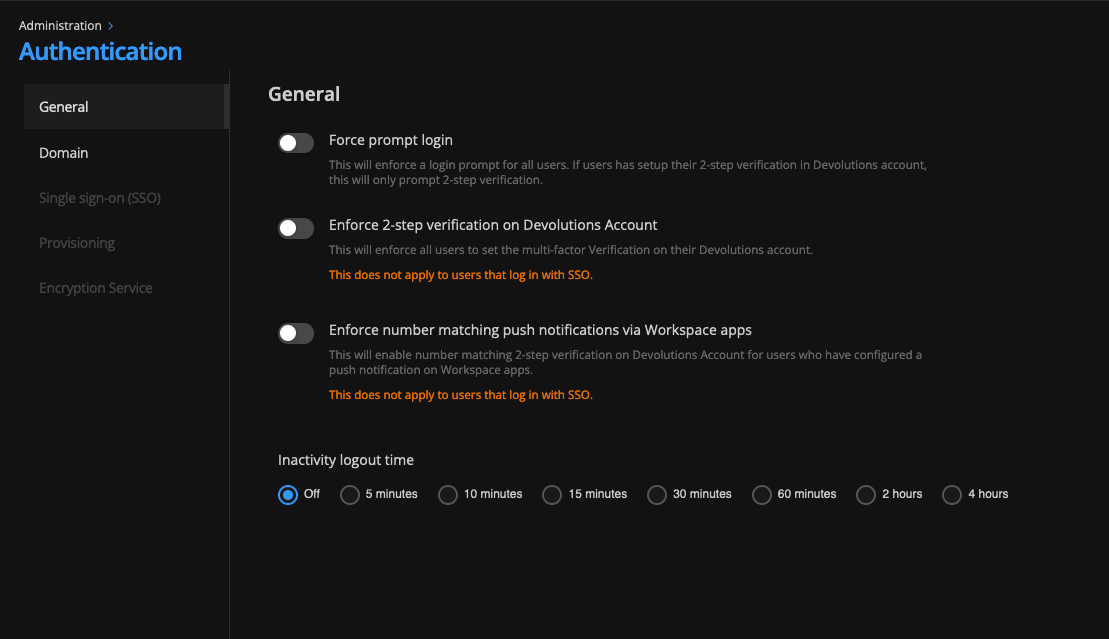
his setting will 'lock' the Hub Business Space after a selected period of inactivity. It won't lock the entire app but will only restrict access to the Hub within the app. Therefore, if your users have multiple spaces or TOTP in the Authenticator Space, they will still have access to these.
The option you showed me is the setting for a user to set up the lock for the entire app. Currently, you can't enforce this for your users, but we can add a task to our roadmap to include this setting in the Hub Administration.
So, if you want to enhance security for your Hub and your users, you can enable the 'Enforce biometric lock' and set an 'inactivity logout time.' This will lock the space after the selected time and require biometric authentication when the app starts. The next level of security would be to activate the 'Force prompt login' setting to ensure all users have to log in each time they want to access the Hub on their app.
I hope this answers your questions. If you have any further questions, feel free to ask.
Best regards,
Sébastien Aubin
Product manager - Password Management
222bb2d7-09e7-45d5-9c0f-8d4db7d74202.png
14e26fae-0028-4984-807d-59f0baed6d1b.png
Hello Sébastien,
Thanks for the feedback. I've activated the enforce biometric. About inactivity app lock (auto lock and background lock), it would be great if you can add a task to your roadmap to include this setting in the Hub Administration for all users.
About the inactivity logout time that is actually available, it will log out the user after x minutes? If yes, we use the SSO with encryption service, so this parameter would not take effect?
Thanks for info. Have a nice day
Hi, yes it should take effect even if you have the SSO encryption. I just added the task on our roadmap to make the new settings in Hub.
Thank you,
Sébastien Aubin
Product manager - Password Management