
jonathonhogan-doran
Edit Clientname (hostname?) on RDP-connection
I found it - but it may benefit from a label - in Dark Mode the new [_____________] that appears next to it when you flick the select to "Yes" is not that obvious.
May infact be best to default set it (when blank) to the current computers client name - as users may want to the alter it to something similar for their internal client naming convention.
Example for us it would "DXC0231868" and the client I want to test as is "DXC0233444" to check how the software response and default get set etc.
cheers,
JonHD
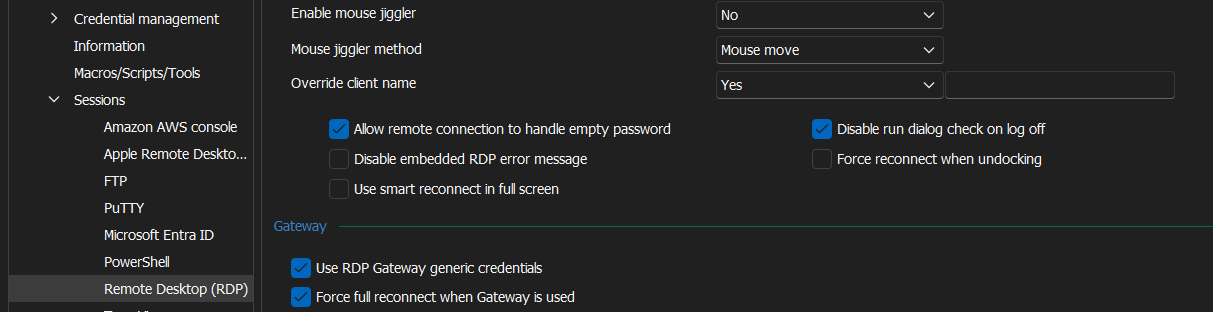
Edit Clientname (hostname?) on RDP-connection
I can't find on a given remote desktop session, where I can enter the override client name?
e.g MyHub (XXXXX) --> (><) RDP00123599.gov.au --> Properties
Edit Clientname (hostname?) on RDP-connection
Is there any similar capabilities in RDM for Windows? or RDM for iOS?
We similarly have a remote accessible APP that relies on the Client Name to configure defaults for a give location (e.g printers, folder redirection etc)
This setting is for RDM Android. Are you referring to RDM for Android or RDM for Windows?
If you are referring to RDM Android, this setting is now under:
1- Application Settings
2- Sessions
3- RDP
4- Client name
Best Regards,
Edit Clientname (hostname?) on RDP-connection
I am unable to find how to get to this setting in RDM Version 2024.2.16.0 64-bit (Windows client) ?