
michaelconz
Multiple authentications when opening (rdp) session in RDM with a managed privileged account
Hello Erica,
RDM: 2023.3.39.0 64-bit
DVLS: v 2023.3.13.0
Datasource is accessed with Domain SSO ans secured with MFA/OTP
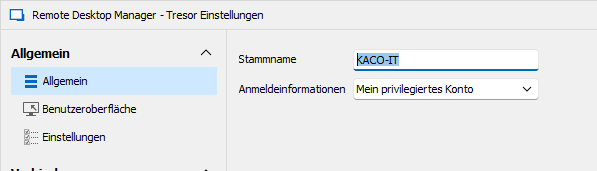
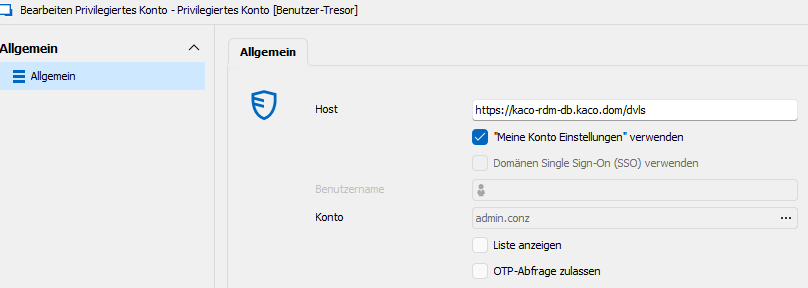
Privileged Account is set as you stated in File - My Account Settings - My Privileged Account
The rdp session entry is set to use "My Privileged Account" (inherited from root)
Michael
Multiple authentications when opening (rdp) session in RDM with a managed privileged account
Hi,
we are using RDM with Devolutions Server and PAM. Our RDP sessions are stored in a vault on Devolutions Server and the priviliged accounts we are using to connect are managed in PAM.
The first time on each day/session when we want to use a priviliged account, we usually check them out for 8-10 hours. After that, it gets checked in automatically and the password of the account (MS ActiveDirectory account) get's changed.
Right now, when I start a rdp session, RDM will authenticate 2 times before it starts the rdp connection. This takes about 4 seconds in total before the actual connection is made. When I want to start multiple rdp sessions at once, this multiplies. So starting 4 sessions takes about 16 seconds of authentication. I have a video attached where you can see what I mean.
Are we experiencing this because of a bad configuration? Are there any settings to speed things up?
I was expecting that after I authenticated to the Devolutions Server (application start), and checked out my privileged user in PAM (on first usage per session), there would not be any need to authenticate again during the session. Or at least that it wouldn't take that long.
Michael