
Adam Listek
[Try & share] Push events to external systems with Webhooks
@martin_tsaguekifack Thanks for the feedback and great feature suggestion. We are looking into expanding that per your suggestions!
Version 2026.1 (February 27th, 2026)
Discover all of the new features and improvements in Devolutions Gateway 2026.1!
NEW FEATURES
Service - Added options to use a dedicated certificate for CredSSP credential injection
IMPROVEMENTS
Service - Gateway now auto-generates a self-signed certificate for CredSSP when no TLS certificate is configured
Service - Improved real-time performance of session shadowing
In case you missed it, here are a few features released since the last major release.
[2025.3.4.0] Service - Add credential injection support for RDCleanPath
[2025.3.4.0] Service - Add outbound HTTP/HTTPS/SOCKS4/SOCKS5 proxy configuration support
[2025.3.3.0] Installer - DVLS Public Key Download: Automatically downloads public keys from Devolutions Server
[2025.3.3.0] Service - Hub Service Auto-Updater: Supports automatic updates through the Hub Service
[2025.3.3.0] Standalone - VNC and RDP Client Updates: Updated clients with improved pixel format handling, fixed clipboard timing issues, better error messages, and updated security libraries
Learn about all of the new features and improvements across the Devolutions ecosystem with remote access management 2026.1!
Version 2026.1 (March 3rd, 2026)
Discover all of the new features and improvements in Devolutions PAM 2026.1!
NEW FEATURES
Manage temporary access to PAM accounts
End privileged sessions automatically after account check-in
Extend PAM to MongoDB through discovery and account password rotation
Connect multiple PAM services for high availability
Monitor PAM service health and trigger web-based updates
IMPROVEMENTS
Enhance just-in-time elevation for SSH with Linux privilege set controls
Assign and manage privileged access account risk
Improve check-in behavior with auto check-in on entry close
[Try & share] Connecting RDM MCP with your AI provider
Tell us what you think!
In this new series spotlighting features you might have missed, we’d love to hear from you! Share in a comment your first impressions or how you’ve been using it in your day-to-day. Your experiences help inspire others in the community and play a key role in shaping the future of our products.
Remote Desktop Manager now includes an experimental Model Context Protocol (MCP) server that enables any MCP-compatible client, such as Claude, Visual Studio, VS Code, or MCP Inspector, to interact with your local RDM instance. It exposes tools, prompts, and resources for structured access to data sources, vaults, and entries, with capabilities to build vault hierarchies, modify entries, and generate strong or passphrase-based passwords.
This feature is currently flagged as Experimental and will evolve in future releases.
[Try & share] Push events to external systems with Webhooks
Tell us what you think!
In this new series spotlighting features you might have missed, we’d love to hear from you! Share in a comment your first impressions or how you’ve been using it in your day-to-day. Your experiences help inspire others in the community and play a key role in shaping the future of our products.
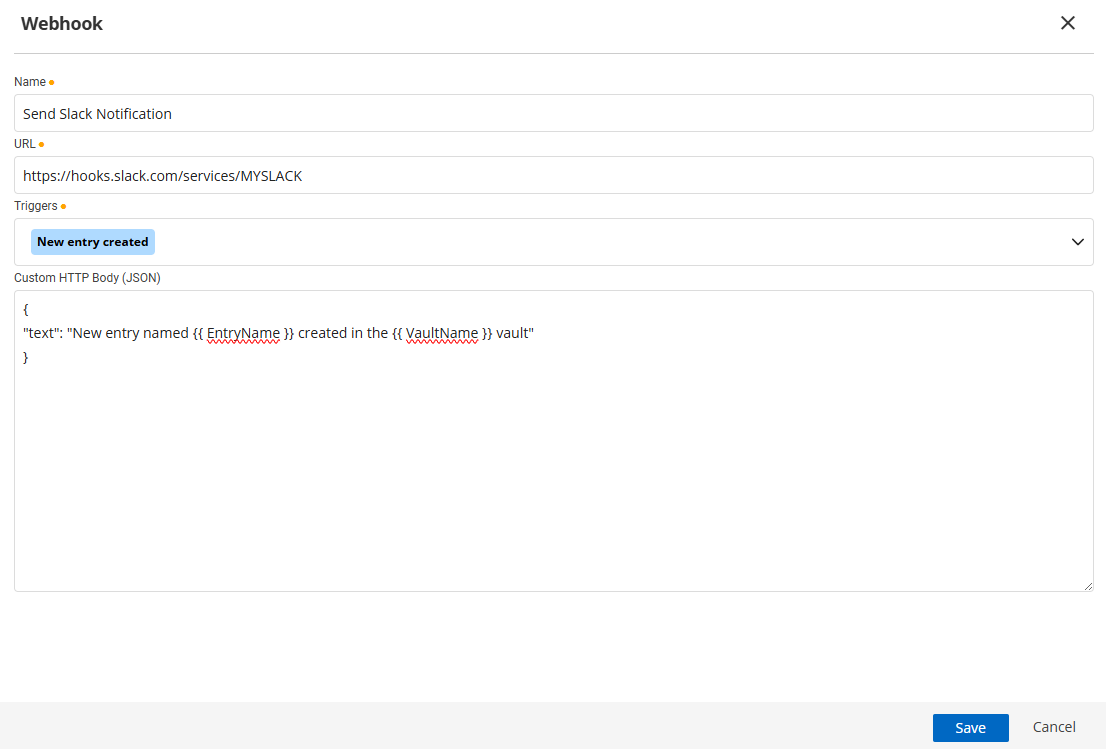
You can now push Devolutions Hub Business and Devolutions Server (DVLS) events to external systems via webhooks. Send JSON messaging on triggers to your SIEM, ticketing platform, or chat tools (e.g., Slack or Microsoft Teams) to automate reviews, create tickets, or notify runbooks. Configure endpoints and event scopes in Administration, then point them at standard incoming webhooks.
[Try & share] Classify Active Directory & Entra ID privileged accounts by tier
Tell us what you think!
In this new series spotlighting features you might have missed, we’d love to hear from you! Share in a comment your first impressions or how you’ve been using it in your day-to-day. Your experiences help inspire others in the community and play a key role in shaping the future of our products.
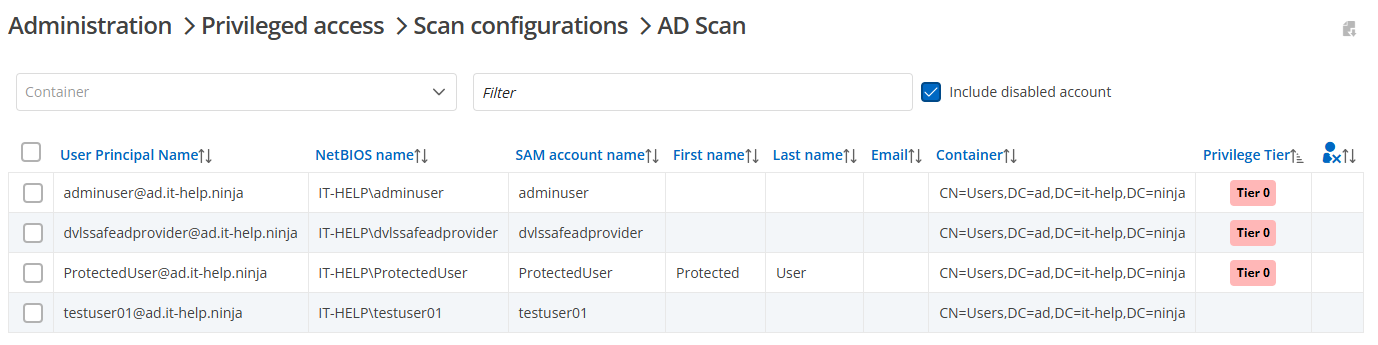
When discovering PAM accounts, Devolutions Hub Business and Devolutions Server (DVLS) automatically assign a numerical risk score ranging from 1 to 10, based on domain group membership, and designate an account tier. The assigned tier makes it easy to filter dashboards, prioritize rotations and approvals, and focus audits on what matters most.
[Try & share] Segment traffic in Devolutions Gateway with virtual instances
Tell us what you think!
In this new series spotlighting features you might have missed, we’d love to hear from you! Share in a comment your first impressions or how you’ve been using it in your day-to-day. Your experiences help inspire others in the community and play a key role in shaping the future of our products.
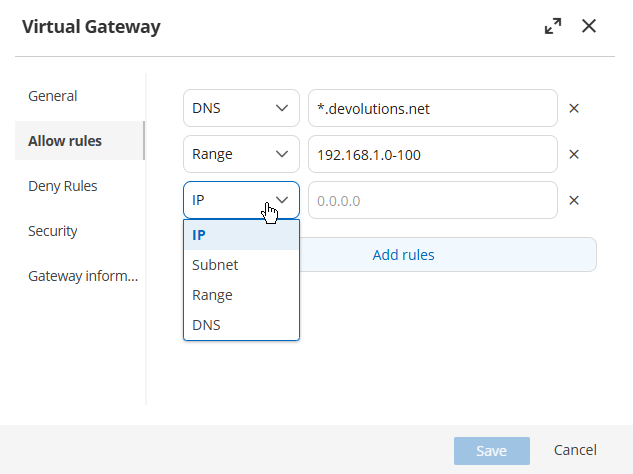
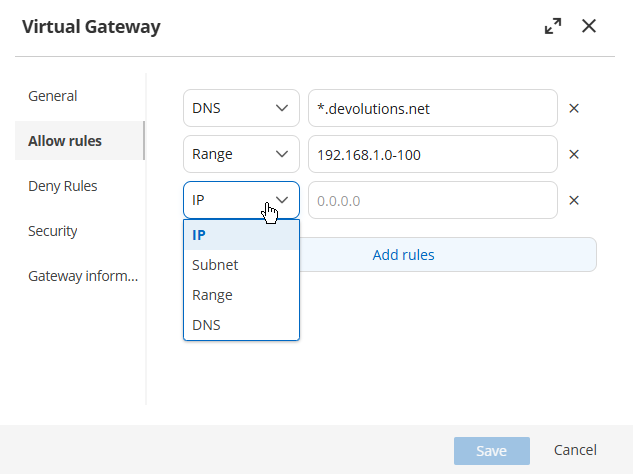
Operate multiple virtual Gateway instances to segment traffic as needed in Devolutions Hub Business, Devolutions Server (DVLS), and Remote Desktop Manager (RDM). Separate by IP, subnet, IP range, or DNS while combining multiple allow and deny rules. This, along with Gateway farms, improves isolation and flexibility without deploying additional Gateway instances.
[Try & share] Segment traffic in Devolutions Gateway with virtual instances
Tell us what you think!
In this new series spotlighting features you might have missed, we’d love to hear from you! Share in a comment your first impressions or how you’ve been using it in your day-to-day. Your experiences help inspire others in the community and play a key role in shaping the future of our products.
Operate multiple virtual Gateway instances to segment traffic as needed in Devolutions Hub Business, Devolutions Server (DVLS), and Remote Desktop Manager (RDM). Separate by IP, subnet, IP range, or DNS while combining multiple allow and deny rules. This, along with Gateway farms, improves isolation and flexibility without deploying additional Gateway instances.
[Try & share] Segment traffic in Devolutions Gateway with virtual instances
Tell us what you think!
In this new series spotlighting features you might have missed, we’d love to hear from you! Share in a comment your first impressions or how you’ve been using it in your day-to-day. Your experiences help inspire others in the community and play a key role in shaping the future of our products.
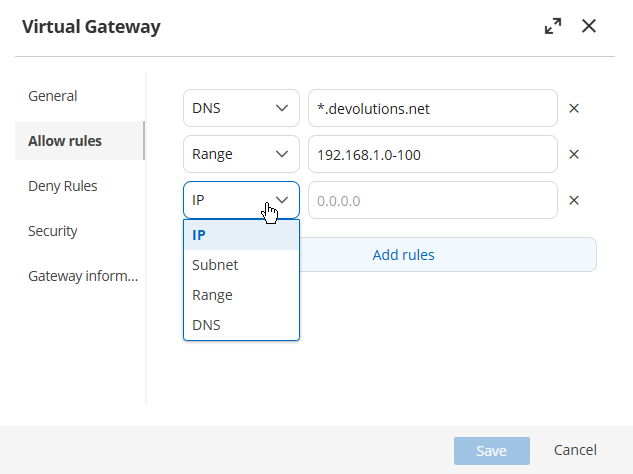
Operate multiple virtual Gateway instances to segment traffic as needed in Devolutions Hub Business, Devolutions Server (DVLS), and Remote Desktop Manager (RDM). Separate by IP, subnet, IP range, or DNS while combining multiple allow and deny rules. This, along with Gateway farms, improves isolation and flexibility without deploying additional Gateway instances.
Version 2025.3.0.0 (September 24, 2025)
Discover all of the new features and improvements in Devolutions Gateway 2025.3!
NEW FEATURES
Service - Devolutions Gateway now records and expose traffic transferred over JMUX tunnels for auditing and usage insights
Standalone - Added an MVP for self-contained session URLs so sessions can be launched or shared via a single link
Standalone - SSH and Telnet web clients now support clipboard copy/paste
IMPROVEMENTS
Optimized binary size to reduce download and footprint
Service - WebM video player now autoplays for smoother playback
Standalone - Added a color format selector for VNC sessions to balance bandwidth and image quality
Standalone - Clipboard features are disabled in non-secure contexts to protect data
Standalone - Improved error handling across remote desktop clients for clearer, more actionable messages
Standalone - Introduced manual clipboard mode for RDP, VNC, and ARD with Send Clipboard and Save Clipboard buttons; auto mode is toggleable and supported only on Blink-based browsers (e.g., Chrome)
Standalone - Replaced TightLow/High with a granular JPEG Quality control for finer tuning of performance vs. clarity
Standalone - The web app shows a fallback screen with guidance when an unsupported browser is detected
FIXES
Standalone - Fixed user domain parsing for UPN-formatted usernames during sign-in
Version 2025.3 (October 7, 2025)
Discover all of the new features and improvements in Devolutions PAM 2025.3!
NEW FEATURES
Edit PAM accounts directly in RDM using Devolutions Server (DVLS)
Classify privileged accounts by tier and automatically score risk (1–10) during account discovery
Enable Entra ID just-in-time (JIT) elevation for Devolutions Hub Business
IMPROVEMENTS
Provide Gateway support for the Windows User provider in PAM
Included ticket numbers in DVLS PAM activity reports
Added JIT-specific options in DVLS checkout policies
Enforce account lifecycle policies
Version 2025.2 (June 5th, 2025)
The Devolutions Gateway 2025.2 update introduces improved configuration options, Gateway Standalone enhancements, and laying the groundwork for future updates.
Improved system certificate selection with certificate caching
Addition of
--config-pathparameterVNC improvements in Gateway Standalone
ARD improvements in Gateway Standalone
RDP improvements in Gateway Standalone
Laying the groundwork for future Gateway releases
Proxy-based credential injection
Virtual Gateways in DVLS
Enhanced load balancing
Expanded network scanning
Version 2025.2 (June 4th, 2025)
The Devolutions PAM 2025.2 update introduces new PAM providers, enhanced check-out flexibility, and a streamlined interface.
DVLS and Hub AWS PAM provider
Azure AD / Entra ID PAM provider (Hub)
On-premise Active Directory PAM provider (Hub)
PostgreSQL PAM provider (DVLS and Hub)
Optional check-in/check-out PAM accounts in DVLS
Initial release of privilege elevation and delegation (PEDM)
Consolidated Account lifecycle policy section for password rotation and propagation sections
Devolutions Server Installation on Linux with Devolutions PowerShell Module
@GGORG Thanks! I'll take a look next week, but once again great work. Looking forward to collaborating to make sure we get some awesome out for everyone to use. Looking good on that external Devolutions Gateway!
Devolutions Server Installation on Linux with Devolutions PowerShell Module
@GGORG Fantastic work! I have this to work on shortly, and if you are willing to share your configurations, I would love to take a look. It would help me get a start on the Kubernetes side of an official configuration. Nicely done, very excited myself to get all of this working as well. Thanks!
DVLS GW: Install on Linux Server
Hi John,
I have that on my list to work on. There is technically a Gateway Docker file, but not sure how well it works at the moment. https://github.com/Devolutions/devolutions-gateway/tree/master/package/Linux
I am going to rework that, similar in format to the DVLS one, and hopefully will have that done in the next two weeks. I'll then put it out in the same spot as the DVLS one.
For the Ubuntu Docker, there is no SystemD, that is why I use the s6-overlay instead. Docker has a much different process setup (everything runs under 1). Ideally, I want the ability to run multiple Gateway containers to easily create a Gateway farm in DVLS. I'll update this post as I make progress.
-Adam
[LINUX] ScriptLibrary DVLSForLinux Errors with sh and ps1??
Hi John,
Sorry for the delayed response, but glad it's working! I'll be looking into the next set of improvements to this over the next few weeks, as I have some other work to finish first. Thanks for testing it out!
-Adam
[LINUX] ScriptLibrary DVLSForLinux Errors with sh and ps1??
Not that I've configured it, but the first option appears to be a default, but I have not explicitly configured the host address loopback, so I assume off.
-Adam
[LINUX] ScriptLibrary DVLSForLinux Errors with sh and ps1??
Hi John,
I have a pretty similar setup to yours it looks like (sans those settings your referenced in the screenshot). I haven't had a problem addressing the Docker containers from 127.0.0.1:5000 and localhost:5000. Keep in mind that you will need to use https, by default, since it generates a self-signed cert.
I am also on Windows 11 24H2 with the latest Docker Desktop and Ubuntu 22.04.5 LTS as my WSL2 container. I have a stock Docker setup, no changes to the default networking.
[LINUX] ScriptLibrary DVLSForLinux Errors with sh and ps1??
Hi John,
I see, I'm not as familiar with those!
[LINUX] ScriptLibrary DVLSForLinux Errors with sh and ps1??
Hi John,
Sorry to hear that! It does have its challenges. For what it's worth, this is my WSL2 configuration (%USERPROFILE%\.wslconfig that has been working pretty well as of late:
[wsl2]
dnsTunneling=true
networkingMode=mirrored

[experimental]
autoMemoryReclaim=gradual
bestEffortDnsParsing=true[LINUX] ScriptLibrary DVLSForLinux Errors with sh and ps1??
Hi John,
There are three services involved (when running docker-compose up -d): the MSSQL container which contains the DB, the built DVLS container, and a third Alpine container which simply exists to depend on the DVLS container for it's healthcheck.
If I don't use the third container, then the health check won't wait (can't depend on itself). It's not required for function, but it does mean that that you don't prematurely attempt to access DVLS until it's fully up and running (takes about 1 min. the first time you run the container, and like 15 seconds each re-run of the persisted data).
[LINUX] ScriptLibrary DVLSForLinux Errors with sh and ps1??
Hi John,
There are a few ways to run Gateway, depending on your needs, but yes, as long as DVLS (from within the Docker container) can reach a given Gateway, it should work. I am planning on adding a config including Gateway as well for a demo setup.
Technically there is a Docker config for Gateway here, but it needs some work and documentation, but you are welcome to try it.
https://github.com/Devolutions/devolutions-gateway/blob/master/package/Linux/Dockerfile
-Adam
[LINUX] ScriptLibrary DVLSForLinux Errors with sh and ps1??
Hi John!
I'll answer here, and also in the other thread. It took me some time, and I apologize for that, but I have the first release of our Docker Compose configuration. Please check it out here, and let me know how well (or not), it works for you!
https://github.com/Devolutions/ScriptLibrary/tree/main/DVLSForLinux/Docker
Version 2024.2 beta
Hi John!
I'll answer here, and also in the other thread. It took me some time, and I apologize for that, but I have the first release of our Docker Compose configuration. Please check it out here, and let me know how well (or not), it works for you!
https://github.com/Devolutions/ScriptLibrary/tree/main/DVLSForLinux/Docker