
forner
Azure Bastion SSH connections not working as expected since version 2024.2.21.0
Many thanks Richard, yes I confirm switching port to 22 instead of "default" fixes the issue, great workaround and easy to apply, let me change all our SSH sessions to port 22 in our datasource, we don't have so many.
Looking forward to having new version with bug fixed.
Azure Bastion SSH connections not working as expected since version 2024.2.21.0
Thanks for your replies Richard,
Port is set to "Default".
Azure Bastion SSH connections not working as expected since version 2024.2.21.0
Hello Richard,
Looking at RDM release notes something was changed for Bastion in 2024.1.21.0 "Added support for any connection type through Azure Bastion" since that moment all our SSH terminal sessions through Bastion started to fail, I uninstalled latest version, reinstalled 2024.1.20.0 and they are working fine again with the old version. Issue has been reproduced on multiplle computers/users.
We are using Bastion in TCP tunnel mode, connecting to IP of target server.
Application logs show:
Date Version Type Message
4/9/2024 2:33 PM 2024.1.23.0 - 64-bit 2 "An attempt was made to access a socket in a way forbidden by its access permissions. (System.Net.Sockets.SocketException (10013): An attempt was made to access a socket in a way forbidden by its access permissions.
at System.Net.Sockets.Socket.UpdateStatusAfterSocketErrorAndThrowException(SocketError error, Boolean disconnectOnFailure, String callerName)
at System.Net.Sockets.Socket.DoBind(EndPoint endPointSnapshot, SocketAddress socketAddress)
at System.Net.Sockets.Socket.Bind(EndPoint localEP)
at System.Net.Sockets.TcpListener.Start(Int32 backlog)
at Devolutions.Az.Bastion.WebSocketProxy.Start()
at Devolutions.Az.Bastion.Tunnel.Initialize(Host bastionHost, VirtualMachine virtualMachine, Int32 workloadHostPort, CancellationToken cancellationToken, Int32 localPort, WebContext webContext)
at Devolutions.RemoteDesktopManager.Business.VPNOpeners.VPNAzureBastionOpener.<>c__DisplayClass6_0.<DoOpen>b__0())"
[Devolutions.Az][Error][2024-04-09 14:34:26Z] System.Exception: the server closed the connection
at Devolutions.Az.Bastion.ClientWebSocketConnection.Receive()
I will send profiler output in a separate communication.
RDP via Azure Bastion (native client)
Hello Richard,
I confirm issue I reported about user settings for bastion object not being honored (username) is now fixed in 2023.3.31, thanks for your support.
Regards.
RDP via Azure Bastion (native client)
Hello Richard,
I have tested 2023.3.28 and user specific settings are not applied to Azure Bastion entries yet, I am specifically testing Username (please refer to screenshot on my first comment), it used to work fine formerly when using embedded webview dialog.
Regards.
Juan-Antonio Forner
RDP via Azure Bastion (native client)
Hello
To address the two issues reported upthread:
The problem where the overrides for the Azure resource info does not work with a linked Azure Bastion VPN should be fixed, and that should be present in the upcoming RDM release (2023.3.26). If you still have an issue after upgrading, please don't hesitate to post back here.
The problem where the username override in the user specific settings is not working should be fixed, it's not clear to me if that will be present in the 2023.2.26 release or the subsequent release. I'll update this thread once I have more information.
Thank you all for your patience and once again I apologize for any inconvenience.
Thanks and kind regards,
Thanks Richard for the information, I will let you know if second point gets fixed in future releases..
RDP via Azure Bastion (native client)
Dear Richard,
Thanks for Azure Bastion support in RDM it really makes our lives much easier, but just please let me escalate some issue in 2023.3 release, since you switched integrated login to system browser instead of embedded webview dialog, User Specific Settings are not honored anymore for the Bastion object, formerly with embedded webview dialog we could take advantage of User Specific Settings so that each team member was setting up there his/her personal account but that has stopped working since 2023.3 release, will you please assist? We are currently using 2023.3.24.0 64-bit version.
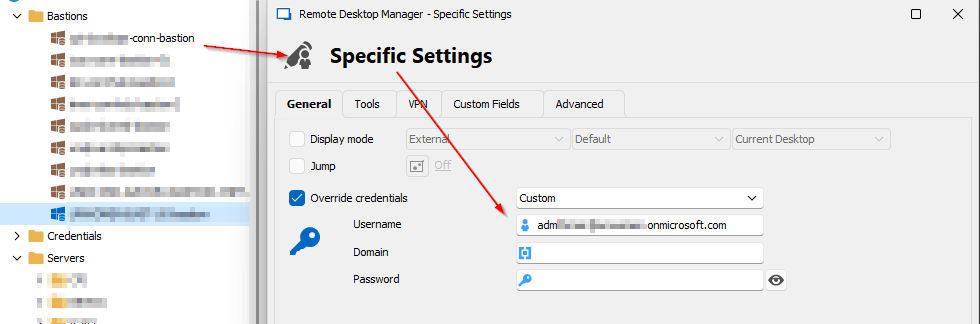
Regards,
Juan-Antonio Forner