
jwoodard
Import / Export -- Windows Terminal Format
Not a problem! Thank you for the reply back!! That looks like a great project find!
Putty's scheme I believe is simply an RGB format. In the very brief testing I did on the below site, I believe it should be close enough.
Thank you for looking into this! I realize it's a very insignificant thing, but people do love their color themes. :-)
Import / Export -- Windows Terminal Format
I guess that's a no then.
Import / Export -- Windows Terminal Format
I do understand the goal behind the feature and very much appreciate it. :-)
To your question, Windows Terminal is a widely used terminal with just a JSON formatting. I want to be able to use the types of sites listed below to customize my terminal. If I have a scheme that I have tweaked, I can still share that with other team members by the current process. However currently, if I find a theme I like and want to try, I have to figure out how to convert the JSON theme into the importable format that RDM understands.
My thought is that, rather than RDM using it's own standard (I believe it is kitty SSH, but still not very common). You might look at a more widely used format for importing/exporting color configuration. This way, users are still free to import/export colors as they have and additionally, they can search other locations and easily import them.
I hope that helps to clarify the request more.
https://windowsterminalthemes.dev
https://github.com/catppuccin/windows-terminal
https://draculatheme.com/windows-terminal
https://www.ubuntupit.com/best-windows-terminal-themes-and-color-schemes/
Import / Export -- Windows Terminal Format
I am aware of the import / export feature with terminal colors, however, there are very few places that have that format (kitty SSH I believe) by default.
In comparison, Windows Terminal seems to be fairly prevalent and just a JSON file. I was wondering if it would be possible to allow for at least importing with this format?
I have included examples of the devolutions export, Windows Terminal scheme and a mapping of the 2.
Thank you for any consideration
## Terminal Scheme ##
{
"name": "AdventureTime",
"black": "#050404",
"red": "#bd0013",
"green": "#4ab118",
"yellow": "#e7741e",
"blue": "#0f4ac6",
"purple": "#665993",
"cyan": "#70a598",
"white": "#f8dcc0",
"brightBlack": "#4e7cbf",
"brightRed": "#fc5f5a",
"brightGreen": "#9eff6e",
"brightYellow": "#efc11a",
"brightBlue": "#1997c6",
"brightPurple": "#9b5953",
"brightCyan": "#c8faf4",
"brightWhite": "#f6f5fb",
"background": "#1f1d45",
"foreground": "#f8dcc0",
"cursorColor": "#efbf38",
"selectionBackground": "#706b4e"
}
## Mapping ##
"Colour0": DefaultForeground
"Colour1": DefaultForegroundBold
"Colour2": DefaultBackground
"Colour3": DefaultBackgroundBold
"Colour4":CursorText
"Colour5":CursorColor
"Colour6": ANSIBlack
"Colour7": ANSIBlackBold
"Colour8": ANSIRed
"Colour9": ANSIRedBold
"Colour10": ANSIGreen
"Colour11": ANSIGreenBold
"Colour12": ANSIYellow
"Colour13": ANSIYellowBold
"Colour14": ANSIBlue
"Colour15": ANSIBlueBold
"Colour16": ANSIMagenta
"Colour17": ANSIMagentaBold
"Colour18": ANSICyan
"Colour19": ANSICyanBold
"Colour20": ANSIWhite
"Colour21": ANSIWhiteBold
## Devolutions Export Scheme ##
Colour21\197,200,198\
Colour20\112,120,128\
Colour19\138,190,183\
Colour18\94,141,135\
Colour17\178,148,187\
Colour16\133,103,143\
Colour15\129,162,190\
Colour14\95,129,157\
Colour13\240,198,116\
Colour12\222,147,95\
Colour11\181,189,104\
Colour10\140,148,64\
Colour9\204,102,102\
Colour8\165,66,66\
Colour7\55,59,65\
Colour6\40,42,46\
Colour5\197,200,198\
Colour4\29,31,33\
Colour3\29,31,33\
Colour2\29,31,33\
Colour1\197,200,198\
Colour0\197,200,198\
Loading Objects - Add Cancel/Abort Option
Apologies, I have been neck deep in other projects.
Currently 2023.2.22.0 and I am working with a local data source
Loading Objects - Add Cancel/Abort Option
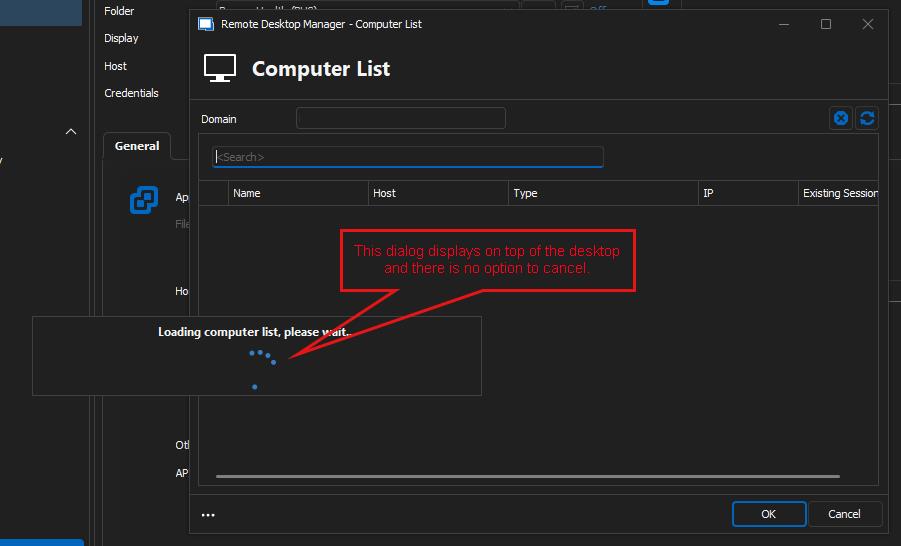
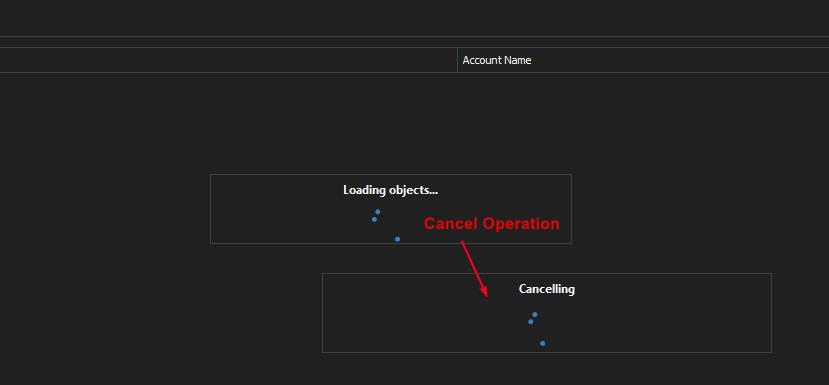
I'm not sure this is directly with our AD, AD in general, or ??? .... However, when there is a "Loading Objects" dialog, there is no option to cancel the operation.
For example, today I was testing the AD integration and was doing a search for a user. The search ran with "Loading Objects" for several minutes and I wanted to just cancel the search, however, there was no option to. I was forced to use Task Manager to kill the process. I tried again with the same outcome.
I did notice if I closed the tab it would then show "Cancelling" and close the tab.
Hopefully I have explained this right. I have included a screenshot hopefully to clarify if not.
Also.... This happened when I do anything loading a computer list. This one is actually worse because I can't even close a tab or get out in anyway but end the process.
I feel like Task Manager should be a last resort and the UI should allow for the cancellation/abortion of the operation.
Thank you for looking into this. :-)
Save window layouts
Yes, I would like to add to this as well..... I keep wanting to grid my SSH connections for many reasons.