
JJ
(Resolved) This application could not be started...
I just resolved my issue today and thought I'd share just in case anyone else runs into this. I spend all of my time migrating clients and spend quite a bit of time around Exchange servers. Today, I was trying to figure out why the server wouldn't download and install Windows updates, and one of the events that kept happening every 4 minutes was ASP/.NET related.
Even though my event logs were throwing completely different errors, during the steps to resolve the issue, it clicked and figured I'd check my registry as well, and sure enough, all of my SKU sub-keys were gone. I merged all of the same reg keys as I did on the exchange server, rebooted, and now I'm back in business!
I frequent this guys site for a lot of exchange related issues. This is where you'll find the fix.
How to fix Event 1310, ASP.NET 4.0.30319.0 warning - ALI TAJRAN
Cheers!
JJ
(Resolved) This application could not be started...
Hi Etienne,
My apologies for not being more descriptive in my OP on what I've tried before posting, which is almost everything I know or have found online. I was hoping that since it's happening to me using RDM, someone else running Windows 10 might be having the same issue. It literally started after rebooting due to Windows Update.
Unfortunately, I'm unable to rollback this particular update. It's happening with many other programs as well.
Thank you,
Jeremy
(Resolved) This application could not be started...
Unfortunately, that did not work and I receive the same .Net message.
(Resolved) This application could not be started...
Hello,
I'm not sure I've seen other reports on that but I could investigate!
Best regards,
Thank you, Etienne! Or is that Lord, Etienne? ;)
I do appreciate any assistance. All of my client profiles are currently inaccessible.
(Resolved) This application could not be started...
Hey forum,
I just got back from a 10 day road trip and Windows wanted to reboot due to updates. I didn't think much of it, and now that the updates are installed, I'm having issues with quite a few applications that require .Net framework.
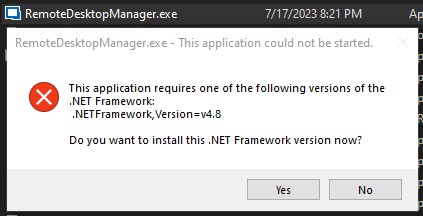
Every time I try to launch RDM, I get the following; "This application could not be started. This application requires one of the following versions of the .NET Framework:
.NETFramework,Version=v4.8"
I'm getting this error for many apps and different versions of .Net but the crazy thing is, the updates installed 4.8 along with some new updates specifically for .Net over the past few days. Anyone seen this issue and if so, your assistance would be greatly appreciated!
Thank you,
JJ