lourensp
Bulk add of other entry objects rather than U/P Credentials
Hi Erica
Can you guide me? I have looked through the Devolutions.PowerShell and used New-DSCredentialEntry to create a new U/P entry.
Do you have any idea what command or parameter I should change to add a Credentials type of : "Azure service principal" with Client secret, Client ID and Tenant ID?
$NewCredEntry = @{
    VaultId                                  = $VaultID
    EntryName                                = $EntryName
    Username                                 = $Username
    Password                                 = $Password
    Folder                                   = $Folder
    credentialViewedCommentIsRequired        = $false
    credentialViewedPrompt                   = $false
    ticketNumberIsRequiredOnCredentialViewed = $false
    checkOutMode                             = 'Default'
    Description                              = ''
    Tags                                     = ''
}
New-DSCredentialEntry @NewCredEntry Bulk add of other entry objects rather than U/P Credentials
Is there another way to import or use the API to add bulk credential entries (such as Azure service principal or Secrets) to the Devolution Server besides the standard U/P import or using RestAPI (/API/v1/vault/VaultID/entry)?
Or change the credential type to Azure service principal after adding a large number of U/P entries?
Categories
Hi Hubert
Thanks for the reply.
This is precisely what I was looking for.
Categories
Can you provide a feature to allow an entry to be added to several categories in RDM?
For example:
Windows
├─ Server0
├─ Server1
├─ Server2
├─ PROD
│ ├─ Server0
├─ Development
│ ├─ Server1
DMZ
├─ PROD
│ ├─ Server0
├─ Development
│ ├─ Server1
Public
├─ PROD
│ ├─ Server2
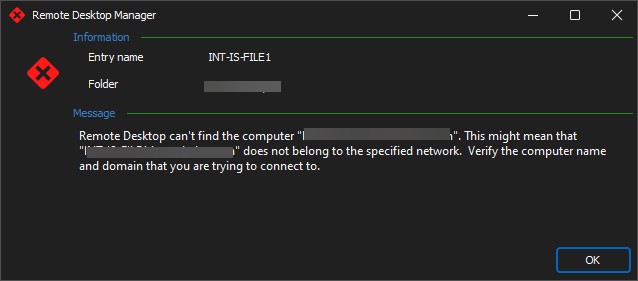
Add retry connect button to cant find computer
Can a retry button be added to the "Can't find the computer" error message?
This is because when our VPN session fails, so does the connection to the RDP session. And when the VPN connection is reestablished, it would be convenient to click on the retry button to reconnect to the lost host session.