
andyperry
Unable to RDP since latest update
Hi, thanks Marc-André for your response.
I have just uninstalled and then re-installed the same version that I downloaded manually and this does now seem to be working.
I can only assume that something got a bit messed up on the update. One thing I did notice that was different on the latest update is that it told me an update was available (.24 I believe) which I upgraded to and then when I did another check, it told me another update was available (.25). I didn't actually test anything with .24 as I upgraded again immediately.
I have seen some posts about .24 being withdrawn now so maybe it was something left behind from that version.
All seems to be good though now.
Thanks
Andrew
Unable to RDP since latest update
Hi,
I have just done an update to 2024.1.25 and I am no longer able to RDP to my servers. I get the following error:
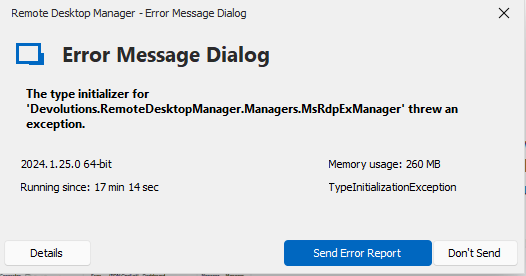
I tried following an article (slightly different) as this mentions MsRdpExManager and changed the default to 8.1 but it is the same error.
I have also submitted the bug using the "Send Error Report" button.
Thanks
Andrew
Copy and/or paste not working
Just wanted to confirm back on this. I have just updated to the latest version and after removing that workaround described above and restarting, my clipboard is now back to normal.
Well, I can at least copy and paste within and between sessions :-)
Thank you for your help
Andrew
Copy and/or paste not working
Just to update further. It does still seem a bit hit and miss. I was just about to say it was still broken, but then I tried again after trying the copy button on the ribbon, which worked (yesterday that was giving me an error about the clipboard), and then it would paste again.
Might be a case of timing of whatever that idle process(es) is/are but I will keep trying in the knowledge that there is an update coming :-)
I am using DVD software, which I have seen posts about as a potential cause (and mentioned above), so it could be that. I did have the problem without having that running though, but not really had time to test it all extensively.....yet.
Thanks
Andrew
Copy and/or paste not working
Stéfane,
Thank you for your replies. Yes that did indeed resolve the issue. I did have to restart RDM though before it took affect, just for clarity, but it is working now.
I had narrowed it down tonight to the copy, as suspected, as I was able to copy from my host PC and paste in to my RDP session.
@Samuel - Just to confirm, the latest version available when I check for updates is 2021.2.28.0 and I am on the 64-BIT version.
Thank you all for your replies and glad I have a workaround.
Thanks
Andrew
Copy and/or paste not working
Hi, I have noticed over the last 2 days that I can no longer paste from the clipboard. I can copy (the Copy option is available) but the Paste Option is not selectable.
I can copy from my local PC but cannot paste in to any RDP session.
I can go to my physical server and copy and paste works fine.
I cannot even copy/paste within the same RDP session, so opening notepad, selecting some text, selecting copy, and still within notepad, the Paste option is there but cannot select (greyed out)
I cannot copy between RDP sessions.
I updated last night to the latest version to see if this would correct the issue but it hasn't. I have checked options, but to be honest I have not changed any options.
It seems to me that it is the COPY that isn't working as I am assuming that since there is no Paste option to select, the copy part has not worked and therefore nothing in the clipboard.
If I use the Copy on the top menu, I get a message box saying "Unable to access the Clipboard, please retry"