
virusbcn
Clipboard nightmare
Hello,
I think your first issue might be related to the clipboard synchronization feature of Teamviewer. I've found what seems to be your issue here and Anydesk might have something similar too.
Regarding your second concern, I managed to replicate it. In my case, I have gnome-tweaks installed on my system, which includes an option that highlights the pointer location when the left ctrl key is pressed. After disabling this feature, I was able to use the left ctrl key on my remote machine. It's possible that something similar is intercepting your left ctrl key. We'll investigate this issue to ensure that the ctrl key functions properly, even if it's being intercepted by another application.
We'll also look for the possibility to support images inside the clipboard.
Best regards,
I am not sure if my problem has been understood...I have 3 remote sessions open on my RDM linux/windows host, in one I am working alone, in another session another person with Teamviewer and in another session another with Anydesk, if the Teamviewer user does ctrl+c in the remote session or in his host and I do ctrl+v in my remote session or in my host, I get the remote user of Teamviewer, and with Anydesk the same, and the other way around too, I do not understand what Teamviewer or Anydesk has to do here.
regarding the left ctrl key, it usually happens only in my remote RDM session, now for example on my left monitor with RDM to a windows I do not get the left ctrl and the right monitor, with Linux Gnome PopOS in firefox, I get the left ctrl, it's a little crazy, I admit, because sometimes it does not go even in the linux with rdm open
Clipboard nightmare
I have a recurring problem with the clipboard and RDM, both on Windows and Linux, the clipboard is shared between different remote sessions, I explain ... I have several sessions open from my host RDM (both Linux and Windows) to several Windows servers, can be 2012 as 2019, etc .... and to these sessions some colleagues connect with teamviewer or anydesk, i launch the connection to them and they connect while i keep the sessions open on my RDM, because what the remote user copies in the RDM2 session appears to him when i paste to the remote user of the RDM3 session or even to me on my host, when I do ctrl+c and then do ctrl+v if I take a little while to do ctrl+v I get what the user 1 or 2 had copied in their session, this is a problem both security and functional, and as I comment happens to me both in Windows and Linux for a long time in successive versions RDM
And another problem that I have only in Linux and that also affects the clipboard, is that for some reason now only works in RDMctrl+c and ctrl+v if I do it with the ctrl located on the right side of the keyboard, if I do it with the left side I only get the c or v, the clipboard does not work, and the clipboard only works with text, with images I have to upload the capture from my host. of course before entering RDM ctrl+c and ctrl+v works perfectly
Display error after upgrade to v2023.3.1.3
Hello virusbcn,
After investigation, this is an issue that will occur when updating to 2023.3.1.3 then to 2023.3.1.4. To fix it, in the 2023.3.1.4 version, right click on the connections tree > Column Chooser > and select "Name". You can disable the new column feature by going to Preferences > User Interface > Tree View > then uncheck "Show tree view header". Please let me know if that helps.
Regards,
Thank you, yes i select Name in Column chooser and now can i view all again :-)
Display error after upgrade to v2023.3.1.3
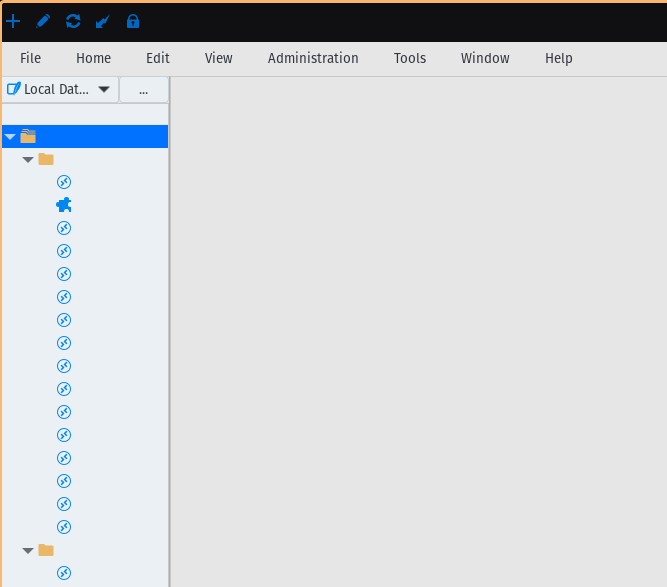
After upgrading to this version this is how all the connections have remained, absolutely nothing is seen, I have tried to change theme, etc ... but nothing remains the same I can not see anything, I have also tried to upgrade to 2023.3.1.4 and still the same. I have PopOS
What can I do?
RDM application is slow
Hello, i am testing in PopOS and love it RDM, but its true that its slow in Linux, when i change between sessions RDS or edit entries, etc... and i have a strange error with the clipboard use, if i copy and paste between windows RDS sessions can i copy/paste, but between Linux host and RDS session not works ¿???
Redraw windows sessions
Thank you Jonathan, i make this changes but the rdp window is still small, i hope you can offer this quickly ;-)
The ribbon bar or the bar where the name of app, padlock, etc.. it is too big, could you make it smaller to give more space to the work window?
I have 2 screens, 23" 1920x1080 I can't fit bigger screens on my desktop. XD
Redraw windows sessions
sorry for my bad drawing, I hope it is now better understood, the navigation bar in Windows I can make it smaller, narrower, as much as I want, and the top bar I can get to leave a few pixels, thus having a very large RDP working window, in Linux the side navigation bar I can not make it smaller has a stop (quite large) and the top bar is also lost a lot.
The picture is from Windows, now I didn't have Linux in front of me, I hope that with the picture you can understand it better.
Redraw windows sessions

Redraw windows sessions
hello, on Windows I have no problem to do it, but on Linux (PopOS) I can't manage to move the session bars, etc.. to make the terminal window as big as possible.
Is it not possible in linux to maximize/move the terminal window?