Display error after upgrade to v2023.3.1.3

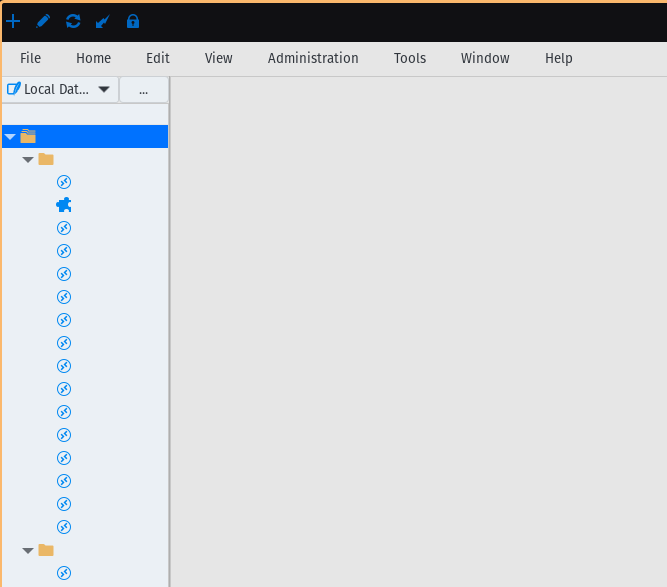
After upgrading to this version this is how all the connections have remained, absolutely nothing is seen, I have tried to change theme, etc ... but nothing remains the same I can not see anything, I have also tried to upgrade to 2023.3.1.4 and still the same. I have PopOS
What can I do?
Captura desde 2023-12-21 10-47-47.png
All Comments (3)
Hello virusbcn,
After investigation, this is an issue that will occur when updating to 2023.3.1.3 then to 2023.3.1.4. To fix it, in the 2023.3.1.4 version, right click on the connections tree > Column Chooser > and select "Name". You can disable the new column feature by going to Preferences > User Interface > Tree View > then uncheck "Show tree view header". Please let me know if that helps.
Regards,
Gabriel Dubois
Hello virusbcn,
After investigation, this is an issue that will occur when updating to 2023.3.1.3 then to 2023.3.1.4. To fix it, in the 2023.3.1.4 version, right click on the connections tree > Column Chooser > and select "Name". You can disable the new column feature by going to Preferences > User Interface > Tree View > then uncheck "Show tree view header". Please let me know if that helps.
Regards,
Thank you, yes i select Name in Column chooser and now can i view all again :-)
I am glad to hear that it is now working. It may be possible that you have to do it again with other type of vault, as for the favorite vault for example.
Happy holidays!
Gabriel Dubois