Clipboard nightmare

I have a recurring problem with the clipboard and RDM, both on Windows and Linux, the clipboard is shared between different remote sessions, I explain ... I have several sessions open from my host RDM (both Linux and Windows) to several Windows servers, can be 2012 as 2019, etc .... and to these sessions some colleagues connect with teamviewer or anydesk, i launch the connection to them and they connect while i keep the sessions open on my RDM, because what the remote user copies in the RDM2 session appears to him when i paste to the remote user of the RDM3 session or even to me on my host, when I do ctrl+c and then do ctrl+v if I take a little while to do ctrl+v I get what the user 1 or 2 had copied in their session, this is a problem both security and functional, and as I comment happens to me both in Windows and Linux for a long time in successive versions RDM
And another problem that I have only in Linux and that also affects the clipboard, is that for some reason now only works in RDMctrl+c and ctrl+v if I do it with the ctrl located on the right side of the keyboard, if I do it with the left side I only get the c or v, the clipboard does not work, and the clipboard only works with text, with images I have to upload the capture from my host. of course before entering RDM ctrl+c and ctrl+v works perfectly
All Comments (6)
Hello,
I think your first issue might be related to the clipboard synchronization feature of Teamviewer. I've found what seems to be your issue here and Anydesk might have something similar too.
Regarding your second concern, I managed to replicate it. In my case, I have gnome-tweaks installed on my system, which includes an option that highlights the pointer location when the left ctrl key is pressed. After disabling this feature, I was able to use the left ctrl key on my remote machine. It's possible that something similar is intercepting your left ctrl key. We'll investigate this issue to ensure that the ctrl key functions properly, even if it's being intercepted by another application.
We'll also look for the possibility to support images inside the clipboard.
Best regards,
Simon Duguay Létourneau
Hello,
I think your first issue might be related to the clipboard synchronization feature of Teamviewer. I've found what seems to be your issue here and Anydesk might have something similar too.
Regarding your second concern, I managed to replicate it. In my case, I have gnome-tweaks installed on my system, which includes an option that highlights the pointer location when the left ctrl key is pressed. After disabling this feature, I was able to use the left ctrl key on my remote machine. It's possible that something similar is intercepting your left ctrl key. We'll investigate this issue to ensure that the ctrl key functions properly, even if it's being intercepted by another application.
We'll also look for the possibility to support images inside the clipboard.
Best regards,
I am not sure if my problem has been understood...I have 3 remote sessions open on my RDM linux/windows host, in one I am working alone, in another session another person with Teamviewer and in another session another with Anydesk, if the Teamviewer user does ctrl+c in the remote session or in his host and I do ctrl+v in my remote session or in my host, I get the remote user of Teamviewer, and with Anydesk the same, and the other way around too, I do not understand what Teamviewer or Anydesk has to do here.
regarding the left ctrl key, it usually happens only in my remote RDM session, now for example on my left monitor with RDM to a windows I do not get the left ctrl and the right monitor, with Linux Gnome PopOS in firefox, I get the left ctrl, it's a little crazy, I admit, because sometimes it does not go even in the linux with rdm open
After looking into it, here's what I think is happening:
We have an option enabled by default called "Clipboard"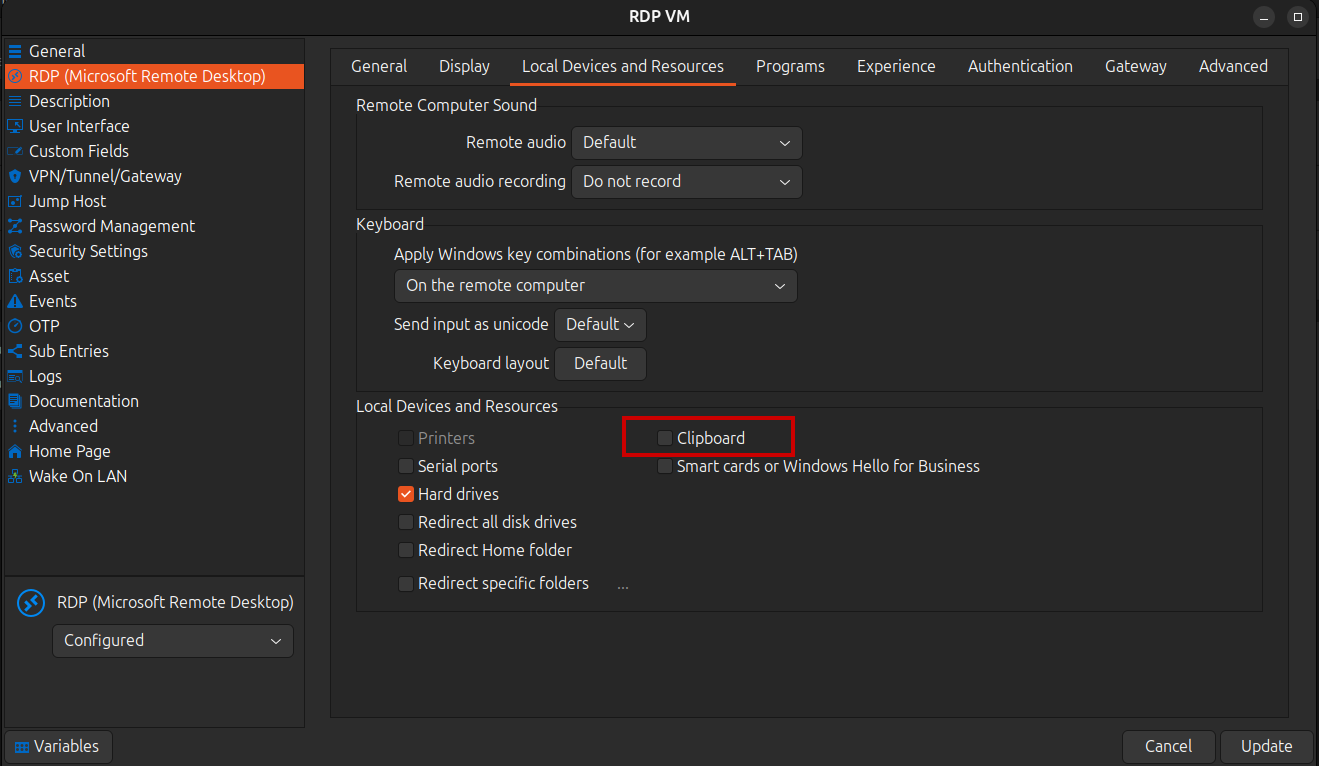
When enabled, your clipboard synchronizes with the remote session's clipboard whenever either one changes. The same functionality is found in TeamViewer and AnyDesk. If a user's clipboard changes, it will sync with the remote session's clipboard. Since your clipboard is shared with the remote session, it will also sync with yours. Consequently, if your clipboard changes, it will sync with the clipboards of all other remote sessions you are connected to, causing all users' clipboards to change as they are synchronized together.
This is the expected behavior and not a bug per se. The only thing I think you can do is to disable the "Clipboard" option in RDM, although this will prevent you from pasting content copied on your local clipboard into your remote sessions but won't affect the clipboard of every one.
Simon Duguay Létourneau
Screenshot from 2024-02-06 12-25-56.png
Hello,
Thank you for being so patient!
I'm pleased to inform you that a new version of RDM Linux (2025.3.2.2) has been released. It now supports image handling through the clipboard. The other ticket regarding the Left CTRL key not working is still in progress.
Latest Version: Download RDM
Please let us know if this works or if you encounter any issues.
Best regards,
Maxim Robert
Hello.
Client: Free 2025.3.2.3 64-bit
Operating System: TUXEDO OS (Ubuntu 24 based)
KDE Plasma Version: 6.5.2
KDE Frameworks Version: 6.19.0
Qt Version: 6.9.2
Kernel Version: 6.14.0-123037-tuxedo (64-bit)
Graphics Platform: Wayland
Remote RDP: Windows 11
When copying text from an RDP session to a local machine, the text in Russian breaks.
Inside the session, I copy the text "Привет" and locally it turns, for example, into "���������!�Q" or in "���������� 1G"
When copying from a local machine to RDP, the text is transferred normally.
How to fix it?
Remmina works fine.
Text encoding issues when copying Cyrillic characters from an RDP session should be resolved in the next version of RDM for Linux (2026.1.0).
Best regards.
Nicolas Parr