
Martin Jensen
Powershell - connecting to the logged on user's vault
It works if I place the username/password entry in the root of my private vault... But that shouldn't be an issue with having it in a folder?!?
Powershell - connecting to the logged on user's vault
I first Get-RDMPrivateSession and do the Set-RDMPrivatePassword on the object before trying to Set-RDMPrivateSession on same Session - so the Group it contains (a Folder in my private vault) is present and have the correct value "Credentials" as seen in my post above. I dont try to create a new session, but to modify an old one.
Kind regards
Martin Jensen
Powershell - connecting to the logged on user's vault
Hi,
Doesn't work as I get an error :
RemoteDesktopManager.PowerShellModule.PSOutputObject.PSConnection
Set-RDMPrivateSession : Connection has invalid group specified.
At C:\Users\ap0martijen\AppData\Local\Temp\RDM\53d9da2a-f111-4fe9-b49b-2d0aa8607417.ps1:63 char:1 + Set-RDMPrivateSession -Session $adminsession -Refresh + ~~~~~~~~~~~~~~~~~~~~~~~~~~~~~~~~~~~~~~~~~~~~~~~~~~~~~ + CategoryInfo : InvalidOperation: (:) [Set-RDMPrivateSession], Exception + FullyQualifiedErrorId : 0,RemoteDesktopManager.PowerShellModule.SetRDMPrivateSessionCommand
PS C:\Program Files (x86)\Devolutions\Remote Desktop Manager> Get-RDMPrivateSession -name "PAM AP0"
DocumentData :
HostResolved :
PsPlaylistLocal :
SubConnections : {}
UserSpecficSettings :
AlwaysAskForResources : False
AutoReconnection : True
CommandLineWaitForApplicationToExit : False
Console : False
DesktopComposition : False
DisableBitmapCache : False
DisableCursorSetting : False
DisableFullWindowDrag : False
DisableMenuAnims : False
DisableThemes : False
DisableWallpaper : False
DisplayConnectionBar : True
FontSmoothing : False
Span : False
UsesClipboard : True
UsesDevices : False
UsesHardDrives : True
UsesPrinters : False
UsesSerialPorts : False
UsesSmartDevices : False
AllowClipboard : False
AllowPasswordVariable : False
AllowViewPasswordAction : False
AlternalteHostVPNBefore : False
AlternateHostAllowCustomHost : False
AutomaticallyClose : False
ConfluenceIgnoreCertificateAuthentication : False
ConfluenceIgnoreCertificateErrors : False
DomainHostOverride : False
Encrypt : True
ExcludeFromNotifications : False
ExludeFromOpenedSession : False
GoOfflineOnConnect : False
IncludeInFavorite : False
OpenEmbedded : False
PromptCredentials : False
SharedTemplate : False
ShowInTrayIcon : True
Undocked : False
UseVPN : False
Image :
TemplateGroupData :
ApplicationIntegrationMode : Default
AuthentificationLevel : Default
ScreenColor : C32Bits
ScreenSize : Default
SoundHook : Default
WebBrowserApplication : Default
AlternateHostMode : Default
ColorMode : Custom
ConnectionStringMode : Default
ConnectionType : Credential
CredentialInheritedMode : Default
DescriptionMode : Text
DisplayMonitor : Default
DisplayVirtualDesktop : Current
DomainOverrideType : Default
ForeColorStyle : Status
HostSourceMode : SessionSpecific
IntelligentCacheAction : AddUpdate
KeyboardHook : Default
PinEmbeddedMode : Default
PingConnectionMethod : Default
PingConnectionMode : Default
ReconnectMode : Default
RiskyEvents : Default
ShowDocumentationTab : Inherited
TabGroupMode : Custom
TemplateSearchPathMode : None
UndockMaximized : Default
UserNameFormat : Default
Visibility : Default
AutomaticallyCloseInterval : 0
HostPort : 0
PingConnectionScanPort : 0
SortPriority : 0
SubMode : 0
WakeOnLANPort : 0
ID : b0671f7c-a148-4c9f-85a0-053438b5d45d
SecurityGroup : 00000000-0000-0000-0000-000000000000
UserVaultMigrationID : 00000000-0000-0000-0000-000000000000
AlternateShell :
CommandLine :
CommandLineWorkingDirectory :
RDPFileName :
ShellWorkingDirectory :
Url :
WebBrowserUrl :
AlternateHosts :
ClearTextPassword :
ClearTextPrivateKeyData :
Color :
ConfluenceDocumentationUrl :
ConnectionStringConnectionID :
ConnectionSubType :
CreatedBy : XXXX\ap0XXXX
CreationSource :
CredentialConnectionGroup :
CredentialConnectionID :
CredentialConnectionSavedPath :
CredentialDynamicDescription :
CredentialDynamicValue :
CredentialPrivateVaultSearchString :
CustomDnsServer :
CustomPort :
CustomStatus :
Data :
DataFileName :
Description :
DescriptionRtf :
DescriptionUrl :
DocumentationTitle :
DocumentLinkConnectionID :
ForeColor :
Group : Credentials
GroupCredentialPrompt :
GroupTab :
Host :
HostConnectionID :
HostConnectionSavedPath :
HostDomain :
HostFull :
HostNetworkInterfaceMac : en0
HostUserName : XXXX.intern\$P0NAME$+XXXX.intern\$AP0NAME$+$NAME$
HostWithPort :
ImageMD5 :
ImageName :
Name : PAM AP0
PamCredentialID :
PamCredentialName :
ParentID :
PersonalConnectionID :
PrivateKeyConnectionID :
PrivateKeySearchString :
RepositoryID : 79fafcf8-b820-4f12-9eef-c8ea6eff8eb3
Stamp : 90e6553f-6868-48a0-9aa3-64b552b29107
Status :
StatusLockedBy :
StatusMessage :
SwitchDataSourceID :
SwitchDataSourceName :
SwitchRepositoryFolder :
SwitchRepositoryID :
SwitchRepositoryName :
TabTitle :
TemplateName :
TemplateSearchPath :
TemplateSecurityGroup :
TemplateSourceID :
UpdatedBy : XXXX\ap0XXXX
WakeOnLANBroadcastIPAddress :
VNCOptions :
VNCUrl :
VPNDomain :
VPNName :
VPNSafePassword :
VPNUserName :
CreationDateTime : 20-09-2022 12:47:01
UpdateDateTime : 26-10-2022 12:41:37
ActiveDirectoryConsole : RemoteDesktopManager.PowerShellModule.PSOutputObject.PSActiveDirectoryConsoleConnection
AddOn : RemoteDesktopManager.PowerShellModule.PSOutputObject.PSAddOnConnection
Agent : RemoteDesktopManager.PowerShellModule.PSOutputObject.PSAgentConnection
AppleRemoteManagement : RemoteDesktopManager.PowerShellModule.PSOutputObject.PSAppleRemoteManagementConnection
Autofill : RemoteDesktopManager.PowerShellModule.PSOutputObject.PSAutofillConnection
Aws : RemoteDesktopManager.PowerShellModule.PSOutputObject.PSAwsConnection
Azure : RemoteDesktopManager.PowerShellModule.PSOutputObject.PSAzureConsoleConnection
AzureStorage : RemoteDesktopManager.PowerShellModule.PSOutputObject.PSAzureStorageConnection
BeyondTrustPasswordSafeConsole : RemoteDesktopManager.PowerShellModule.PSOutputObject.PSBeyondTrustPasswordSafeConsoleConnection
BoxNet : RemoteDesktopManager.PowerShellModule.PSOutputObject.PSBoxNetConnection
ChromeRemoteDesktop : RemoteDesktopManager.PowerShellModule.PSOutputObject.PSChromeRemoteDesktopConnection
Citrix : RemoteDesktopManager.PowerShellModule.PSOutputObject.PSCitrixConnection
CloudBerryRemoteAssistant : RemoteDesktopManager.PowerShellModule.PSOutputObject.PSCloudBerryRemoteAssistantConnection
Cmd : RemoteDesktopManager.PowerShellModule.PSOutputObject.PSCmdConnection
ControlUp : RemoteDesktopManager.PowerShellModule.PSOutputObject.PSControlUpConnection
Credentials : RemoteDesktopManager.PowerShellModule.PSOutputObject.PSCredentialsConnection
Customer : RemoteDesktopManager.PowerShellModule.PSOutputObject.PSCustomerConnection
CyberArkDashboard : RemoteDesktopManager.PowerShellModule.PSOutputObject.PSCyberArkDashboardConnection
CyberArkPSM : RemoteDesktopManager.PowerShellModule.PSOutputObject.PSCyberArkPSMConnection
Dameware : RemoteDesktopManager.PowerShellModule.PSOutputObject.PSDamewareConnection
DataEntry : RemoteDesktopManager.PowerShellModule.PSOutputObject.PSDataEntryConnection
DataReport : RemoteDesktopManager.PowerShellModule.PSOutputObject.PSDataReportConnection
DeskRoll : RemoteDesktopManager.PowerShellModule.PSOutputObject.PSDeskRollConnection
DevolutionsGateway : RemoteDesktopManager.PowerShellModule.PSOutputObject.PSDevolutionsGatewayConnection
Document : RemoteDesktopManager.PowerShellModule.PSOutputObject.PSDocumentConnection
DropBox : RemoteDesktopManager.PowerShellModule.PSOutputObject.PSDropBoxConnection
DvlsPamDashboard : RemoteDesktopManager.PowerShellModule.PSOutputObject.PSDVLSPamDashboardConnection
Events : RemoteDesktopManager.PowerShellModule.PSOutputObject.PSConnectionEvents
FileExplorer : RemoteDesktopManager.PowerShellModule.PSOutputObject.PSFileExplorerConnection
Ftp : RemoteDesktopManager.PowerShellModule.PSOutputObject.PSFtpConnection
GoogleCloud : RemoteDesktopManager.PowerShellModule.PSOutputObject.PSGoogleCloudConnection
GoogleDrive : RemoteDesktopManager.PowerShellModule.PSOutputObject.PSGoogleDriveConnection
GotoAssist : RemoteDesktopManager.PowerShellModule.PSOutputObject.PSGoToAssistConnection
GroupDetails : RemoteDesktopManager.PowerShellModule.PSOutputObject.PSGroupConnection
HostDetails : RemoteDesktopManager.PowerShellModule.PSOutputObject.PSHostConnection
Hub : RemoteDesktopManager.PowerShellModule.PSOutputObject.PSHubConnection
HyperV : RemoteDesktopManager.PowerShellModule.PSOutputObject.PSHyperVConnection
IDrac : RemoteDesktopManager.PowerShellModule.PSOutputObject.PSIDracConnection
ILO : RemoteDesktopManager.PowerShellModule.PSOutputObject.PSILOConnection
Intel : RemoteDesktopManager.PowerShellModule.PSOutputObject.PSIntelConnection
InventoryReport : RemoteDesktopManager.PowerShellModule.PSOutputObject.PSInventoryReportConnection
ITerm : RemoteDesktopManager.PowerShellModule.PSOutputObject.PSITermConnection
Jump : RemoteDesktopManager.PowerShellModule.PSOutputObject.PSJumpConnection
JumpCommand : RemoteDesktopManager.PowerShellModule.PSOutputObject.PSJumpCommand
JumpDesktop : RemoteDesktopManager.PowerShellModule.PSOutputObject.PSJumpDesktopConnection
LogMeIn : RemoteDesktopManager.PowerShellModule.PSOutputObject.PSLogMeInConnection
MetaInformation : RemoteDesktopManager.PowerShellModule.PSOutputObject.PSConnectionMetaInformation
OTP : RemoteDesktopManager.PowerShellModule.PSOutputObject.PSConnectionOTP
PlayList : RemoteDesktopManager.PowerShellModule.PSOutputObject.PSPlayListConnection
PowerShell : RemoteDesktopManager.PowerShellModule.PSOutputObject.PSPowerShellConnection
ProxyTunnel : RemoteDesktopManager.PowerShellModule.PSOutputObject.PSProxyTunnelConnection
ProxyTunnelMac : RemoteDesktopManager.PowerShellModule.PSOutputObject.PSProxyTunnelConnectionMac
Putty : RemoteDesktopManager.PowerShellModule.PSOutputObject.PSPuttyConnection
Radmin : RemoteDesktopManager.PowerShellModule.PSOutputObject.PSRadminConnection
RDCommander : RemoteDesktopManager.PowerShellModule.PSOutputObject.PSRDCommanderConnection
RDGateway : RemoteDesktopManager.PowerShellModule.PSOutputObject.PSRDGatewayConnection
RDP : RemoteDesktopManager.PowerShellModule.PSOutputObject.PSRDPConnection
Recording : RemoteDesktopManager.PowerShellModule.PSOutputObject.PSRecordingConnection
RemoteAssistance : RemoteDesktopManager.PowerShellModule.PSOutputObject.PSRemoteAssistanceConnection
ReportTool : RemoteDesktopManager.PowerShellModule.PSOutputObject.PSReportToolConnection
Root : RemoteDesktopManager.PowerShellModule.PSOutputObject.PSRootConnection
RunAsConnection : RemoteDesktopManager.PowerShellModule.PSOutputObject.PSRunAsConnection
S3 : RemoteDesktopManager.PowerShellModule.PSOutputObject.PSS3Connection
Scp : RemoteDesktopManager.PowerShellModule.PSOutputObject.PSScpConnection
Script : RemoteDesktopManager.PowerShellModule.PSOutputObject.PSScriptConnection
Security : RemoteDesktopManager.PowerShellModule.PSOutputObject.PSSecurityConnection
Shortcut : RemoteDesktopManager.PowerShellModule.PSOutputObject.PSShortcutConnection
SkyDrive : RemoteDesktopManager.PowerShellModule.PSOutputObject.PSSkyDriveConnection
SmartFolder : RemoteDesktopManager.PowerShellModule.PSOutputObject.PSSmartFolderConnection
SNMPReport : RemoteDesktopManager.PowerShellModule.PSOutputObject.PSSNMPReportConnection
Spiceworks : RemoteDesktopManager.PowerShellModule.PSOutputObject.PSSpiceworksConnection
Splunk : RemoteDesktopManager.PowerShellModule.PSOutputObject.PSSplunkConnection
Stats : RemoteDesktopManager.PowerShellModule.PSOutputObject.PSStatsConnection
Sync : RemoteDesktopManager.PowerShellModule.PSOutputObject.PSSyncConnection
TeamViewer : RemoteDesktopManager.PowerShellModule.PSOutputObject.PSTeamViewerConnection
TeamViewerConsole : RemoteDesktopManager.PowerShellModule.PSOutputObject.PSTeamViewerConsoleConnection
Template : RemoteDesktopManager.PowerShellModule.PSOutputObject.PSTemplateConnection
Terminal : RemoteDesktopManager.PowerShellModule.PSOutputObject.PSTerminalConnection
TerminalConsole : RemoteDesktopManager.PowerShellModule.PSOutputObject.PSTerminalServerConnection
TerminalMac : RemoteDesktopManager.PowerShellModule.PSOutputObject.PSTerminalConnectionMac
Tools : RemoteDesktopManager.PowerShellModule.PSOutputObject.PSToolConnection
VirtualBox : RemoteDesktopManager.PowerShellModule.PSOutputObject.PSVirtualBoxConnection
VMRC : RemoteDesktopManager.PowerShellModule.PSOutputObject.PSVMRCConnection
VMWare : RemoteDesktopManager.PowerShellModule.PSOutputObject.PSVMWareConnection
VNC : RemoteDesktopManager.PowerShellModule.PSOutputObject.PSVNCConnection
VPN : RemoteDesktopManager.PowerShellModule.PSOutputObject.PSVPNConnection
VPNMac : RemoteDesktopManager.PowerShellModule.PSOutputObject.PSVPNConnectionMac
Web : RemoteDesktopManager.PowerShellModule.PSOutputObject.PSWebConnection
WebDav : RemoteDesktopManager.PowerShellModule.PSOutputObject.PSWebDavConnection
WindowsAdminCenter : RemoteDesktopManager.PowerShellModule.PSOutputObject.PSWindowsAdminCenterConnection
XenServer : RemoteDesktopManager.PowerShellModule.PSOutputObject.PSXenServerConnection
XWindow : RemoteDesktopManager.PowerShellModule.PSOutputObject.PSXWindowConnectionPowershell - connecting to the logged on user's vault
Works all they way down, untill I try to write a password back to another credential entry:
$spw = ConvertTo-SecureString "$pw" -AsPlainText -Force
$session = Get-RDMPrivateSession -Name "AdminUser"
Set-RDMPrivateSessionPassword -Session $session -Password $spw
No error, but nothing gets updated... ?!?
Powershell - connecting to the logged on user's vault
Hi,
Works a lot better as I were using Get-RDMPrivateCredentials on the entry, which returned only a secure string.
Best regards
Martin Jensen
Powershell - connecting to the logged on user's vault
Got a lot futher, but have a new question - Can I get a password (as plain text) from an username/password credential entry in my own uservault?
This is what I am trying to do (this script will each user be using for their own vault):
Piggyback on the logged on user's windows authentication to open a DVLS Data Source
Access that user's own private vault
Read the username and password in a credential entry
Use those credentials to access the API of a PAM system (need the password in plain text for the auth header)
From the API get the password of an admin account
Write the password back to another username/password entry in the private vault
Kind regards
Martin Jensen
Powershell - connecting to the logged on user's vault
HI,
I might have found the issue - I had a OptionFilePath in PowerShell Override - replaced it with $null and now does it look correct....
I will test futher and see if that fixes it for me :)
Kind regards
Martin Jensen
Powershell - connecting to the logged on user's vault
HI,
Been away, so sorry for the late reply.
Found out it isn't PowerShell (local), but just a PowerShell entry with embedded script.
Just to make it simple have I created a DVLS Data Source named DPS in RDM.
Created a PowerShell Entry in my User Vault with the code:
$ds = Get-RDMDataSource -Name "DPS"
Set-RDMCurrentDataSource $ds
Get-RDMCurrentDataSource
It starts and loads the RDM module, but then does it pop up the webpage for the DVLS and ask me to log on..
The PowerShell console says "Waiting for Devolution Server autehntication..."
As the idea is to retrieve the password for the user logged on (manged by a PAM sysatem), then doesn't the user known what it is and can't logged in - want to use Windows Authentication as in the Data Source.
Custom Installer and updates
Sorry for the late reply, but have been away.
Not quite sure if you answer is the same way or the other way around as I believe PatchMyPC uses the default installer. It is our first installation with a custom installer that generates the .cfg-file.
But if the default installer also always delete the cfg-file, then is it the same thing for us - Just to be 100% sure :)
Custom Installer and updates
Hi,
We uses SCCM to deploy RDM and use a custom installer on an older version. It works fine and I can see the cfg-file in the folder, but as it is an older version, then do our PatchMyPC updates RDM.
This does sadly remove the cfg-file and it takes to much time to created a new custom installer and package in SCCM very time RDM gets updated. We deploy workstations before users are going to use RDM, so that is why we are sad the configuration is gone when they a starting RDM for the first time.
So my questions - is there a way to prevent the CFG-file (default.cfg?) from being deleted when installing an update on a custom made installed RDM? Of cause might it be a PatchMyPC issue
Kind regards
Martin Jensen
Powershell - connecting to the logged on user's vault
I am currently tying to make a Powershell(local) entry which needs to get and write to credential entries in the logged on user's private vault.
But I am not able to connect to the datasource as the user (Should be able to give to another user and they can run it as them without editing the script itself).
The entry will run in RDM in an already open DVLS vault as the user - can I piggyback on the connection and datasource from RDM somehow?
I have also tried to connect with a normal powershell script, but cant get it to work:
$license = Get-RDMRegistrationInfo
$license.Name = 'Remote Desktop Manager'
$license.Email = ''
$license.Serial = '3EP33-BN66P-DU3E8-YYYYY-XXXXX'
Set-RDMRegistrationInfo $license

$dsname = "ScriptDPS"
$dsurl = "https://secret.url.internal"

$ds = New-RDMDataSource -DVLS -Name $dsname -Server $dsurl -SetDatasource
Set-RDMDatasourceProperty $ds -Property "UseWindowsAuthentication" -Value "True"

Set-RDMDataSource $ds
Set-RDMCurrentDataSource $ds
Get-RDMCurrentDataSource

Registration successful


ID          : 4ad09ad6-f532-4409-abdc-e2576aa156fc
IsConnected : False
IsOffline   : False
Name        : ScriptDPS
Type        : RDMS
Always end with an "IsConnected: False".
If I add appkey/secret with the UseWindowsAuthentication, then do I get "InvalidUserNameOrPasswordPleaseVerifyYourCredentials". Can connect with Appkey/secret, but dont know if I can acces a private uservault from there - so not sure where to look for a solution.
RDM: 2022.2.21.0
DVLS: 2022.2.10.0
PS Module: 2022.2.3.0
PS Version: 5.1.19041.1682
Kind regards
Martin Jensen
Blackslash in Website entry
Hi,
Only one little issue - the computer where we run RDM from have no internet access, so not able to install extensions from the internet. Is there an offline installer for the browser extensions?
Kind regards
Martin Jensen
Blackslash in Website entry
Hi,
We are currently running RDM Enterprise Edition 2022.2.21.0 64-bit and are using Devolution Server (Version:2022.2.8.0) as Data Source. I have found a fix/workaround for the \ issue while testing some more,
There is a GPO which blocks me from installing the Egde Web View 2 runtime, so I were using Google Chrome as "Web browser" in the entry. Lucky is my middel name "Bypass Security" so I found a workaround to install Web View 2. With Microsoft Egde as Webbrowser doesn't is make extra \ when inputting em.
I am tying to get it to log into BeyondTrust Password Safe website and it works if I manually enter domain\username and password, but not when RDM does it. I can see it inputs in the form, but it cant login without I first alter something in the fields - like adding a space and then delete it again. It doens't accept that there is a domain in the username Domain\Username if it comes from RDM, but if i manually alter it, then is it okay. Same goes from Password - RDM input the correct one, but isn't vallid when submitting without some human changing. Feels like there is some onChange event in the background .
The Username and password input field uses a new random ID as ID every time, but has a static name;
<input _nofocus="" type="text" id="a6528703-5679-47c0-89ef-aed1d1e38965" name="username" value="" tabindex="0" autocomplete="off" aria-describedby="a6528703-5679-47c0-89ef-aed1d1e38965-describer" aria-errormessage="a6528703-5679-47c0-89ef-aed1d1e38965-error'" aria-invalid="true" aria-required="true"> Can I send keypresses or something else with RDM which might makes this work? I will try to dig further in the code of the page next week, to see if I can figure any behind the scene code out :)
Kind regards
Martin Jensen
Blackslash in Website entry
Hi,
We are currently getting a lot of users to use RDM Enterprise and now we see a lot of strange behaviors, so sorry in advance for a lot of posts :)
When trying to use the Website entry and have a username in the format domain\username, then does the website entry strange input 2 "\" for each \ in the username, so dom\dummy gives dom\\dummy (and dom\\\dummy gives dom\\\\\\dummy - just to test). Works fine with websites that don't uses \ in the username or support @ format.
I have seen en old post https://forum.devolutions.net/topics/32191/backslash-in-username , but another type entry is suggested (Web Browser, but cant find it) and not sure about the Custom Controls ?
The Website uses random ID for the fields, so not sure if I can use any of the other options as they all says X ID...
Kind regards
Martin Jensen
Prevent Users from getting the Default Vault
Hi,
That is 100% what I were looking for. I read about some Template on your site, but had no idea where or what template it was referring to.
I have remote all Vaults under User default vault and use only User groups to give access.
Thanks a lot for the help.
Kind regards
Martin Jensen
Rights to copy an entry
Rights to copy an entry
Hi,
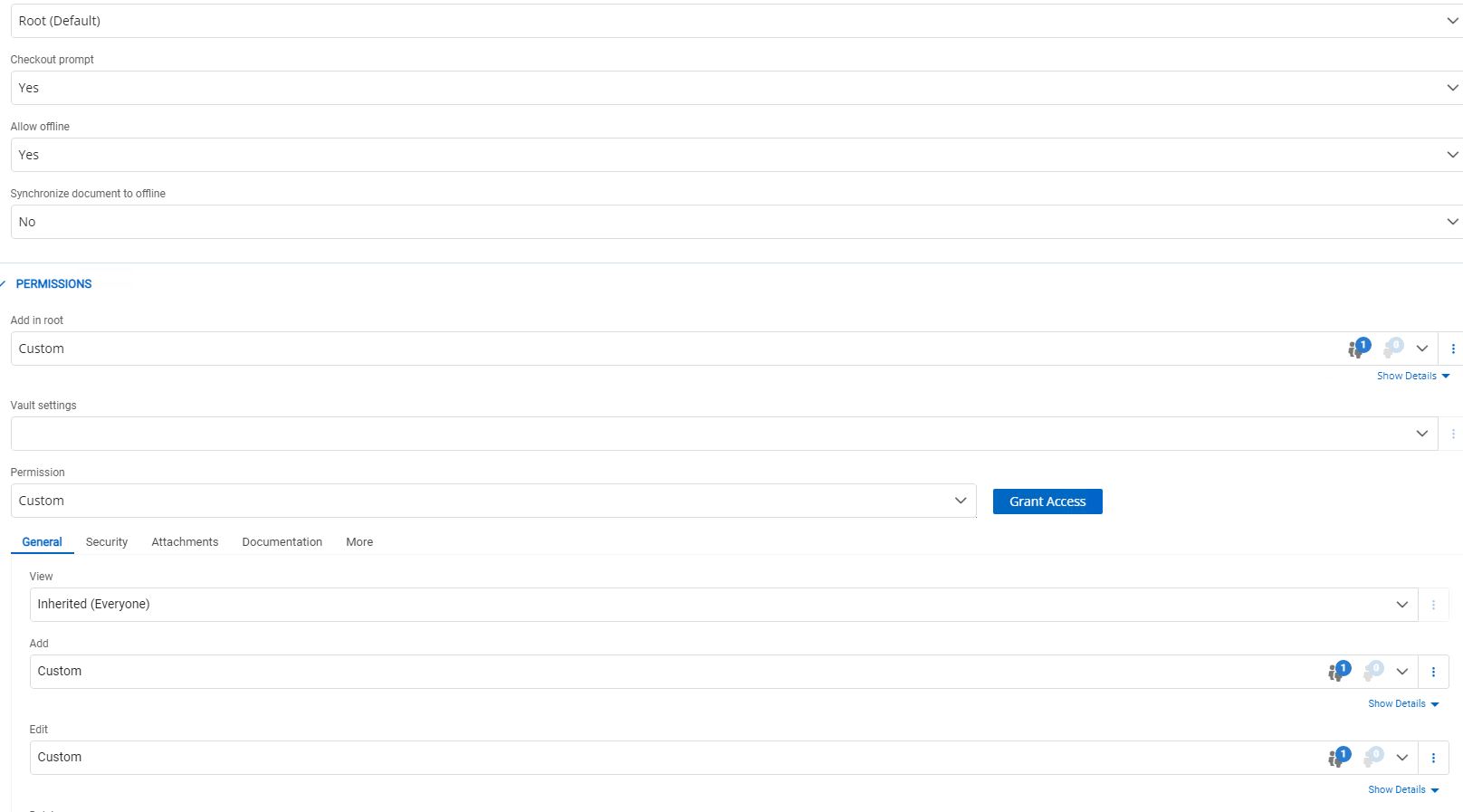
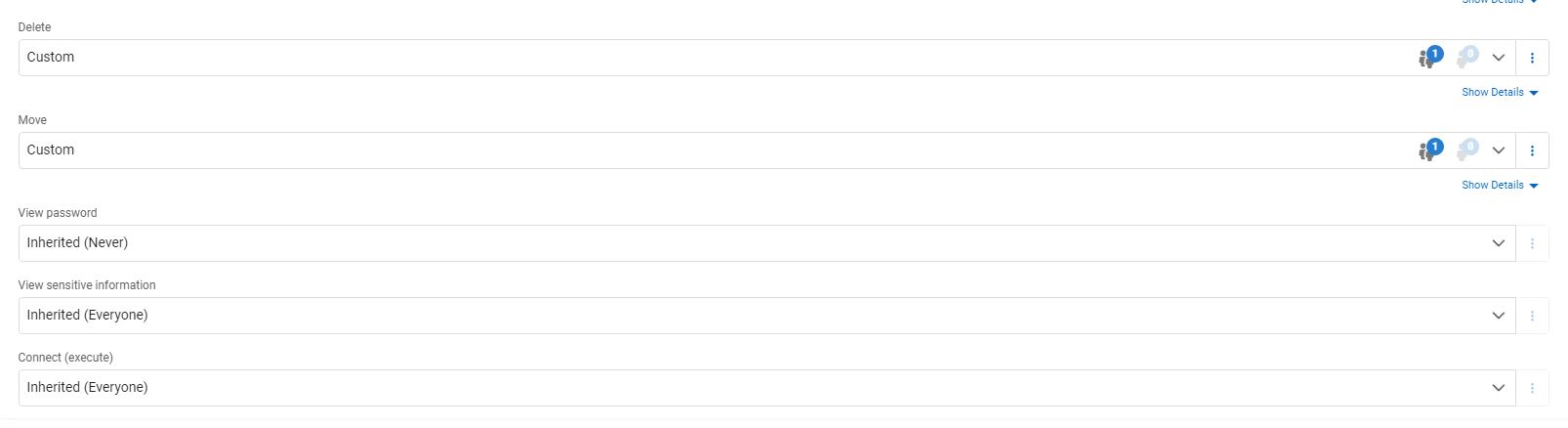
We have a some vaults and one of them is meant to be a "Master Vault" with all server entries in it. We dont what users to be able to edit anything, but should be able to copy entries and paste them to their own personal or another Vault.
Current does the first part of non-edit work, but when selecting Copy do they get an error that the clipboard is empty.
It is possible to copy without edit ? We might need to give some more rights...
Kind regards
Martin Jensen
Prevent Users from getting the Default Vault
Hi,
We have Domain Authentication and "Automatic User Creation" enabled, which works fine except all get the Default Vault as an option when they log on, but dont have a ground associated with it,..
How to prevent users from getting the Default Vault when they are Automatic created?
Kind regards
Martin Jensen
Keyboard issues with FreeDRP
Hi,
I have tested and seen MSRDC works with external - can always hope M$ makes an API for it.
Regarding FreeRDP and "Apply Windows Key combination", then does it makes ALT GR+4 and CTRL+ALT+4 work to get a $ on the remote computer (Danish layout on both). Diont know if it gives any issues in day to day use - but time will tell when I test over a longer time.
Will send a PM about the PAM issue.
Kind regards
Martin Jensen
Keyboard issues with FreeDRP
Hi again,
New strange behavior with 2022.2.20.0, but to the questions:
Alt Gr: Still does a "CTRL Lock" for some time after the press of Alt Gr. So and A is a select all and V is paste.
Ctrl+Atl: Does nothing alt all - no $, no CTRL Lock,...
And now for something new I haven't seen before:
We use another brand PAM system where the username is [domain]\[username]+[domain]\[managedAccount]+[system] and the PAM-server as Host and with a blank domain and we have "Always ask for password" option enabled.
When using non-FreeRDP does it work fine, but with the two FreeRDP options does it reprompt for password and move the first [domain] to the domain field - you can add the [domain] back to the username and get past, but sadly doesn't the PAM system accept this :/
Lucky is the workaround easy - dont use the FreeRDP option and dont get the Dynamic Resolution option
Kind regards
Martin Jensen
Keyboard issues with FreeDRP
Hi,
Well, it doesn't crash now, but instead do a [CTRL] lock . No special charater, but everything after I try to use the [ALT GR]-key is [CTRL]+the key pressed for some time - Select all, Find, Cut, Paste and so on.
Have tried RDP (FreeRDP 7.0) and RDP (FreeRDP Latest) - but same result.
Kind regards
Martin Jensen
Keyboard issues with FreeDRP
Hi,
To be able to use "Dynamic resolution" in "Screen sizing mode" do I need to use FreeDRP under RDP mode.
But I have fund a lot of issues with input when running in FreeRDP mode.
First I just random had no input to my remote server from my keybord, but mouse worked fine. Needed to restart RDM to get it to work again
Now I have a totally new issue - all ALT GR+another key makes RDM crash. Kinda hard to write Powershell as my danish keyboard uses ALT GR+4 to get $
Error (Google translated from danish to english):
Name of program with error: RemoteDesktopManager64.exe, version: 2022.2.14.0, timestamp: 0xf9c131ad
Name of module with error: DevolutionsRdp.dll, version: 1.0.0.0, timestamp: 0x6282889c
Exception code: 0xc0000409
Offset with error 0x00000000002d6b39
Process ID 0x4edc
Program start time 0x01d88d222d7fdfcd
Program path: C: \ Program Files (x86) \ Devolutions \ Remote Desktop Manager \ RemoteDesktopManager64.exe
Module path: C: \ Program Files (x86) \ Devolutions \ Remote Desktop Manager \ runtimes \ win-x64 \ native \ DevolutionsRdp.dll
Report ID: 47debebd-8410-49cc-8994-0e095660b3ed
Full name of program with error:
Relative program ID for program with error:
User Vault - Fast online after disconnect
Hi,
CTRL+F5 does show the Authentication in progress while in the user vault, but the Navigation bar still says Not connected.
After the CTRL+F5 doesn't the Authentication in progress show when changing to a DVLS vault. It does lag/freeze the RDM in a couple of seconds before I can change back to my, now online, user vault. All in all does it takes same or more time this way.
It isn't the biggest issue, but just if there where a sertting or something i had overlooked. And it might be that I launch my
Not sure if there is a security issue, but have removed the "disconnect data source On Windows lock" and this "fix" this issue.
User Vault - Fast online after disconnect
Hi,
I dont know if it is by design, bug or I am doing something wrong.
My User Valut goes in "Not Connected" when Remote Desktop Manager disconnect from the DVLS datasource, which make sense. But I need to click to a DVLS shared Vault to go online. Refresh (button or F5) while still on my User Valut doesn't do anything.
Offline mode works fine.
RDM: 2021.2.15
DVLS: 2021.2.8.0
Kind regards
Martin Jensen
Automatic update Vault
Hi,
It looks like the feature I am looking for as I have a script which generate the RDM file in my first "master" import - so I will play around with that feature and see if it does the trick :)
Thanks for the help.
Kind regards
Martin Jensen