
withinrafael
Add option to snap to remote display dimensions
Hey Richard,
I also found myself wondering about the UX for the host if the docked window started snapping to the target resolution. I agree that scoping this to the undocked window makes more sense. No rush, and thank you for the quick triage!
Add option to snap to remote display dimensions
Hey Richard, thanks for the response. It's not clear we're talking about the same thing. It's my understanding dynamic resolution relates to resizing the remote based on the client dimensions. But I'm simply asking here for the reverse--that the RDM view window snap to the known size of the remote target.
EDIT: You beat me to it. You got it now. Thanks!
Add option to snap to remote display dimensions
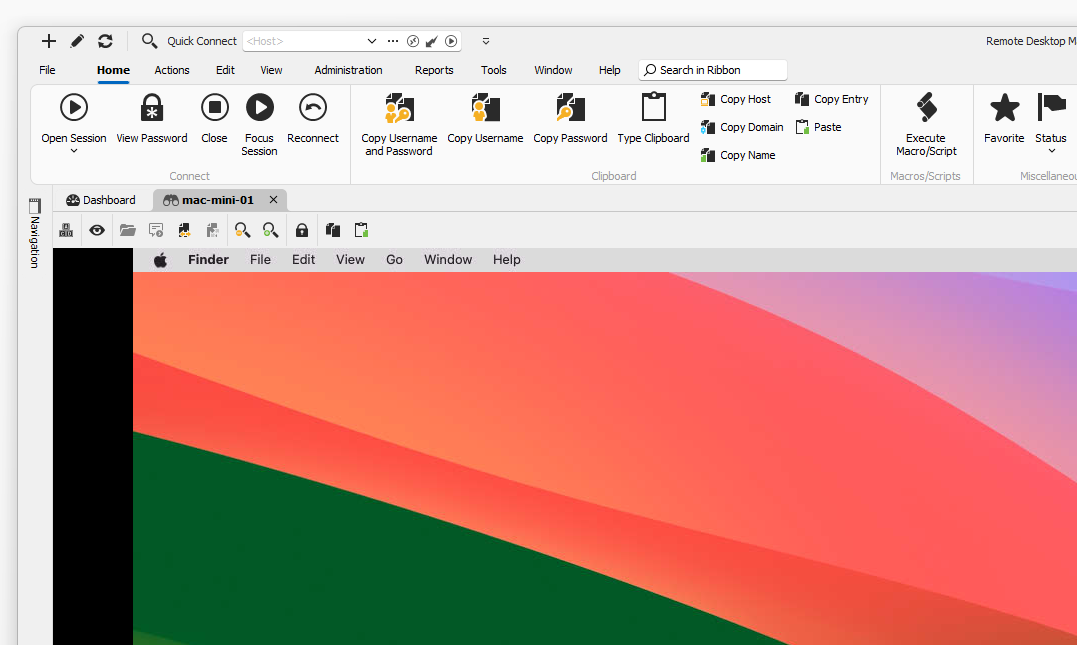
After remoting into a target, it's not possible to fit RDM to the remote display, creating either black bars (smart sizing off) or a distorted appearance (smart sizing on). It would be great if RDM could fit/snap to the remote display's dimensions, leaving no black borders, in both undocked and docked window scenarios.
Thanks!
RDM 2024.1.25.0 64-bit
Windows 11 26100.1
macOS 14 target
ARD: Connection lost, attempting to re-establish the connection
macOS 11.4 (20F71) on a M1 Mini.
Interestingly, I lost power today so the Mini shut off completely. Things seem to be better so far. I'll keep an eye on it (and keep logging enabled). Sorry this is so elusive.
ARD: Connection lost, attempting to re-establish the connection
Hey Philippe, just saw your question. There is no "preferred encoding" that I could find, but I have Performance set to "Full quality (zlib full colors)", compression set to "1", clipboard transfer enabled.
In the latest RDM 2021.1.40.0, ARD is almost non-functional now. I get a few minutes of usage and it generally just hangs. Latest logs
ARD: Connection lost, attempting to re-establish the connection
Hi Philippe,
Here's the log per request, from 2021.1.26.0.
I'm not familiar with the terminology yet but if by "external mode" you mean my session is hosted in an external window then yep. That's correct.
Thanks!
ARD: Connection lost, attempting to re-establish the connection
RDM 2021.1.22.0 64-bit
Windows 10 19043.964
macOS 11.3 target
After a period of inactivity on my Mac Mini M1 2020 (macOS 11.3), I fire up RDM on Windows 10 and start an ARD session with the Mac machine. I then login and start tinkering with Parallels and RDM immediately throws me out to a black client window with error:
Connection lost, attempting to re-establish the connection
At no time does the session return. I close the window and return to RDM to restart the session and RDM hangs completely, requiring Task Manager intervention.
Q: Are there any logs or diagnostics I can collect for the team here? Debug mode I can flip on?