
xnnxzxaz
Duo 2FA. Actions needed from Devolutions?
Hello,
Thank you for your feedback.
We have already pushed a fix for this Duo update. Please see the following article for more information.
What data source type are you using with your RDM? If you use DVLS, then you also need to update DVLS to version 2025.3.14.
Best regards,
@Erica Poirier
Hi Erica,
Thanks for your response. I did update this morning after logging in so my mentioned logs/warnings might be from before i updated. My data source is an Azure DB so all should be good. Sorry for the confusion and unnecessary thread.
Kind regards
Duo 2FA. Actions needed from Devolutions?
Remote Desktop Manager version: 2025.3.30.0 64-bit (JIT)
Hi,
Remote Desktop Manager has Duo security 2FA integration. We use Duo to protect the Remote Desktop Manager application, so when i start up RDM, a Duo 2FA request is being made and sent to my phone where i have the Duo app installed. Some Duo applications and components will stop working at 2 Feb 2026 due to certificates expiring, see: https://help.duo.com/s/article/9451?language=en_US#required-versions , unless updated.
I'm looking at my Unsupported Client Log in the Duo Admin console which logs Duo clients that stop working after 2 februari and it seems that Remote Desktop Manager is using a client or component that stops working after 2 februari. For example, this is a an entry of this morning:
Jan 28, 2026 8:39 AM Web SDK websdk <KEY CENSORED> <COMPANY NAME CENSORED> <API HOSTNAME CENSORED> <IP ADDRESS CENSORED> DuoAPICSharp 1.0Can you confirm that Remote Desktop Manager uses a Duo client/component that stops working after 2 februari? If yes, will you push out an (emergency) update with updated Duo client/component before 2 februari? Or am I wrong in my assumption that this log entry is from RDM?
Retract and assign license?
Thanks, this worked :)
Retract and assign license?
Hi,
We have a paid 2-license plan. One of our admins is on a sick leave and his replacement needs to use one of the two licenses whilst the license of the co-worker on sick leave needs to be retracted. My license usage will stay the same, that is: I'm using one of the two licences too which makes a total license use of 2/2.
How do we go about in assigning a license for the replacement or have it setup in a way so that we comply to the license count / terms? I've looked around in the portal but I can't seem to assign or retract licenses to indivual users? (Unless I'm overlooking something). Please advice. Note: we don't have access to the laptop of the co-worker that is on sick leave.
Thanks in advance
Backup datasource entries
Okidokie np. Thanks for the info.
Backup datasource entries
Hi Erica Poirier,
Thanks for your extensive reply. That's all the info I needed. I will also consider external storage for the docs.
Kind regards
edit: quick question, I probably wasn't too clear on that but my earlier mentioned 'Documents' are just Pages in the Documentation section of an entry so no real documents as in terms of attachments or anything. Should these be on external storage too preferably?
Backup datasource entries
Hi,
I wish to backup entries I made in my datasource. These entries in the datasource are servers (RDP and SSH), websites, devices etc. and their names, IP addresses etc. My datasource is a SQL server and naturally I could backup the whole SQL database but I'm looking at other methods too.
What I want to accomplish with this backup is that anytime my DB gets corrupted, deleted or whatever, I wish to instantly re-import all my datasource entries to a new DB (naturally whilst defining a new datasource in RDM).
I have found that in RDM > Main view > right click on DB/datasource > Export Selection (.rdm) (xx entries) I seemingly am able to create a .rdm file with an export of all my entries and I have some questions about this: can this file be used to import all my entries on a new DB in case my current DB gets corrupted? Does it also contain the IP adresses, linked credentials and names of the entries? Does it also contain documents of the entries?
Thanks in advance.
Datestamp entry in RDM > documentation entry
Hello,
This is not possible for now but I see what you want. We could add the possibility to use the variable (we have variable) for the date and this could be in your default documentation template. Do you think it could work?
Regards
Thank you for your reply. This would very much work and I would be very pleased if this would be added. Keep up the good work.
Datestamp entry in RDM > documentation entry
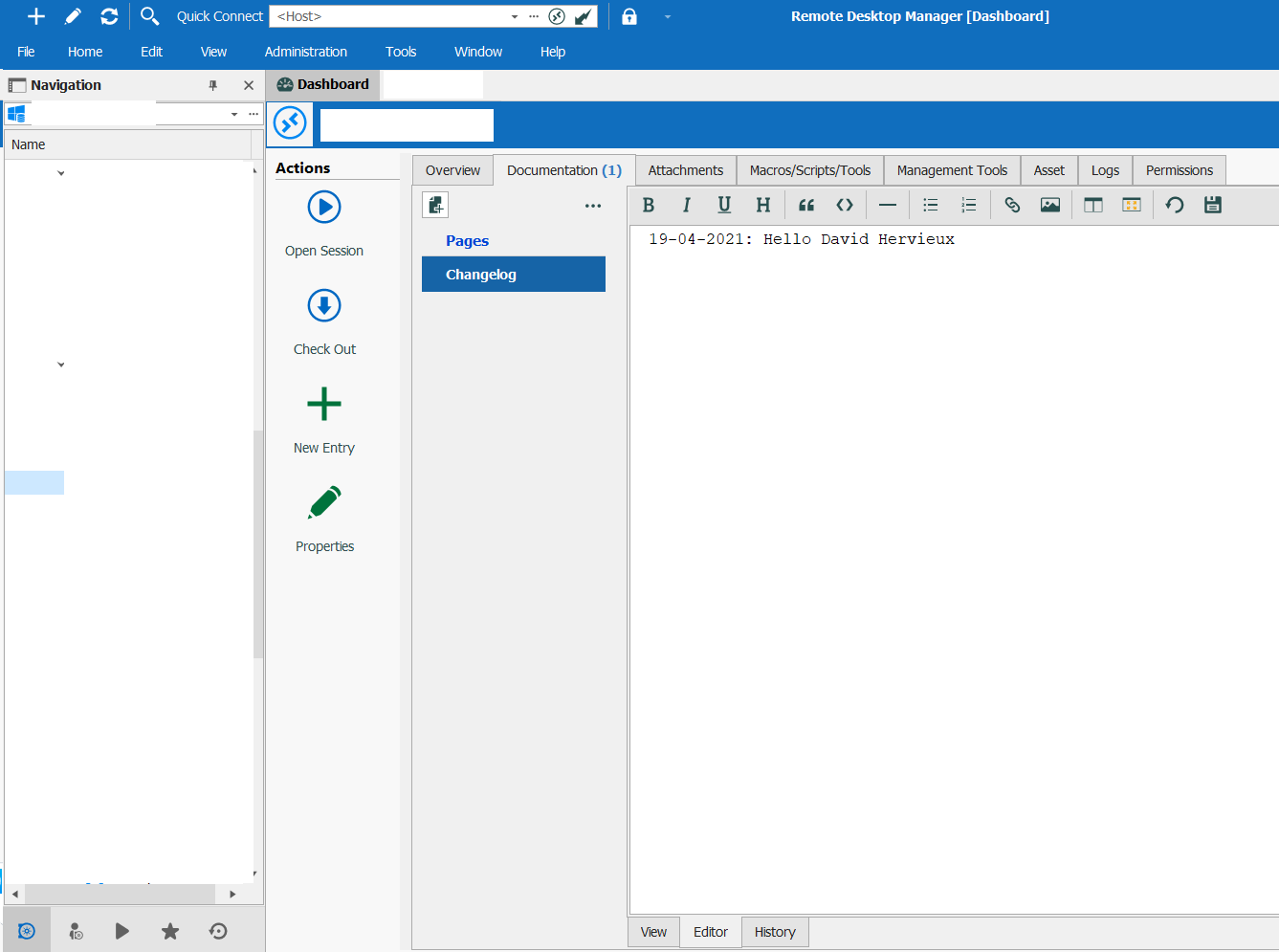
Hi, I made the screenshot. In the screenshot you'll see an entry in the documentation editor: "19-04-2021: Hello David Hervieux" . I entered the date (19-04-2021) in that entry manually but I want the date to automatically be entered whenever I enter new text in the document, is this possible?
Datestamp entry in RDM > documentation entry
Hi,
Is it possible that whenever I make an entry in a document in the documentation section of a RDM entry, the date get's automatically prepended to every entry I make?
So for example it will show like this:
4-4-2021: rebooted server
9-4-2021: installed updates
12-4-2021: adjusted backup job
I know there's a 'History' tab in the documentation section but I would like the entries in the document itself to also have a date entry.
Thanks in advance.