
olivierchabrolles
HyperV on localhost
Hello Richard,
Yes I am sure when the host is rebooting, the VM starts automatically and change its IP address.
When I ran the following code directly in PowerShell
$vmName = "LUMM_ACC"
$vm = Get-VM -Name $vmName
$ipAddress = ($vm | Get-VMNetworkAdapter).IPAddresses -join ", "
$firstIpAddress = $ipAddress.Split(',')[0]
$ipAddress
I do not have an empty string in $firstIpAddress, but it seams indead it is blank when I am running the code in the 'Before Open' event, or at least the assignation :
$RDM.Connection.Host = $firstIpAddressis expecting some " ' ".
Anyway, I solved my issue another way using Devolutions Powershell API and script
$vmName = "LUMM_ACC"
$vm = Get-VM -Name $vmName
$ipAddress = ($vm | Get-VMNetworkAdapter).IPAddresses -join ", "
$firstIpAddress =  $ipAddress.Split(',')[0]

$sessions = Get-RDMSession

foreach ($session in $sessions)

{

	if ([string]::IsNullOrEmpty($session.Host))

	{

 continue

	}

	$session.MetaInformation.IP = $firstIpAddress
	$session.Host = $firstIpAddress

	Write-Host "Name: $($session.Name) - Host: $($session.Host) - IP Address: $($session.MetaInformation.IP)"

	Set-RDMSession $session

}

Write-Host 'Done!'

Update-RDMUI
I just need now to schedule that script at host startup or RDM startup, and voila!
Thanks for your help!
Best regards,
Oliivier
HyperV on localhost
I tryed also reading this forum :
$RDM.Connection.URL = $firstIpAddresswith no success, it seems it does not update the host IP.
The powershell scrip is execution as if I included a type mistake, I have an error message...
Regards,
HyperV on localhost
Hi Richard,
I tried the following :
$vmName = "LUMM_ACC"
$vm = Get-VM -Name $vmName
$ipAddress = ($vm | Get-VMNetworkAdapter).IPAddresses -join ", "
$firstIpAddress = $ipAddress.Split(',')[0]
$RDM.Connection.Host = $firstIpAddress
$RDM.Save()
I placed in the Before Open event, it works fine once, but when I rebbot, it does notreplace Host addresse anymore...
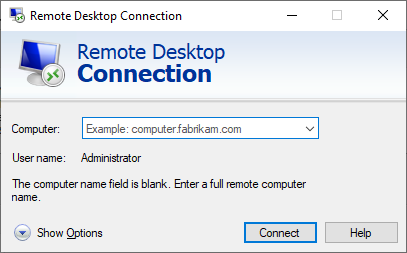
any idea?
Regards,
Olivier
HyperV on localhost
Hi Richard,
Definitly, I will have to play with Powershell script in 'Before Open' event.
Thanks a lot!
HyperV on localhost
Hi,
I have a simple Win10 instance with HyperV installed and just one VM.
Each time my PC is rebooting the VM ip address change. So I cannot reuse configured RDP session saved in my Local Data Source.
I would like to add a 'Before Open' Powershell Script to get the VM IP address using for example the following command :
get-vm | ?{$_.State -eq "Running"} | select -ExpandProperty networkadapters | select vmname, macaddress, switchname, ipaddresses | ft -wrap -autosize
But I don't know how to store the IP address in a variable and update the Host IP address of the RDM RDP session.
Can you, please point me to a solution?
Best regards,