
Markus Brandt
More icons for entry symbols
Hello David,
the symbols look good.
What is the Google symbol in the right lower corner for?
Does they mean, that the symbols can change their color?
More icons for entry symbols
Hello David,
no, I don't insist on symbols with 0 to 9 or A to Z (nevertheless some characters would be meaningful [for different locations/customers/environments (proc,test,dev)/etc.).
They were only samples.
My wish was only to get more icons.
This could be new symbols for other devices or functional systems (DB-/Web-/SharePoint-/Exchange-/DMZ-/Amazon-/Hyper-V/VMware-/Docker/...-Server), different colored symbols for existing ones, new graphical symbols like circles, squares, triangles [in different colors, too (?)].
Only more, any kind. Different colored ones would be a simple solution.
Regards
Markus
Swapped Characters Y and Z on German keyboard
Hi Nicolas,
no difference between the various German keyboard variants (I tried them all).
Best regards
Markus
Mouse pointer hotspot misaligned
Hi Nicolas,
I did some testing and made screenshots.
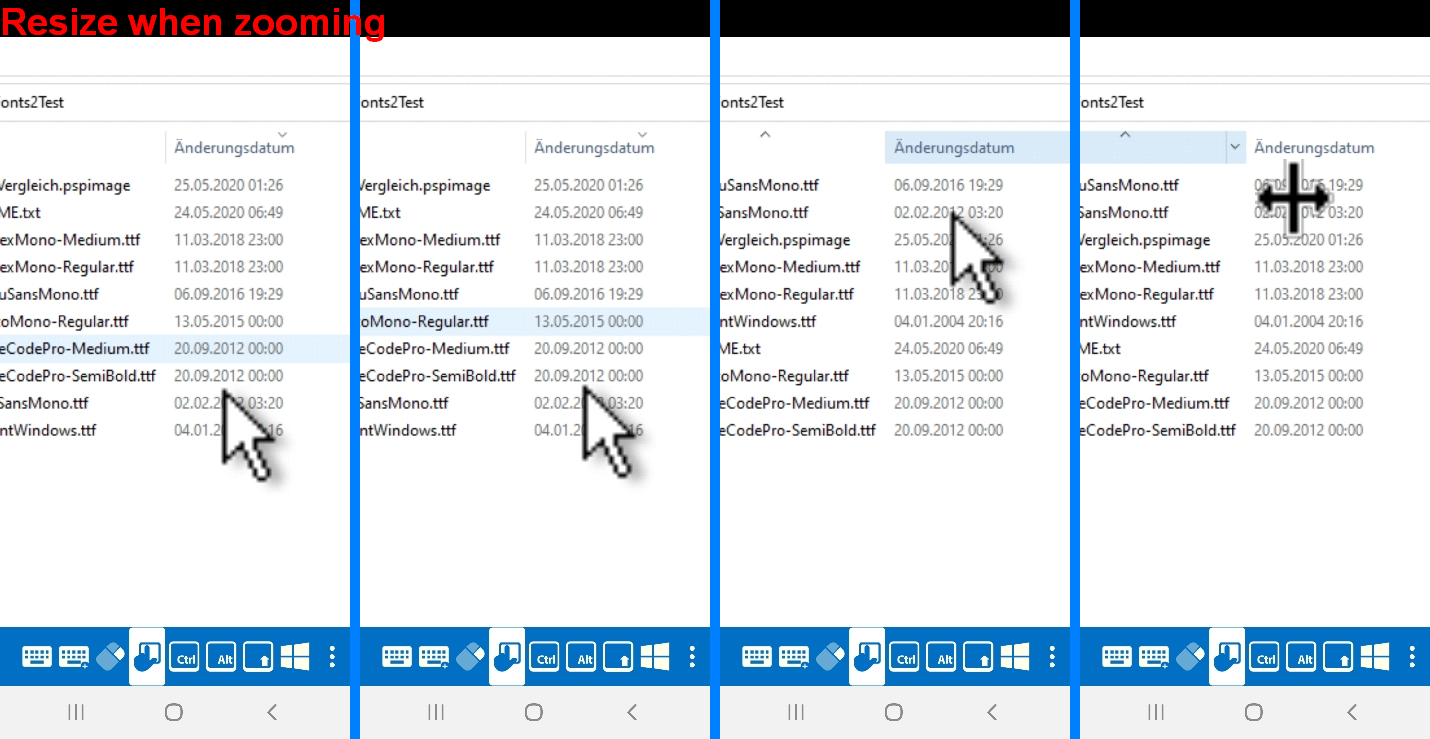
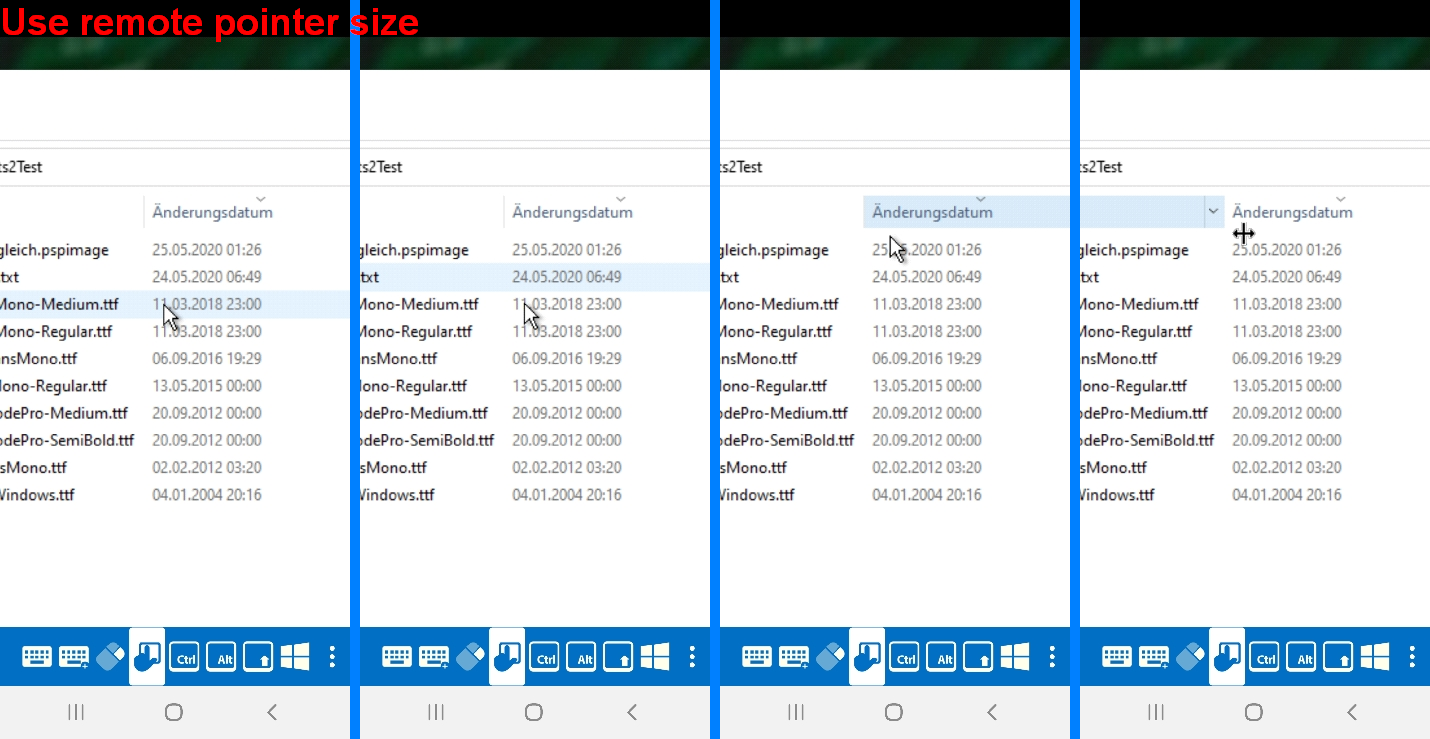
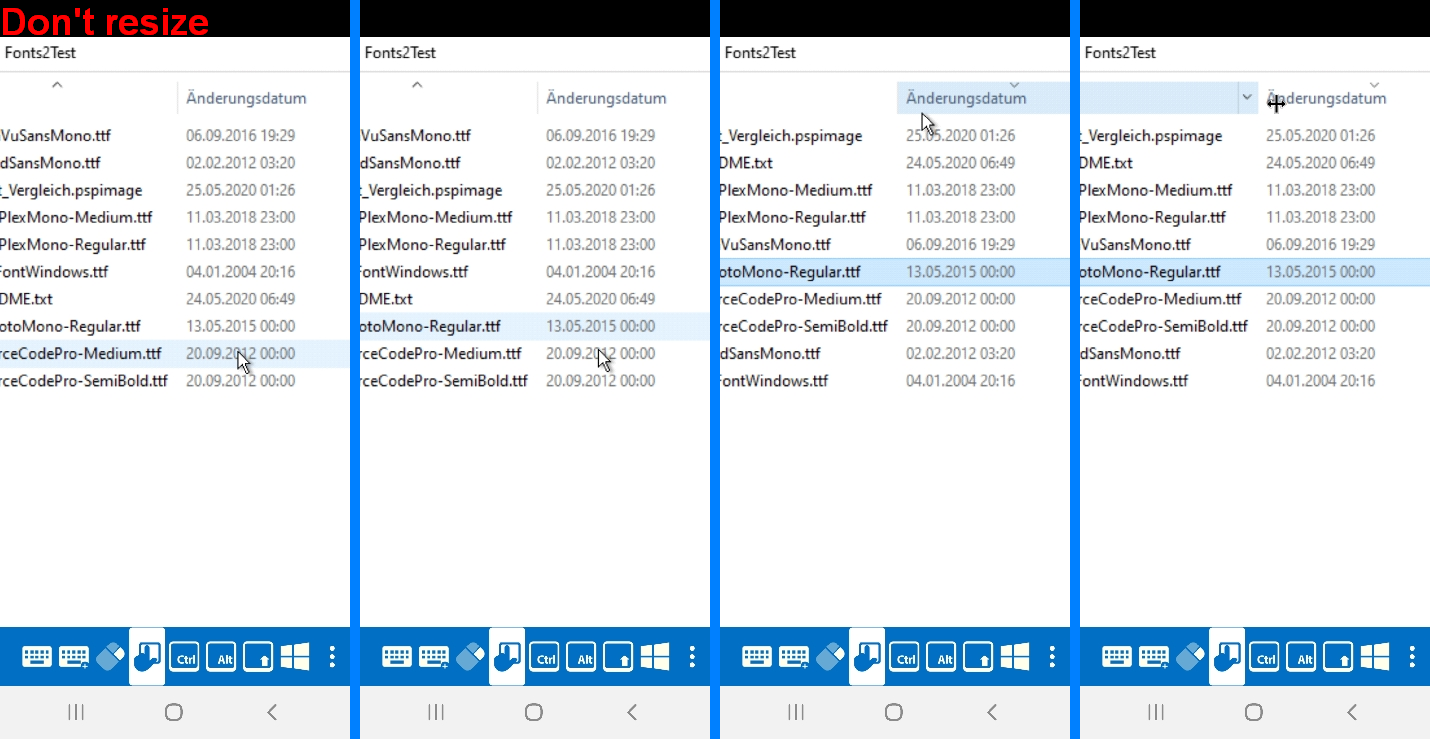
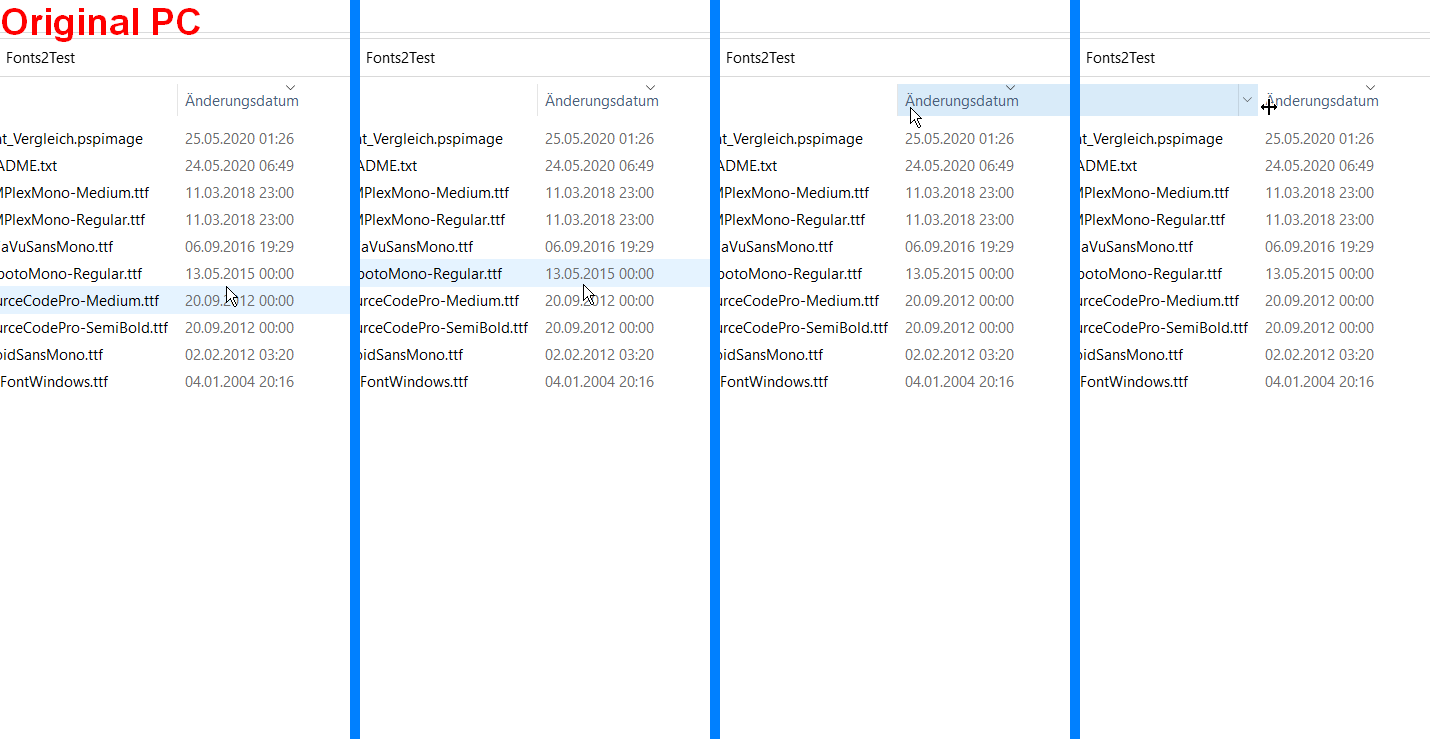
Below you see 4 different results, one made directly on my PC, the other one with the different settings of RDM.
The photos in each row mean:
most upper position of the mouse pointer before flipping the row mark one line higher
position of the mouse pointer (short) after flipping
most left position of the mouse pointer before changing to "resize column" pointer
position of the mouse pointer (direct) after change
As you can see the settings "Don't resize" and "Use remote pointer size" behave quite similar, although they are both off comparing to the original PC mouse pointer.
The setting "Resize when zooming" is totally misplaced.
Regards
Markus
Startup performance
Hi,
I'm using RMD on a Samsung Galaxy S10 and Galaxy Tab with a Devolution Online Drive as data store.
On both devices the app takes a long time to start up (3-6 secs, not really much, but a really long time for an Android app and an impatient user).
I know a lot of features need a lot of loading, but could you improve the startup and user responsive time a little?
Regards
Markus
Documentation
Hi Devolution,
I long searched for a replacement of my featured RDP app Parallels 2FX (legacy), tested a lot of alternatives and finally voted fro your very impressive and full-featured app RDM.
But when I started to test it, I was overwhelmed with the different settings and the vast function even the Android version of RDM has.
Frankly speaking, I couldn't see the wood for the trees and what are the different settings for - and I'm a long standing IT admin, knowing a lot of management systems and connection types :-)
So I started to find some docs, user guides, how-tos for your RDM Android app. And found nothing few.
There is a little, really short video, linked within the RDM Android app under "Video Tutorials", some hints here and there within different release notes and forum posts and a really huge user manual (more then 1300 pages, wow!) for the desktop version of RDM, which helped clarifying many - but not all - questions of mine.
Some settings of RDM are self-explaining, some can be transformed from the similar desktop setting and some settings are nowhere described :-(.
I know programmers hate to write docs, me too.
But for an Android novice normal user, finding RDM within the Google store and starting with it, there is a lack of description of the Android version of RDM.
Perhaps you can take your desktop user guide, add some descriptions for the Android version here and there, put a link in the description of the Google store and on your download site for the Android app on your homepage (like you did in for the desktop version) and implement a link to the user guide PDF within the "Help and Support" menu of the Android app (the current link "Online Help" isn't a really help link, it points more to a "What is RDM" page).
And perhaps you can add an Android section section within your Knowledge Base of RDM, create a small FAQ or revive the Online Help section within the Devolutions forum, which is currently broken (the link to "https://helpandroid.remotedesktopmanager.com/" doesn't resolve).
A very impressed new user of RDM, still learning all of your features
Markus
More icons for entry symbols
Hi,
when creating a new entry within RDM I have the chance to change the default image ("RDP" symbol, "VNC" symbol, "Earth Globe" for web entries, ...)
I would like to have some more symbols like a symbol for an access point (not the existing wireless router), switches, printers, server types (Active Directory Controller, Print Server, Database Server, SharePoint Server, ...) and perhaps some generic ones ("A", "B", "C", "1", "2", "3", square, triangle, circle or what you like).
This would be extremly helpful for Web-Connections to different Web-Management sites, so I can see from the symbol where I'm connecting to (or the server role).
And I would like to color them, currently only the symbols under the "Image" section have this feature. Symbols under the "Sessions" and "Data Entries" do not have this functionality.
PS:
Another correction (wish). The symbol for "Wireless Router" is within the Section "Data Entries". I think it would better fit under "Sessions".
Support for DPI scaling on RDP connection
Hi,
when I connect to my workstation from my tablet the DPI scaling is set to 100%, whereas I normally use 150% on my PC.
I know, I can zoom in, but this means also, that I'm loosing a lot of "context" from the programs.
When connecting to the same workstation from another PC using Microsoft Remote Desktop Connection (mstsc.exe), the DPI scaling of the connecting PC ("From-PC") is retrieved. So there must be a configuration setting within the RDP protocol to achieve this, even though Android does not have the same concept (a similar Android setting is on most launchers to resize the display font).
Is there a chance that you can implement such a setting and make this available through a setting within the RDP-connection setting?
Mouse pointer hotspot misaligned
Hi,
when I am zooming my desktop on a RDP connection, the hotspot (the "point" where the mouse pointer points to) is off by roundabout 150-180 pixels, meaning the hotspot is 150 pixels left and above the arrowhead of the mouse pointer.
I use to check my Workstation while there is a long time running video conversion and have to zoom in from my smartphone to a high level to access some menu point or buttons on the workstation.
Environment:
Server (connected-to device): Windows 10, 2004, installation language German, loggedon UI German
Client (connected-from device): Samsung Galaxy S10e, Android 10 with German UI
App: RDM Android V2020.2.1.0
Setting in RDM: Settings > Other > User Interface > Session > Session pointer size mode: Resize when zooming
Setting in RDM-Session: no touchmode (symbol left hand on square is white)
Android UI language not recognized after installation
Hi,
I freshly installed RDM Android V2020.2.1.0 on my Android with German UI.
RDM starts up with English UI and I have to switch to German in Settings > Other > User Interface > Override language (switch on and Language German (Germany)).
Why does RDM not detect my language, other apps can do it by themselves?
Swapped Characters Y and Z on German keyboard
Hi Devolutions,
when connecting via RDP my Android device to my Windows workstation the keys y and z are swapped.
Only the two ones, all other keyboard keys send their correct symbol.
Environment:
Server (connected-to device): Windows 10, 2004, installation language German, loggedon UI German
Client (connected-from device): Samsung Galaxy S10e or Samsung Tab A, both Android 10 with German UI
App: RDM Android V2020.2.1.0
RDP-Settings in RDM: Local Resources > Keyboard: German (Germany), Send input as unicode: Default
Tested alternatives/workarounds:
a) installed second keyboard "English (United States), US-keyboard layout" on Windows PC.
When switching to this keyboard within a RDP session Y and Z are on their right keyboard position AND all other keys are also like on a German keyboard (not in US-Keyboard layout! BTW: Same constellation directly working from console with a German keyboard -> US-keyboard is applied ";" below "ö", "/" below "-" caps, ...)
b) Setting "Send input as unicode: True" in RDP-Connection property.
Y and Z are correctly end to programs (keyboard layout on PC: German) BUT CTRL-Y and CTRL-Z are still swapped, meaning when I'm pressing CTRL-Z on the Android German Keyboard the PC is receiving CTRL-Y
Can you fix this?
Regards
Markus