
remotron5000
Citrix Unlock
I just used the last build you wanted me to run (5.7.3.4) and I did nothing else differently. It just allowed me to log in without the ctrl+alt+del requirement. What ever you changed on this last version seems to have worked for me.
Citrix Unlock
It worked!
Citrix Unlock
The CitrixConnect program worked as long as I had "Disable Ctrl Alt Delete" checked. I had no luck with the new version you posted yesterday, however. Is there a way to add the "Disable Ctrl Alt Delete" option in the new version?
Citrix Unlock
I tried it, but it appears it has had the focus since I can click on the Citrix progress box and have it overlap the Welcome to Windows prompt. The Help screen appears as well when I click it.
I also have mine still set to 66.
Citrix Unlock
Tried it, but no luck.
Below is a screenshot of what I'm seeing, if that helps at all.
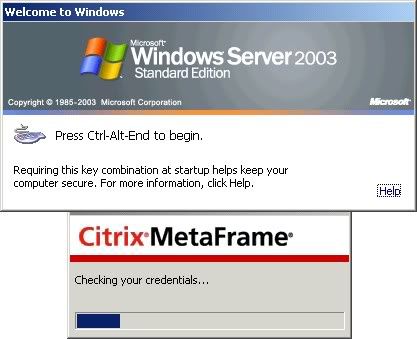
Citrix Unlock
Unfortunately, it didn't work. I still have the password stored from the trial on the other version I have installed, although I ran this one as the standard edition.
Citrix Unlock
I tried to set it to 66, but it ended up just defaulting back to 3. When I used the up and down buttons next to it, I only had the options 0-3. I tried it at 3, but the same issue occurred.
Citrix Unlock
I tried to find where I could set the debug level, but I couldn't locate it. Can you describe how I can find this setting?
Also, thank you for your help. Your product helps make my job go much smoother.
Citrix Unlock
I had already been set to basic. I tried it and also 128 bit, but it did the same thing.
Citrix Unlock
That worked both with and without Disable CTRL-ALT-DEL set!
Citrix Unlock
Just tried it. Unfortunately it didn't work. After that, I also tried username@domain.com, but that didn't work either. They both did the same thing. I'm stumped.
Citrix Unlock
I signed up for the trial version and entered my credentials, but it did the same thing. I couldn't upgrade to 11.2 due to company policies, so I'm stuck at 11.0 for now.
When I connect, it says "Checking your credentials…" with a partially filled progress bar and the dialog that asks me to CTRL-ALT-END over the top of it.
The odd thing is that I can RDP to the server without the need to do a CTRL-ALT-END and it all works fine. I would just use RDP, but they want us to connect via Citrix instead.
Citrix Unlock
I tried looking for an option to force the login, but I couldn't find one. I have my username and domain entered in the saved session. I should mention that I don't have the Enterprise edition.
Citrix Unlock
Do you mean within RDM or on the server?
Citrix Unlock
I have:
Remote Desktop Manager V 5.6.3.0
Citrix XenApp V. 11.0.0.5357
Citrix Unlock
I'm also having an issue not being able to send ctrl-alt-end. It just does nothing. When I try Ctrl+F1, it just closes that session window. I can log into that Citrix server using the normal Citrix client and it doesn't require that I send a ctrl-alt-end.
Any ideas?