sitedtc
[VPN] FRITZ!Box
Hi Jeff..
Was looking for VPN functionality directly to a fritzbox... And stumbled against this post..
Would be a nice feature, because in a large part of Europe (certainly Germany and Holland) this router is used a lot,
since it's the default router for many providers.
Would be nice to have an option to setup VPN to a fritbox without the need of Shrewsoft vpn..
Maybe this article can help to find a solution..
Connect from PC joined to AzureAD via RDP to other PC/Server
I found the solution myself.. Just sharing it, to maybe saving someone else the search.
The only thing you change is the login name. It cannot be “username” any longer, but should be “computername\username”.
Probably only necessary if you have a AzureAD connected computer where you run RDM on, and want to connect to remote host with NLA enabled on it.
Because I never had this problem on another normal domain joined PC. Without NLA enabled this is not necessary.
Connect from PC joined to AzureAD via RDP to other PC/Server
When I connect from a PC joined to AzureAD with RDP to another PC with NLA enabled I get an error.
"a verification error has occurred. the credentials specified on the package were not recognized"
Disabling NLA on remote PC fixes the problem.
On the same PC connecting with mstsc connecting to same remote PC is no problem
Connecting from VM not joined to AzureAD with RDP to another PC with NLA enabled. everything is OK
How can I fix this on tje AzureAD joined PC, and still leave the NLA setting on enabled on the remote PC?
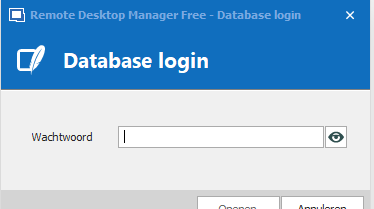
Opening RDM - unclear which database password to use
When opening RDM it opens the last used database and asks for the password.
If you have multiple in use, it's unclear which one RDM wants to open and which password you have to use.
Is there a way the database name is shown in this password popup windows?