
robor007
CommVault Simpana client
To anyone looking for this solution, rather than attempt to get the ability to edit User/Local Machine Specific Session for the CommVault connections I created them in my Local Data Source. Problem solved. Thank you to David for helping me get this working! :)
CommVault Simpana client
I just sent you the requested xml data source.
CommVault Simpana client
I'll be happy to but I do not know how to do that. If you can you point me in the right direction I should be able to get it done.
CommVault Simpana client
I tried but when I right click the session and highlight Import/Export all of the options are grayed out.
CommVault Simpana client
I did get it working with the web browser using the URL to our CommCell server and directly launching the .jnlp file. It takes quite a bit longer to use the URL because it has to download a new .jnlp file each time but I just adjusted the wait time to compensate.
Regardless of which method (URL or .jnlp) I use I cannot edit the User Specific or Local Machine Specific Settings to store my credentials locally. Of course, that means anyone with access to RDM (which is everyone in our office) can use my session and log in as me.
I could modify the macro to not use my password so it has to be entered manually but I'm trying to make this a one-click thing and still maintain security.
CommVault Simpana client
The option for editing User and Local Session settings is not available, only Edit Session.
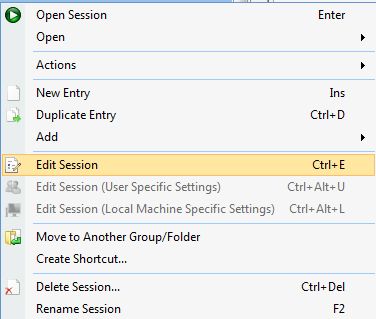
What I am actually launching is a .jnlp (java) file. Normally, we connect to a URL and it downloads and executes that .jnlp file to launch the login screen. I tried putting the URL into an RDM session and it fails so launching the .jnlp file directly was my workaround. I tried using the Web Browser option (Firefox and IE) and Windows Explorer and neither will allow User or Local Session edits.
EDIT: I got it working using the URL but I still cannot edit the User or Local Session.
edited by robor007 on 4/5/2013
edited by robor007 on 4/5/2013
CommVault Simpana client
The $MACRO_PASSWORD$ did the trick. I can successfully launch, connect and log in via RDM. Unfortunately, anyone with access to our RDM group can do the same.
Is there any way the credentials can be stored on my machine? The option to edit user specific or local machine specific sessions are not available. For instance, we use a RDM session for connecting to a vSphere and I can edit the User Specific or Local Machine Specific settings to put my own username/password in it.
CommVault Simpana client
This is my macro string that works:
domain\username{TAB}{DELAY}mypassword{TAB}{DELAY}hostname{DELAY}{ENTER} (works but all viewable)
I put my password into the Macro password field (it does display dots) and tried these macro strings
domain\username{TAB}{DELAY}%password%{TAB}{DELAY}hostname{DELAY}{ENTER} (doesn't enter anything in the password field)
domain\username{TAB}{DELAY}$mypassword${TAB}{DELAY}hostname{DELAY}{ENTER} (enters something in the password field but login fails)
CommVault Simpana client
Could you try to use the macro password variable to hide the information? You can also use the custom field in Information.
I tried using the macro password but when I save it and go to edit it again my Typing Macro is displayed in plain text.
CommVault Simpana client
Hi wfaulk and David... Did you ever get this working? I was able to get a 'Typing Macro' containing my domain\username, password, and hostname all in clear text but that's not something I want available to everyone who uses RDM in our organization. I have been pulling my hair out trying to get the credentials to work. One problem I have is my %username% is different than the login I'm using to get into CommVault.