CommVault Simpana client
0 vote

My company uses the CommVault Simpana enterprise backup software. The client is a JNLP client, and I'm able to get RDM to start it using the Java Web Start feature without problem. However, the first thing that the client does is ask for a username, password, and server. It would be great if RDM could supply that information.
What kind of information do you need to make that happen?
Here are screenshots of the login window and a window inspector with information on that window:
http://img838.imageshack.us/img838/9427/connecttocommcell201202.png
http://img703.imageshack.us/img703/6447/frozenautoitv3windowinf.png
All Comments (28)
Hi,
Have you tried the auto typing feature in the Event tab page? This allow you to execute a macro after the connection.
David Hervieux
The Green "Play" arrow on the session goes away immediately after the Java splash screen, so I assumed that RDM wasn't tracking the process well enough to be able to perform auto typing. I tried it anyway to test and it turns out it does work. Almost.
First, it takes literally 30-40 seconds for the login screen to appear. So I set the initial delay to 40 seconds. (It would be nice if I could tell it to wait for the specific window to appear.)
I have told it to type:
$USERNAME${TAB}{DELAY}$PASSWORD${TAB}{DELAY}server.domain.com
However, both $USERNAME$ and $PASSWORD$ expand to nothing. I suspect that this may be due to how I have the credentials specified.
The session's credentials are set to a specific entry in the credential repository. Then the repository's entry is overridden with a "User Specific Setting". I suspect that this may be the same bug as being unable to copy those credentials to the clipboard.
I'm running v.6.6.0.0.
I suppose this has turned into a bug report and not a feature request. Sorry.
Could you try the latest beta to see if it works?
http://remotedesktopmanager.com/download/Setup.RemoteDesktopManager.6.9.8.0.exe
David Hervieux
I don't have permissions to upgrade my database.
Oh, I see. I pretty sure that we have fixed this bug. We will release soon the official version. Let me know at this time if this resolve the issue
David Hervieux
And now I can't downgrade. :(
Will 6.6.0.0 clients still work if the database is upgraded to whatever 6.9.8.0 wants?
You can download the zip content to downgrade:
http://remotedesktopmanager.com/download/Devolutions.RemoteDesktopManager.Bin.6.6.0.0.zip
I can't guarantee you at 100% that it will still work but it suppose to.
David Hervieux
Will 6.6.0.0 clients still work if the database is upgraded to whatever 6.9.8.0 wants?
The client 6.6 should work but I can't guarantee you. Maybe we could find a case we missed.
David Hervieux
Hi wfaulk and David... Did you ever get this working? I was able to get a 'Typing Macro' containing my domain\username, password, and hostname all in clear text but that's not something I want available to everyone who uses RDM in our organization. I have been pulling my hair out trying to get the credentials to work. One problem I have is my %username% is different than the login I'm using to get into CommVault.
Could you try to use the macro password variable to hide the information? You can also use the custom field in Information.
David Hervieux
Could you try to use the macro password variable to hide the information? You can also use the custom field in Information.
I tried using the macro password but when I save it and go to edit it again my Typing Macro is displayed in plain text.
The macro password field content is hidden with dots for me and it should be like that for you.
Could you post of print screen of what you see?
David Hervieux
This is my macro string that works:
domain\username{TAB}{DELAY}mypassword{TAB}{DELAY}hostname{DELAY}{ENTER} (works but all viewable)
I put my password into the Macro password field (it does display dots) and tried these macro strings
domain\username{TAB}{DELAY}%password%{TAB}{DELAY}hostname{DELAY}{ENTER} (doesn't enter anything in the password field)
domain\username{TAB}{DELAY}$mypassword${TAB}{DELAY}hostname{DELAY}{ENTER} (enters something in the password field but login fails)
You haven't tried the macro password variable:
$MACRO_PASSWORD$
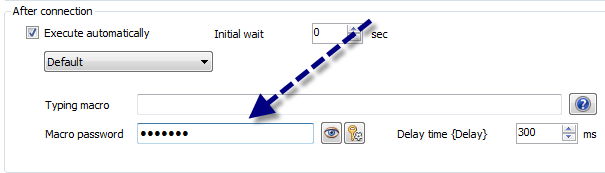
David Hervieux
The $MACRO_PASSWORD$ did the trick. I can successfully launch, connect and log in via RDM. Unfortunately, anyone with access to our RDM group can do the same.
Is there any way the credentials can be stored on my machine? The option to edit user specific or local machine specific sessions are not available. For instance, we use a RDM session for connecting to a vSphere and I can edit the User Specific or Local Machine Specific settings to put my own username/password in it.
You could use the variable $PASSWORD$ if you enable it in Advanced. After that you could use the Local Specific Settings or the User Specific Settings. This will override the saved value.
David Hervieux