
support40
Register Device
Helo, I try it now, but still nothing in dashboard..
in addition, there is another problem, sometimes I see 3 entries in the dashboard, sometimes 2, it changes when I refresh the list. The komputer28 entry appears and disappears.
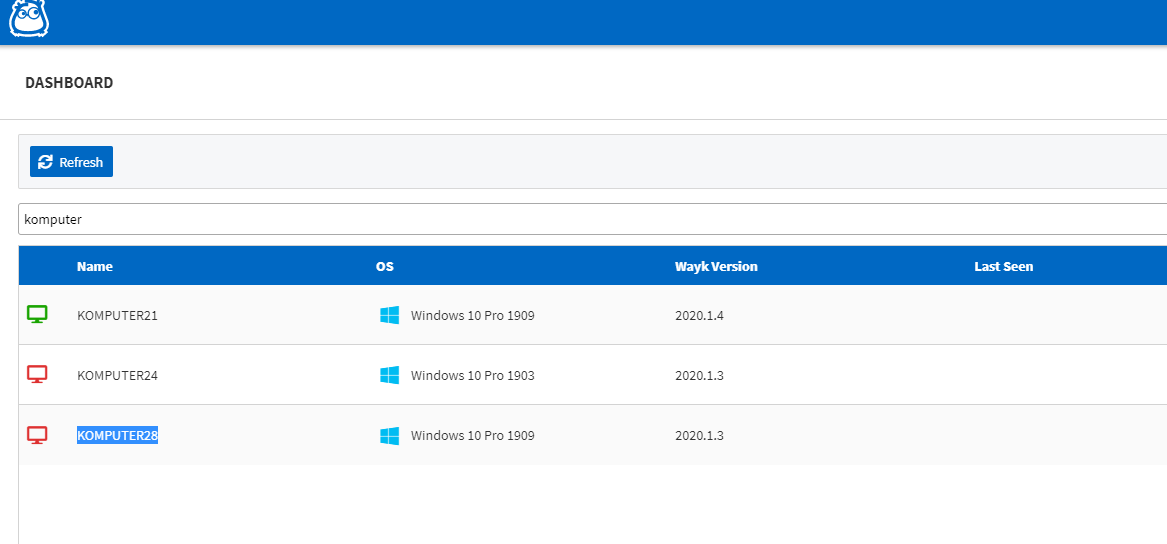
Register Device
Hello, logs in the attachment.
Register Device
Hello,
After upgrading to the new version, I cannot register new devices.
Wayk shows that everything is ok, but the device is not available on the dashboard
Still not satisfied
I'm using powershell command:
Install-WaykNow
Still not satisfied
Good morning,
I am sorry to say, but the application is gradually getting worse, more and more often the wayknow application acting as a server hangs, breaks the connection and cannot be reconnected to it until it is restarted (shows a red dot).
What's worse - after such suspension a unique ID changes, which was supposed to be guaranteed!
Example: ID 200e3a94-e491-da66-5218-68b27e438ee0 changed to 909468bc-6e31-9706-31f8-39a46aca7126.
I am unable to provide logs, my client is disgusted with this problem and refused.
Connect using RDM
Any updates?
Connect using RDM
I update to newest version before i Try to connect: 2019.2.16.0
I have another problem:
because the connection with RDM does not work - I open the connection in the WAYK application.
When I right-click on the Wayk object in RDM and select> open with parameters> external opening (shift + enter),
my Wayk app opens, but I don't even try to connect.
I can show these problems if you want, you can connect to my computer remotely.
Connect using RDM
When i use "prompt for perrmision" i get this error:
When I use secure password it work OK.
Additional question: is it possible to configure RDM to ask me every time about type of authentications?
Takeover of the session
Takeover of the session
The new version still doesn't take over session if someone is already connected.
When can it be expected that such functionality will work?
When are you planning to implement parallel sessions?
I attach the log.
Connect using RDM
Hello,
In order to be sure of connecting to the client, we decided to connect using unique id.
In Wayk, just add a computer to your bookmarks and the connection is established correctly.
In RDM, adding a wayk entry, I add a unique id in the advanced tab, however, the program also requires me to enter something in the host field, without this I can not save entry.
Problems with the application
Thank you for your answer,
I'm holding your word and waiting for the v2 version.
Problems with the application
Good morning,
we purchased the WaykNow application because it was supposed to help us remotely access clients' computers.
As a result, we have to regularly help the application work.
A successful remote connection is a lottery. Sometimes service restarts and computer restarts help, but is this a solution?
It is absurd that unattended access requires an earlier restart of the computer.
I have read most of the forum threads and see that this is not just my problem, similar threads regularly recur.
Gentlemen, get to work because what you are selling now is trash. You're pulling people to buy a non-functional application.
Allow linking to TeamPass password repository
Hi,
Application log is empty, maybe I'm doint it wrong?
Allow linking to TeamPass password repository
Hello,
I'm trying to configure teampass integration. I see only empty lists, no data.
does this mean the function still doesn't work?
Is there any other free password manager system available through the web with working integration?