
cRoW2k
Exception on launch on Fedora 45
You’re great, thanks @Carl Marien !! Back to work!
Exception on launch on Fedora 45
Hi, it’s me again. I’ve updated to Fedora 45 and even tried reinstalling the latest version of the RPM available on the website, but it won’t launch. Here is the error I’m getting.:
Unhandled exception. System.TypeInitializationException: The type initializer for 'Avalonia.Controls.Documents.RichTextElement' threw an exception.
 ---> ei: An unexpected error occurred while processing the AvaloniaUI license key. Please verify the license key is correct or copy a fresh key from the Avalonia Portal.
 ---> System.PlatformNotSupportedException: OpenSSL is required for algorithm 'RSAOpenSsl' but could not be found or loaded.
   at System.Security.Cryptography.RSAOpenSsl.ThrowIfNotSupported()
   at System.Security.Cryptography.RSAOpenSsl..ctor(Int32 keySize)
   at System.Security.Cryptography.RSA.Create()
   at em.b(Byte[] a, Byte[] b, String c)
   at em.a(String a, String b)
   --- End of inner exception stack trace ---
   at em.a(String a, String b)
   at ef.n(String a)
   at Avalonia.Controls.Documents.RichTextElement..cctor()
   --- End of inner exception stack trace ---
   at CompiledAvaloniaXaml.!AvaloniaResources.Populate:/Themes/Default.axaml(IServiceProvider, Styles)
   at CompiledAvaloniaXaml.!AvaloniaResources.Build:/Themes/Default.axaml(IServiceProvider)
   at CompiledAvaloniaXaml.!AvaloniaResources.Populate:/Assets/EntryPoint/Styles.EntryPoint.axaml(IServiceProvider, Styles)
   at Devolutions.AvaloniaUI.AvaloniaApp.!XamlIlPopulate(IServiceProvider, AvaloniaApp)
   at Devolutions.AvaloniaUI.AvaloniaApp.Initialize()
   at Avalonia.AppBuilder.SetupUnsafe()
   at Avalonia.ClassicDesktopStyleApplicationLifetimeExtensions.SetupWithClassicDesktopLifetime(AppBuilder builder, String[] args, Action`1 lifetimeBuilder)
   at Devolutions.RemoteDesktopManager.AvaloniaProgram.Initialize()
   at Devolutions.RemoteDesktopManager.Program.Main(String[] args)
Annullato                  (core dump creato) remotedesktopmanager
OpenSSL 4.0.3 29 Sep 2026 (Library: OpenSSL 4.0.3 29 Sep 2026)
Ctrl+D will open a Duplicate entry on SSH terminal instead of logging off (2026.3.1.1)
Hi Maxim, thanks again for your work! Now it's working as expected.
2026.3.1.1 on Fedora 44 KDE: Slow switching tabs, ctrl+d does not close session but edit instead
Hi @Carl Marien ,
Local SQL Lite, 5 entries linux. 2026.3.0.5 was working. I usually switch from 2 or 3, my homelab server. No particular usage, it's slow just after i logged into my vm's. Just clicking mouse over tab. The CTRL-D edit connections ever, regardless of the activity.
2026.3.1.1 on Fedora 44 KDE: Slow switching tabs, ctrl+d does not close session but edit instead
Hi all,
Firt issue: Since the last update, switching between shells while working on multiple simultaneous SSH sessions takes two seconds.
Second issue: I constantly use Ctrl+D to close the session (which is the standard behavior on Linux), but the function has been changed; now, it edits the active connection instead. Would it be possible to restore the previous behavior?
Thanks again.
SSH terminal randomly gets stuck in Alt/Meta state on RDM Linux 2026.3.0.5
Just installed. Yes, now it's working. Thanks u @Maxim Robert and team.
SSH terminal randomly gets stuck in Alt/Meta state on RDM Linux 2026.3.0.5
Environment
OS: Fedora Linux 44
Desktop environment: KDE Plasma
Remote Desktop Manager: 2026.3.0.5
Connection type: SSH
Remote host: Linux
RDM terminal: built-in SSH terminal
While using an SSH session in RDM, the terminal works normally for some time and then suddenly starts behaving as if the Alt/Meta key is still pressed.
Normal keyboard input is replaced by sequences such as:
^[i
^[n
^[d
^[j
^[s
^[kFor example, typing normal characters results in ESC + character being sent to the remote shell.
At the same time, Ctrl+C stops working correctly. The remote shell continues to behave abnormally and pressing Ctrl+C does not interrupt the current input/process as expected.
Workaround
Pressing the Alt key once immediately restores normal keyboard input.
After pressing Alt, the SSH terminal works normally again without reconnecting the session.
Reproduction / observed behavior
Open an SSH session in RDM.
Use the terminal normally.
After some time, the keyboard input may become corrupted.
The terminal starts receiving ESC + character sequences (^[x).
Ctrl+C no longer works correctly.
Pressing Alt once immediately fixes the problem.
This seems to indicate that RDM is incorrectly retaining or restoring the Alt/Meta modifier state in the SSH terminal.
Please investigate whether this is a regression or a known issue in the 2026.3.x terminal/keyboard handling on Linux.
Edit connection: Cancel & Update buttons not selectable
Hello,
Thank you for the additional information and the video.
After taking another look, I was able to reproduce the issue on my end. It appears that the RDP settings tab is being rendered in front of the Update and Cancel buttons.
On my end, the buttons are only slightly obstructed and remain accessible, while in your case, the tab appears to completely cover them, making them impossible to select.
I’ve created a bug report for our development team so they can investigate this behavior further.
Thank you again for reporting the issue and providing the additional details!
Best regards,
@Carl Marien
Many thanks,
Edit connection: Cancel & Update buttons not selectable
Hello,
Thank you for the report.
I tried to reproduce the behavior on my end, but I wasn't able to recreate the issue.
Could you clarify what you're seeing with the Update and Cancel buttons? Are they:
Located outside the visible screen area (for example, requiring additional scrolling or caused by display scaling), or
Rendered outside the UI/form itself?
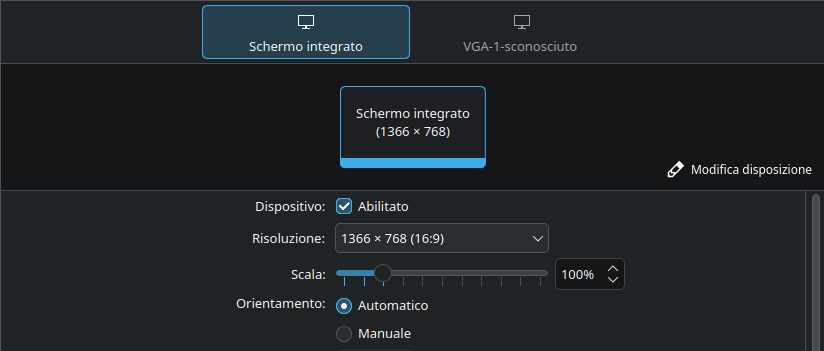
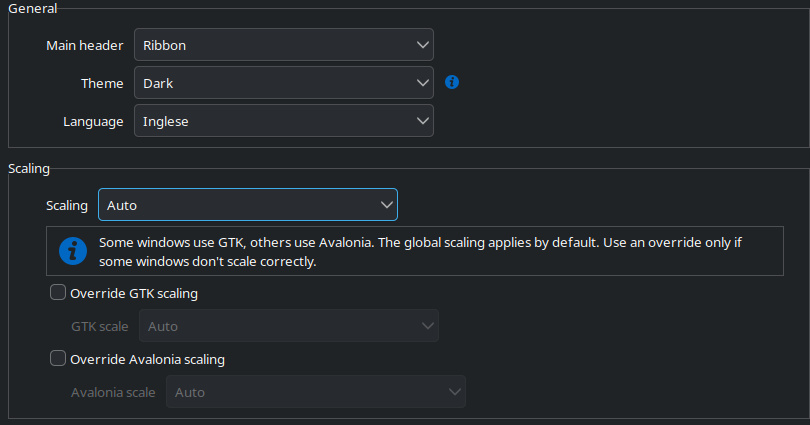
If possible, could you also let us know your display resolution and scaling settings (both KDE Plasma and RDM, if applicable)? This will help us narrow down the cause.
Thank you!
@Carl Marien
Hi,
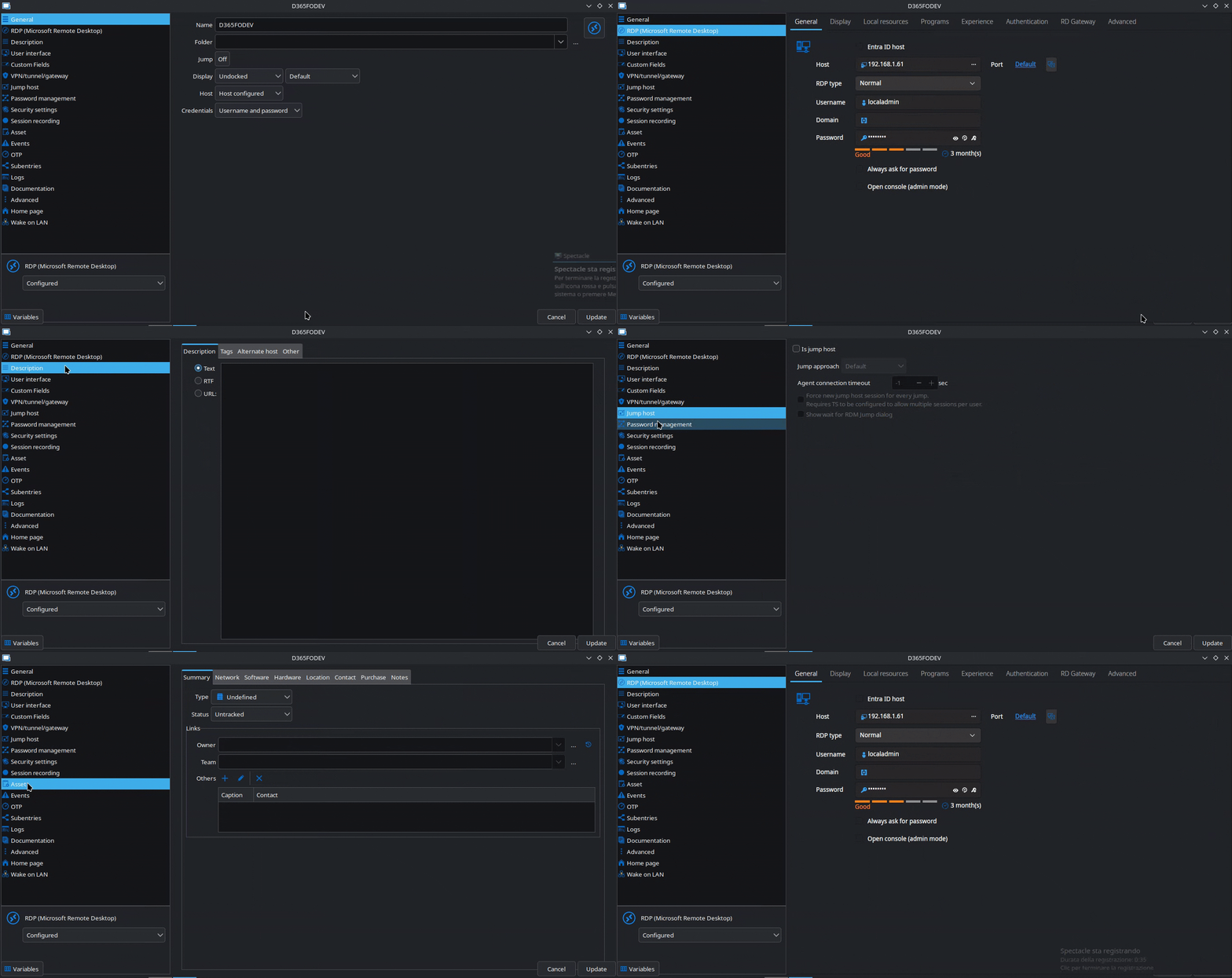
They practically disappear when i switch from one menu to another, they go under the rendering of the next window. I'm attaching another video because it's hard to explain in words.:
My desktop resolution:
And RDM scaling settings:
Edit connection: Cancel & Update buttons not selectable
2026.2.1.4 64-bit on Fedora 44 w/KDE Plasma
Hi all, when i edit a connection i need to switch tabs to find out update (or cancel) button to save.:

Same behavior with ssh sessions.
Closing a duplicate SSH session close both sessions
It works, good job guys!
RDP sessions with expired password
Thanks anyway for clarifications, Alexis.
RDP sessions with expired password
Hi Alexis, there's no need for you to apologize, of course.
I always open them externally.
RDP sessions with expired password
Hello Alexis,
my case:
The RDP session is linked to a credential entry
But in reality i've not setup any expiration date (my bad). So i forget to update the credential entry but without any messages on screen i couldn't understand what was the problem. In the Windows RDM version if the password is expired, rdp session it still opens but then the classic login error returns.
And yes, i would expect RDM to receive the expired-password response from the server for the password being used, and then display a message or pop-up indicating that the password has expired.
RDP sessions with expired password
Hi all,
Fedora 43, RDM 2026.1.1.1 (but also previous release).
When I try to connect to an RDP server with credentials containing an expired password, double-clicking the server seems to start but then stops without any message. What I would expect is for the session to open anyway and for it to show me that the password has expired (or that the error displayed on xfreerdp's stdout returned a speaking message to RDM).
Closing a duplicate SSH session close both sessions
Good mornig,
RDM 2026.1.0.8, fedora 43
I attached a video to better explain the bheavior.:

Multimonitor support on (Fedora KDE) linux and broken pipe
Hello again
I did raise a related issue with freerdp.
Thanks and kind regards,
@Richard Markiewicz
I figured it was you given the date the issue was posted ;)
Thanks again, Richard.
Multimonitor support on (Fedora KDE) linux and broken pipe
Me again,
A side note is that when you find yourself in this position right now, [Ctrl]+[Alt]+[Enter] should drop xfreerdp out of full screen (or back to full screen again).
With this combination, the xfreerdp toolbar appears, where i can choose to either minimize (which is what I was mainly interested in) or make it full-screen (right-clicking on the toolbar will bring up a menu with various options, including full-screen). I'm therefore satisfied, but if you happen to hear from your colleagues, I'd be grateful.
Multimonitor support on (Fedora KDE) linux and broken pipe
Good morning Richard,
I actually never checked it because it didn't work at all before 3.20.
In the meantime, I'm doing some tests via command line, passing options just to understand which integration isn't working.
In addition to the workaround you suggested, I'm also waiting for some suggestions from your colleagues on the *nix side.
Thanks!
Multimonitor support on (Fedora KDE) linux and broken pipe
Hi Richard,
Do you think the fact that the connection bar isn't appearing is due to some regression in xfreerdp or RDM? However, i didn't find any issues on the GitHub of the first one. RDM options are enabled (when full screen).
Multimonitor support on (Fedora KDE) linux and broken pipe
Hi @Richard Markiewicz !
Just landed 3.20.0 and it works!
Thanks u all, Happy Holidays!
Multimonitor support on (Fedora KDE) linux and broken pipe
Thanks for the transparency, Richard. I didn't deserve it, and I really appreciate it.
Given the importance of the regression, I definitely think it'll arrive in version 43 sooner or later.
Multimonitor support on (Fedora KDE) linux and broken pipe
Hello Simon,
Obviously, I have version 3.18.0 provided with the distribution (which is dated November 12, 2025). I'd like to avoid compiling by hand since I don't know which configure parameters need to be passed to the compiler to comply with Fedora standards.
I look forward to seeing 3.19.1 released to the official repos as soon as possible.
Thanks anyway.
Multimonitor support on (Fedora KDE) linux and broken pipe
Hello Gabriel,
No, it does not work either
Yes, i use Linked (vault) credentials
No, same error.
Multimonitor support on (Fedora KDE) linux and broken pipe
Hi Gabriel, thanks for the update. All connections aren't working anymore, though.
I reset whith "Normal" in preferences, tried both External and Undocked for my sessions. They doesn't even start and I get this message in the console:
[07:07:40:745] [48748:0000be6e] [ERROR][com.freerdp.utils.passphrase] - [set_termianl_nonblock]: tcsetattr(TCSANOW) failed with inappropriate ioctl for device
[07:07:40:745] [48748:0000be6e] [ERROR][com.freerdp.utils.passphrase] - [set_termianl_nonblock]: tcgetattr() failed with inappropriate ioctl for device
[07:07:40:745] [48748:0000be6e] [ERROR][com.freerdp.utils.passphrase] - [set_termianl_nonblock]: tcsetattr(TCSANOW) failed with inappropriate ioctl for device device
[07:07:40:745] [48748:0000be6e] [ERROR][com.freerdp.utils.passphrase] - [set_termianl_nonblock]: tcgetattr() failed with inappropriate ioctl for device