Multimonitor support on (Fedora KDE) linux and broken pipe

Hi guys,
I'm trying to create a multimon connection from Fedora 43 KDE host to Windows 2022 server guest with RDP.
The thing is that as soon as I set Display to External, it asks me for Installation Path upon Open Session (doesn't ask me otherwise) and if I go with Normal, I get "Broken Pipe" error. If I leave display to Embedded or Undocked, it works fine, just without second monitor.
Since I've never managed to make it work with freeRDP, I guess the problem is with it?
Any idea?
TIA,
Miha
PS. RDM Version is 2025.3.0.9
All Comments (30)
Same here. Fedora 43 KDE vs Windows 11. But normal RDP connection (no multimonitor). 2025.3.0.9 (also with .8)
Hello,
Thank you for reaching out to Devolutions Support.
We have opened an investigation on our end regarding this issue. We will contact you as soon as we are able to reproduce it.
Best regards,
Carl Marien
Hello,
When you launch an external RDP connection, the "Normal" configuration expects xfreerdp to be installed, but xfreerdp is not installed by default on Fedora 43.
Could you please check if it’s installed with this command:
which xfreerdp
If this command doesn’t return anything, it means xfreerdp is not installed. In that case, you’ll need to install it for the “Normal” configuration to work properly.
If you prefer to use another external application instead of xfreerdp, you can select the “Custom” option and specify the application of your choice, making sure to include the $RDP_FILE$ variable as an argument wherever your application expects the RDP file path.
Let me know if that help.
Regards,
Gabriel Dubois
Hi Gabriel, not in my case. It was installed prior of RDM.
Hello,
In this case, could you please send us the output of the following command?
which xfreerdp
Best regards,
Carl Marien
Hi Carl,
crow2k@fedorabook:~$ which xfreerdp
/usr/bin/xfreerdp
Hello,
We believe the issue is caused by the " +glyph-cache" argument we pass to xfreerdp. It appears this argument is no longer supported in xfreerdp3, and for that version we should use " /cache:glyph:on" instead.
We’re working on a permanent fix for this issue. In the meantime, as a workaround you can set a default Custom configuration like the one shown in the screenshot (Preferences > Session type > RDP > External). This should work, but it will still prompt you for the RDP password in the terminal (so make sure to start remotedesktopmanager from a terminal).
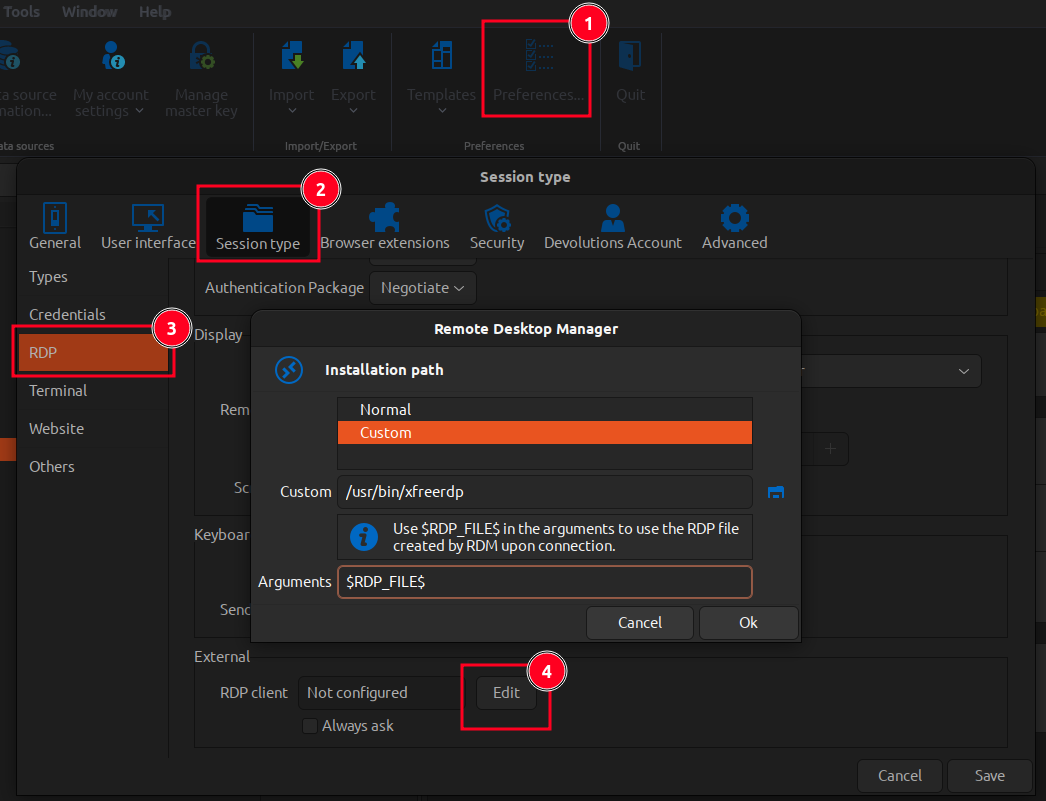
Let me know if this helps. We’ll let you know as soon as this issue is fixed.
Regards,
Gabriel Dubois
Hi Gabriel,
It works!
(RemoteDesktopManager:14602): Gtk-CRITICAL **: 21:32:30.678: gtk_file_chooser_select_filename: assertion 'filename != NULL' failed
[21:33:03:313] [43796:0000ab17] [WARN][com.freerdp.client.x11] - [load_map_from_xkbfile]:     : keycode: 0x08 -> no RDP scancode found
[21:33:03:313] [43796:0000ab17] [WARN][com.freerdp.client.x11] - [load_map_from_xkbfile]: ZEHA: keycode: 0x5d -> no RDP scancode found
Password: <--------
Also undocket mode without insert password.
But can you confirm that a window to close the remote session doesn't appear when RDM is launched from the terminal (maybe due to this workaround)? I used the Windows menu to log out.
Thanks anyway, I'm looking forward to the fix.
Hello cRoW2k,
I’m glad the workaround is working for you.
Embedded and Undocked modes use our own implementation of xfreerdp, so we have full control over them. However, External mode uses an external application of your choice (xfreerdp by default) that works with the RDP files we generate, so we have limited control over it.
I am not exactly sure what you mean by a “window to close the remote session”, but assuming you are referring to the X button used to close the window, the xfreerdp window should have it. If you do not see it, it may be because your session is running in a sort of full-screen mode, which could cause the button to be off-screen.
Regards,
Gabriel Dubois
I am not exactly sure what you mean by a “window to close the remote session”, but assuming you are referring to the X button used to close the window, the xfreerdp window should have it. If you do not see it, it may be because your session is running in a sort of full-screen mode, which could cause the button to be off-screen.
Yes, something like X button or similar also to move window (just to resize and/or move it)
Do you have this issue with the External or Undocked mode? Could you also provide a screenshot please?
Regards,
Gabriel Dubois