
jase
Hide Quick-Connect Selections (Not Templates)
Hey All,
Been using RDM for some time, but first time posting - Would like to get some advice after I failed to find anything in documentation / online about this.
I am generally a heavy user of the Quick Connect toolbar - mainly because the task of managing entries for ~5k devices in PowerShell with lifecycle (new / removals) is not something I have got around to yet!
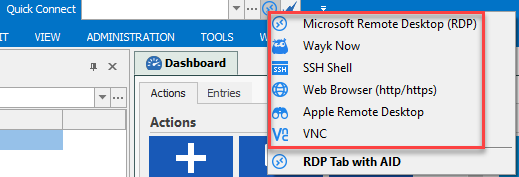
I have just upgraded to the 13.5.0.0 version and the connection type box has suddenly filled up with a number of new default entries (such as Wayk, Apple RD, VNC etc.). I usually use templates, so I wondered if there is a way to hide these default entries to tidy up the connection types, many of those I have no intention of using.
Also couple other things, which probably form more of a feature request:
- Can an option be put in to remove the '...' button next to the quick connect? I occasionally click this instead of the connection type and end up locking up RDM for ~30-60 seconds while it loads a list of computers. A feature I am never going to need with the size of the environment!

- It would be really nice if I could 'tab' between the Quick Connect entry box to the Connection type icon so I can select a connection type without having to use the mouse. This is something which I was used to doing in ASG RD.
Thanks in advance!
Jase