
nzvarminter
New login process
well thats weird!. I have just installed V2021.2.21.0 on both my PC's. On one PC the app opens up without the browser login confirmation, on the other one, the browser opens with the login confirmation tab.
Same version of chrome on each PC, however I am just evaluating an alternative browser (Brave) on PC that does not open a browser confirmation tab. I have made Brave the default browser ,so suspect thats why a confirmation tab is not opening. Nut that raises another question.... if the browser login confirmation is not opening, has the validation process been completed??
New login process
thanks, I've installed the latest desktop update so will see how that goes
New login process
I'm using RDM as my password manager, with the datasource being a devolution on-line drive. This all used to work great across 2 workstation, and my android phone until the V 4.1.3 was installed a couple of months ago.
Since this upgrade the app randomly opens a browser window titles "Devolution - login" with a message on that page saying "loging complete, you may now close this page", when I log in, and sometimes when I make a change to a record.
This browser window opens in both my desktop and android apps, however today its changed to just opening a blank browser tab named "Devolution - login" with no message at all!
Sometime the web page requires me to login, sometimes it says "login completed bla bla bla"
I have had communication with the support guys and they say this is the new normal and they cant change it.
Well its driving me crazy. Its inconsistent, It means I loose the focus of my app, and I have to close the browser page and move back to RDM.
I'm seriously looking at other password managers now
I assume you are all experiencing this new login process to??? Surely there is abetter way?
Thanks in advance
Grant
RDM Free with Web Login
nope here is my config. and here is the resultant embedded browser window thats opened. I have the display set to external and have even changed default browser to chrome but makes no difference. I change the display to "embedded", the then it op-en in a tabbed internal browser form. When I then go back into properties, the "External" display option is no longer available.
Ok its a bug to do with the secure note tab. When the note/secure note option is ticked, the display type "external" disappears from the display dropdown option. So any record that has a secure note related to it will not open the url in an external browser if the display is set to "external"
RDM Free with Web Login
OK I've installed RDM Free to replace PVM (though still have PMV installed). Both reading same dataset from Devolution online drive.
When in DRM on any record that has a URL, and has display set to "undocked-primary monitor". When click "Navigate URL" it opens in a detached Dev form and not the default browser
If I try with a record that has display set to "embedded" then it opens my default browser. So I can only assume the "Navidate URL" button has the switch wrong for opening embedded or with browser!
so whats happened to "password vault manager"
Been a few months since I have logged into this forum. There used to be a forum named "password vault manager" for the password vault manager app. Now all I can find is "password Server". Has the apps name changed???
launching URL to external browser
Nah, its all screwed up!
My template for login (web) is already set to external as default.
If I create a new login (web) the icon for this record in the tree show the globe, and the globe button on the right hand panel works correctly launching my external browser.
If I then add a secure note tab to this record, the icon in the tree view changes to the note icon, and the globe button on right hand side panel now open an embedded browser tab and there is no way to change back to external browser
launching URL to external browser
I have an extg record that has a URL to my local NAS. When I click on the globe icon, then launches the url in my default browser.
I now make a duplicate of this record, and now when I click on the globe icon, it open the url in an embedded tab and there is no way to force it to open in an external browser.
How can these two "identical" record behave differently, and how do I configure PVM to ALWAYS open URL's in an external browser
upgrade to V10...now continually prompting for datasource master key
datasource size 521.8 kb
44 RTF notes (no images now as that was killing performance)
upgrade to V10...now continually prompting for datasource master key
So does full encryption with a master key effect performance for saving and editing records?
upgrade to V10...now continually prompting for datasource master key
Pretty sure I have no set a master key in the past.Its all working ok now and I've clicked on the "no Master Key" for now, but what I want to know is..should I set a master key or not.
PVM is pretty slow now to save each time a single record is updated, so the last thing I want is for it to be slower, which I expect would happen if there is another layer of encryption going on in the back end?
Where is the documentation that explains what level of encryption/protection I am getting with/without a master key?
Creating new records - selecting folder
ok now I understand.
Interesting. If I edit the folder name, it takes 2-3 minutes to refresh after saving the change which is way too long as I have 30-40 folders to edit.
If I change any other fields (say enter "a" in login field which is irrelevant for a folder object) then the save time is 2 seconds
I assume the diff is a physical change to the folder name forces an update of that folder name in all child records, whereas the other property changejust updates the folder object.
thanks
upgrade to V10...now continually prompting for datasource master key
Not sure if I initially set a master key. Have no notes in my password record so assume not. No documentation in the help on what a master key is and whether I need it or not.
Help tells me who to set one, but not what its for!
Creating new records - selecting folder
No thats not working! If I edit a record in one of the records under a missing folders, it then shows up that folder in the lookup list when in that record, but not if in any records in other folders.
The folder dropdown, and ... both need to be dynamic and show virtual folders
Not sure why there is dropdown and ... whats the difference???
upgrade to V10...now continually prompting for datasource master key
Ok just upgraded my client to V10 and now am continually getting prompted to enter/re-enter a datasource master key but its not accepting my single password.
This is in addition to my single password to open the app.
What has changed?????
Web Login extension still not working reliably.
ok changing both the pvm client, and chrome browser to 19460 that fixes the problem.
If I set both manually to 19444, the Chrome extension does not make the connection
If I set PVM client to default, and manually set Chrome to 19444 the Chrome extension does not make the connection
If I set PVM client to default, and manually set Chrome to 19460 that fixes the problem
So what is thte "default" port number? in my PVM, when I click on the default link in file-options-web browser, its says 19444 is the default port
Web Login extension still not working reliably.
PVM file-option-browser extension set to "use default", which is set to 19444
chrome web login extension is also set to "use default port (19444).
will now try changing both to 19460
Web Login extension still not working reliably.
not on laptop,its one a Lenova desktop and and second unknown brand PC.
same problem on both pc's
The web login problem is across all websites on two separate pc installs
Web Login extension still not working reliably.
two issues here. First thing every morning when I open a browser and click on the * on toolbar it comes up with "no connection" If I close and re-open PMV then refresh it usually fixes the toobar connection.
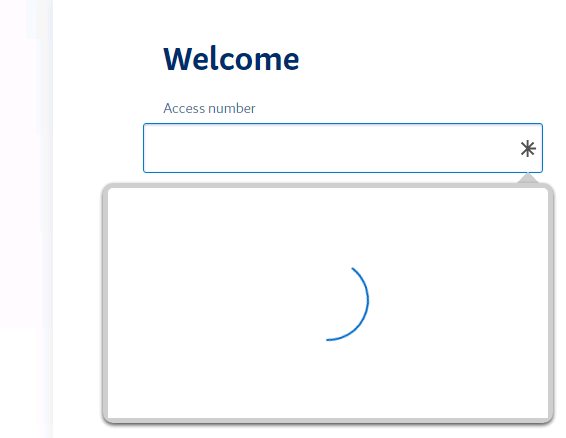
however the in-field interface with the login extension is not working at all. I just get the circle no matter what I try to refresh
Please bring back rich text notes
ok so it is a small glitch to be fixed. Thats great.
Creating new records - selecting folder
Sorry, I dont understand...where can I manually enter a folder name? my folder hierarchy appears to be physical folders as I can view properties of them
Web Login extension still not working reliably.
The browser app is still not working right.
The option to pick the credentials from the * within the credential fields now always hangs with circle going round. I now have to go up to button on toolbar and then lick from list on there to populate credentials
Creating new records - selecting folder
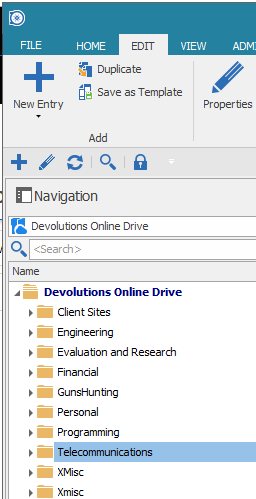
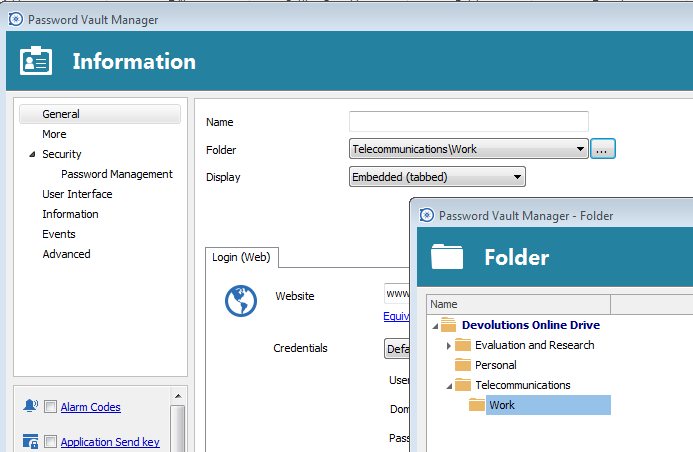
Why when I create a new record do all of my folders not show up to select the current folder:
here is my folder structure
and folders listed when click ...
Please bring back rich text notes
The secure notes are still causing me problems.
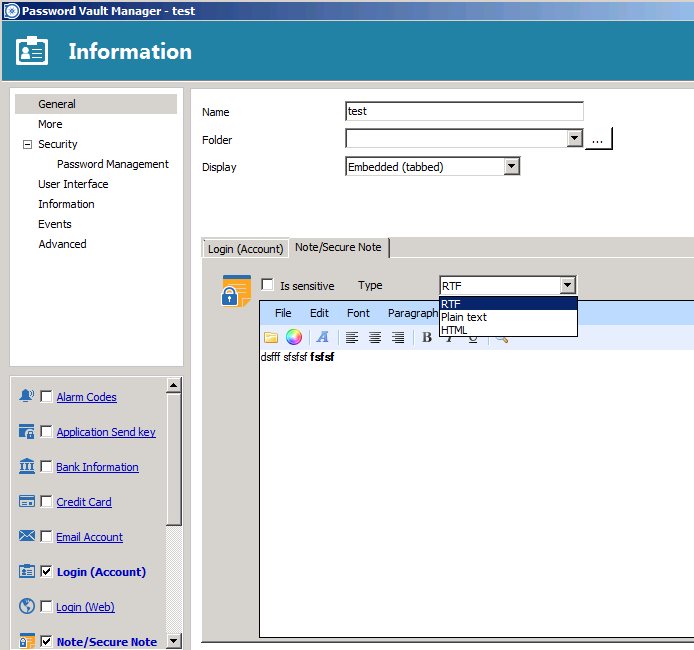
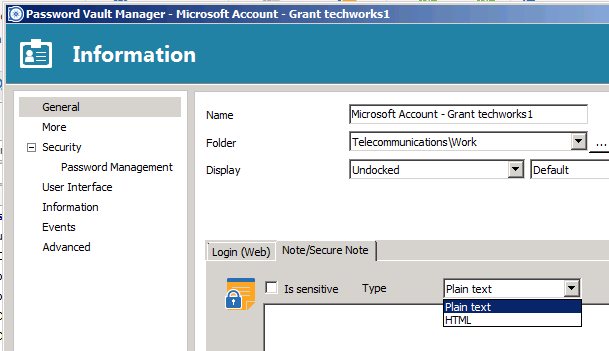
Some new records provide for three types: plain, RTF and HTML, whereas others only provide for 2 options: HTMP and Plain:
Why has the RTF missing on some new records?
Please bring back rich text notes
Aha.. my current setting:
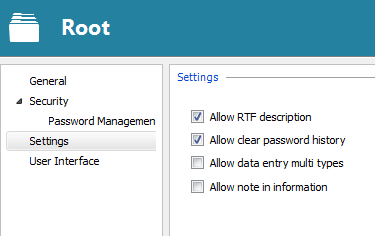
have now ticked "allow multiple data entry types" and the various types now show up again!.
I had a previous issue with this about 2 or 3 releases when I was having extremely slow save times due to saving embedded images in records. The next release dropped the ability to have embedded images and thats when the multiple type options disappeared so I assumed it was no longer available. Since then I have been using an extg record that has the multiple types as my template for new records.
Now back to the way it used to be.
NB what is the last tick box for? "allow note in information"
Thanks for the great support.
Regards
Grant