
sredlin
Use Remote Desktop Manager with Azure AD App Proxy Pre Auth and Devolution Password Server
Hey Nicolas, is there any progress on this?
Use Remote Desktop Manager with Azure AD App Proxy Pre Auth and Devolution Password Server
How is it going? :)
Use Remote Desktop Manager with Azure AD App Proxy Pre Auth and Devolution Password Server
Hey Nicolas, are there any updates regarding this feature?
Use Remote Desktop Manager with Azure AD App Proxy Pre Auth and Devolution Password Server
Hey Nicolas, are there any updates regarding this feature?
Use Remote Desktop Manager with Azure AD App Proxy Pre Auth and Devolution Password Server
Hey Nicolas, can you give us an update yet?
Kind Regards
Stefan Redlin
Use Remote Desktop Manager with Azure AD App Proxy Pre Auth and Devolution Password Server
Hey Nicolas, if it would help you we can also show you our configuration so that we can look at the problem together. We could also test here, since the system is not yet productive.
If this would help we are happy to assist you.
Kind Regards
Stefan Redlin
Use Remote Desktop Manager with Azure AD App Proxy Pre Auth and Devolution Password Server
Hey Nicolas, can you give us an update yet?
Kind Regards
Stefan Redlin
Use Remote Desktop Manager with Azure AD App Proxy Pre Auth and Devolution Password Server
Hello,
It would be great if the Remote Desktop Manager supports Pre Authentication via Azure AD Application Proxy. We would like to publish the Devolution Password Server application via Azure AD Application Proxy and secure it via Pre Auth.
The website itself works fine, but the Remote Desktop Manager refuses to work.
As soon as we change the authentication to Pass Through, the RDM works again.
This would be a desirable feature to secure the publication of sensitive information even better.
Kind Regards
Stefan Redlin
Global setting for user authentication
Thanks for the fast repley.
I make this change yesterday and nothing happend.
Today i check it and just change the language on the server to english to confirm that i selected the right setting and afterwards on my client i'am getting the promt.
Is there a short delay? Do Clients need a reboot?
Global setting for user authentication
Hello Folks,
is it possibile to set a global option (datasource wide) to get a promt for a password every time the application starts?
Regards Stefan Redlin
Add-on Request: Veeam Backup Console
Hey Michaël,
i do a first test and it's working. I will test it tomorrow with different connections.
Do i still need the admin right or will it work as a normal user.
Last one would be much better, cause nobody is an administrator on out terminalserver.
Thank you for your great support. It's absolutly wonderful.
Regards
Stefan
Add-on Request: Veeam Backup Console
Hey Michaël,
vacation was awesome. Thanks for asking. :-)
Here are the Exports.
Connections:

Client:

I hope this information answers all questions.
Regards Stefan
Add-on Request: Veeam Backup Console
Hey Michaël,
sorry for the late response, i was on vacation.
1) If i use the Save Shortcut Button a link will be saved to my desktop and everything works fine.
2) I can save and edit credentials.
3) It's a blue V.
4) I saved it to \AppData\Roaming\Devolutions\RemoteDesktopManager\AddOns
Problem now is that RDM fill in the form like :
Hostname: IP --- Correct
Username: IP\User --- should be Domain\User
The change of Username/Port/IP works.
Regards Stefan
Add-on Request: Veeam Backup Console
Hey Michaël,
thank you for your fast respond.
I replaced the VeeamAddon.dll and the behavior is a little bit different.
I've made a connection from this server to host1 by typing in all data manually.
If i want to connect to the same server the IP Address and Username is filled in. But the Credentials are not filled in.
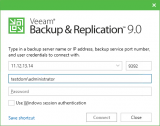
If i create a different connection nothing ist replaced.
Little bit background information.
RDM is installed on an W2012R2 Server which is a rds host. So addon file is stored in \AppData\Roaming\Devolutions\RemoteDesktopManager\AddOns
My user account has locale administrator rights.
Thank you for the development. :-)
Regards Stefan
Add-on Request: Veeam Backup Console
Hello,
I imported the addon and i can create a session with Veeam.
But the Server and Credentials which are used in the session will not be used when i start the session.
All the time it it localhost with "Use windows auth..."
Regards Stefan
When DB offline use different IP
Hello Devolution,
is there a way to use easy two different IP addresses for one session? Maybe the trigger is an event like "database is in offline mode".
This would very helpful in situations where the remote ips are different from the internal (NAT).
Looking forword for an answer.
Regards Stefan
Add-on Request: Veeam Backup Console
Hey Folks,
are there any updates on this one?
Regards Stefan
IGEL UMS
Only found this Info.
https://www.igel.com/en/products/software-solutions/igel-management-interface-imi.html
It would be great if it works like the vSphere Client.
Just open the Programm with the specific IP/Username/Password
IGEL UMS
Hey folks,
would be great if you could implement the IGEL UMS as a connection.