
j.worobij
Spiceworks Devices Entry for whole group
Thank you very much.
Best regards
Spiceworks Devices Entry for whole group
I mean the spiceworks tab in the options of a device:
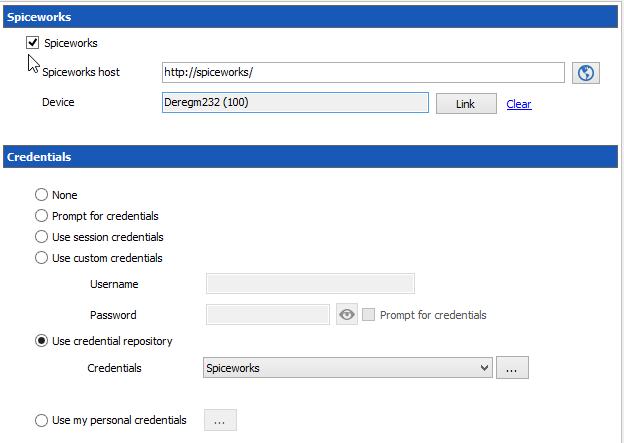
We have so many clients, that i don't want to change each entry. So it would be nice, if i could use a batch action or something like that,
and insert the $HOST$ variable into the device field on the spiceworks tab.
Best practice for personal credentials?
Hi,
is there a best practice guide for using different personal credentials for each admin?
Each of our admins has an own admin account, which they use to log in to the servers or clients.
Now i'm looking for a central way to configure, that each admin use his default credentials.
When i'm editing the credentials, i only can use a specific personal login.
I know they could do it theirselves, but i think it's better, if i would preset this.
Thanks for your help.
Greets
Spiceworks Devices Entry for whole group
Hi,
is there a possibility to enter the spiceworks devices name for a whole group and not for each device?
e. g. with $HOST$ variable?
Thanks for your help.
Greets
Form Auto submit
Hi,
no, I think you misunderstood me.
We only type in an username, but it has no password.
Regards
Form Auto submit
Hi,
the other way.. the first website contains an username but no password.
For the second website, I will search the correct html File.
Regards
Form Auto submit
Hi,
ah I understand and now it works fine.
But I'm sorry .. with the next login, there is the next problem.
Source code:
<td>
<input name="password_work" type="password" size="50">
<input name="password" type="hidden" value="">
</td>
</tr>
<tr height="3">
<td colspan="2"><img src="/images/spacer.gif" height="3"></td>
</tr>
<tr>
<td></td>
<td>
<input type="submit" value="Login">
</td>
</tr>
</table>
In this case the value is "Login" (without spaces), but it doesn't work.
Any idea?
And a problem with HP iLO 3 Login. In this case rdm put "ID_SPNEGO" as login button id.
Instead of the automatic login, there is a windows prompt, where i have to put in user and password again.
Source Code:
<!DOCTYPE HTML>
<html style="overflow:hidden;">
<head>
<meta http-equiv="X-UA-Compatible" content="IE=edge" />
<meta http-equiv="Content-Type" content="text/html; charset=utf-8" />
<meta name="copyright" content="Copyright © 2006-2012 Hewlett-Packard Development Company, L.P." />
<title>Login</title>
<link href="../css/jquery-ui.css" rel="stylesheet" type="text/css" media="all" />
<link href="../css/eov.css" rel="stylesheet" type="text/css" media="all" />
<!--[if lte IE 9]><link href="../css/eov_lteIE9.css" rel="stylesheet" type="text/css" media="all" /><![endif]-->
<!--[if lte IE 6]><script type="text/javascript" src="../js/supersleight-min.js"></script>
<![endif]-->
<script type="text/javascript" src="../js/json2.js"></script>
<script type="text/javascript" src="../js/jquery.js"></script>
<script type="text/javascript" src="../js/jquery-ui.js"></script>
<script type="text/javascript" src="../js/iLO.js"></script>
<script type="text/javascript">
var me=this;
var isConnected=iLO.init({"helpUrl": "scr-webui.html"});
$("#help_button").live('click', function () {
iLO.openContextHelp("scr-webui.html");this.blur();return false;
});
$(".login-link").live('click', function () {
var elem = $(this).attr("toggle");
$("#" + elem).toggle("slow");
return false;
});
$(document).ready(function () {
$("#login_box").load("login_box.html");
$("#effect").hide();
iLO.translatePage();
});
</script>
</head>
<body class="bodyContent login-body">
<table class="login-banner-table" border="0" cellspacing="0">
<tr>
<td class="login-banner-left">
<img class="login-logo" id="login-logo" src="../images/signin_logo.png" alt="hp" />
<div class="login-banner-title">
<h1 rel="localize[appName.titleHeading]" id="titleHeading">Integrated Lights-Out 3</h1>
<h2 rel="localize[appName.hpBrand]" id="hpBrand">HP ProLiant</h2>
<br /><br />
<span id="fwver_span" style="display:none; white-space:nowrap;"><span rel="localize[login.fwver]" id="titleFwver">Firmware Version</span> <span id="fwver"></span></span><br />
<span id="cn"></span>
<br /><br /><br />
</div>
</td>
<td class="login-banner-right"></td>
</tr>
</table>
<div class="login-middle">
<div style="width:20px;float:right;margin-right:20px;margin-top:10px;">
<img id="help_button" src="../images/help.png" title="help"
langKey="help" langAttr="title" border="0" style="cursor:pointer;" />
</div>
<table style="height:100%;width:90%;float:right;border:0;margin:0;padding:0;" cellspacing="0">
<tr>
<td style="width:45%;padding-top:40px;padding-left:10px;padding-right:60px;vertical-align:top;">
<div id="loginSecurityBanner" style="display:none;padding:10px;background:none;">
<h5 style="border-bottom: 1px solid;" rel="localize[login.secNotice]">Security Notice</h5>
<p id="securityMessage" style="text-align:justify;margin:0;padding-left:0px;padding-right:3px;white-space:pre-wrap;overflow:auto;max-height:25em;"></p>
</div>
</td>
<td valign=top id="login_box" style="width:50%;"></td>
</tr>
<tr height="26px;">
<td> </td>
<td style="padding-left:5%"><span id="login-copyright">© Copyright 2002-2013 Hewlett-Packard Development Company, L.P.</span></td>
</tr>
</table>
</div>
</body>
</html>
Thank you very much..
Regards
Form Auto submit
Hi,
the site isn't public, but here is the important source part of the login page (imho):
<table bgcolor='' background='' border='0'> <tr align="center" valign="middle"> <th align="right" style="color:white;font-size:10pt;">Admin Name: </th> <td align="left" style="color:white;font-size:10pt;"><INPUT type=text name="admin_id" tabindex="1" SIZE="21" MAXLENGTH="31" VALUE=""> </td> </tr> <tr align="center" valign="middle"> <th align="right" style="color:white;font-size:10pt;">Password: </th> <td align="left" style="color:white;font-size:10pt;"><INPUT type="password" name="admin_pw" tabindex="2" onFocus="testSelect();" onChange="checkPassword();" SIZE="21" MAXLENGTH="31" VALUE=""> </td> </tr> <script language="javascript"> write_one_check_box("save_username_info"); </script> <tr align="center" valign="middle"> <td> </td> <td align="left"> <INPUT type="button" value=" Login " onClick="checkIt();" tabindex=\ "4\"> </td> </tr> </table>
Regards
edited by j.worobij@goetz-fm.com on 6/16/2015
Form Auto submit
Hi,
unfortunately the auto submit function doesn't work with my configuration.
Auto fill works, but no automatic login, although I already put "[submit]" in the login button ID.
Of course I use IE with embedded mode.
Any idea? I don't find anything in the documentation.
Here's my configuration... Did I forget anything?
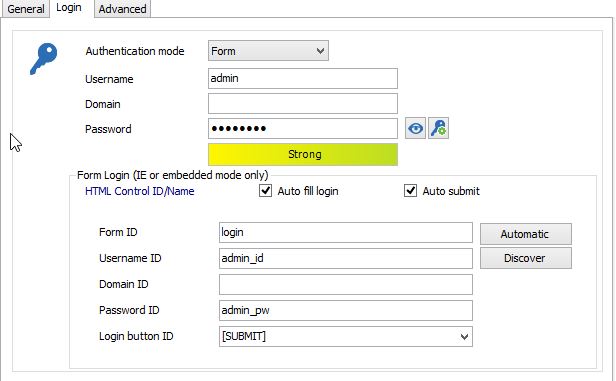
Thanks for your help.
Regards