
ehinkle27
RDM auto login with proxmox
I am trying to auto login to a proxmox login page and I was able to get the fields for username and password, but I can't get the Login box to select. Any idea how to get RDM to submit the request after autofill. I have selected submit and enter and neither work. I have attached a screenshot of the login page and this is what is shown for the code where the login button is. I have also tried putting in the button id.
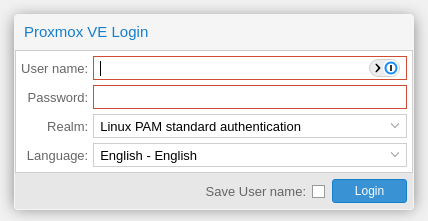
<a class="x-btn x-unselectable x-box-item x-toolbar-item x-btn-default-small" style="min-width: 75px; left: 311px; top: 0px; margin: 0px;" hidefocus="on" unselectable="on" role="button" aria-hidden="false" aria-disabled="false" id="button-1070" tabindex="0" data-componentid="button-1070"><span id="button-1070-btnWrap" data-ref="btnWrap" role="presentation" unselectable="on" style="" class="x-btn-wrap x-btn-wrap-default-small "><span id="button-1070-btnEl" data-ref="btnEl" role="presentation" unselectable="on" style="" class="x-btn-button x-btn-button-default-small x-btn-button-center x-btn-text"><span id="button-1070-btnIconEl" data-ref="btnIconEl" role="presentation" unselectable="on" class="x-btn-icon-el x-btn-icon-el-default-small " style=""></span><span id="button-1070-btnInnerEl" data-ref="btnInnerEl" unselectable="on" class="x-btn-inner x-btn-inner-default-small">Login</span></span></span></a>
Tabs - Visual Effect
was this feature implemented was looking at how when opening tabs they could have different tab colors?
Inherit tab color
was this ever answered?
centralize ssh session logs
If I leverage the script would I be able to use the $NAME$-$TIME_TEXT$.log. in the script to know what file was generated as part of that session?
centralize ssh session logs
Just did some testing to see if I could specify a UNC path and looks like that doesn't work. Looks like I would have to map a drive on the computer and then use that mapped drive as the log location. Is it possible to have it use a unc path and provide username/password if needed to connect to the share?
centralize ssh session logs
or it could have 3 variables to detect if I am offline, sort of what happens with the database I have the option set to ask if I want to work offline or online. IT could then I I say online use the local path, if offline use the unc path.
centralize ssh session logs
even doing the unc i would need the different variable per os since windows unc path connection is different then linux.
centralize ssh session logs
yes the feature would definitely help especially for those that run rdm on different operating systems. I mostly run on windows and linux but I have a mac and could try on the mac as well. I will try pointing to a UNC path and see if that works. Only think I wonder or will need to see how it works is if it can't connect to the unc path if I am working offline how RDM handles that.
centralize ssh session logs
That would be great so I don't have to create different ssh clients (one for windows and one for linux). Imagine I would have a $log_path_linux = ~/console_logs/ and $log_path_win = %UserProfile%/console_logs/ and I currently use my current file names $NAME$-$TIME_TEXT$.log.
That would not fix the sftp, that was to get the logs from all systems in one central location so I don't have to go back to the host to review. I imagine I could point them to a unc path, not sure if that will work, which is why I was thinking to just copy them off box to a central location which could be an sftp or smb share.
Is the first feature something I can do now or coming out? That OS detection would definitely be handy especially If I am using a 3rd party program that runs on both Linux and windows but is called differently. Like I do have putty on both (win/Linux) and launching would be different
centralize ssh session logs
I am using devolutions on multiple computers, some linux some windows with a MSSQL vault. I have one issue with ssh logging when I configure it on a windows computer and then open the session on a linux computer I get the error on the path. so What I have started to do is create an ssh object for linux and one for windows that have the paths. Not sure if there is a better way to do that, but what I mainly wanted to know, is there a way when the terminal session is ended to run a script from RDM to copy the log file that was created in the log path to a remote server via sftp. This would allow all the logs to be centralized in one location?
scp/sftp server tool
Does RDM have the ability to launch a local scp/sftp server for file transfers? that would be a nice feature for when you need to get files from devices but the device requires sftp.
OneDrive explorer freezes session during downloads
I have added a one drive session for RDM and it is great that i can browse files on my one drive. One problem is that when I go to download a file it hangs RDM so that I can not switch over to a different session. Is it possible for when downloading a file or launching the file from one drive I can continue to use RDM and switch to another session seems like this is running on a single thread or something and not able to multi-task.
thanks
SQL RDM Cache
I am running RDM enterprise with SQL server and have it enabled to cache data. Recently I had my laptop with me at a remote location without access to the SQL server. When I launched RDM, it tried to connect and eventual failed, and then I had to switch the system to offline. When in offline mode I was not able to see my systems/passwords that were available when connected to the SQL server. What I have observed is if I launch RDM and have SQL connectivity it will load my information, then if i go offline I can still access the systems/password and update or create new systems. Then when I go online again it asks to sync the new systems.
Is this the expected behavior to only be able to work offlilne, after initially connecting to the SQL server and then switching offline? I would have thought once I connect to SQL server it cached a copy of the systems, then the next day if I opened my laptop and launched RDM with no SQL connection it would switch to offline mode and I would have access to my systems/passwords.
User's do not see all items
We are both using the same version which is 13.5.7.0 of the enterprise edition.
User's do not see all items
No that does not make a difference, we also had done file>refresh.
User's do not see all items
We are using RDM enterprise with the connection database store in MS SQL. We use active directory authentication for the SQL database. I have a user for some reason cannot see all the RDP sessions in the list of connections available. We have He is listed as an administrator as well as most users, but I will have a list of 14 RDP connections and when I login, I can see all 14. When the other user logs in he only see's 10 of the sessions. We do not have any permissions set on the individual RDP files when looking at the files everything is default. Can someone tell me why one user would see some RDP connections and another would not?
other s3 data sources
Is it possible for the data sources to be updated to include other s3 like stores like (google, dreamhost, backblaze, etc). This seems like it should be fairly easy, all those services utilize an access key, ID and bucket name all you would have to do is provide the ability to plugin the url.
CyberArk Password vault
Good to hear will that be the next beta?
CyberArk Password vault
Has any progress been made to integrate with CyberArk password vault? There is currently a way to use the Privileged Session Manager (PSM) but would like to have all passwords stored and pulled from the password vault. They do have a component that allows applications like web apps to pull passwords.
data source settings greyed out and user specific settings
the link you reference shows the below for encryption.
"A mix of our own private key and a master password (passphrase) is used to create a strong encryption key (256-bit key)." When using integrated AD authentication and a SQL server, no password is provided by the user who logs in. In that case is only your private key used to encrypt the password as well as the user specific password?
data source settings greyed out and user specific settings
when setting user specific credentials where is this information stored? Help says user specific local settings are stored in the user profile, so I am assuming the standard user specific settings are stored in the database. If so what type of encryption is used, what key is used and where is that stored?
data source settings greyed out and user specific settings
Below are screenshots for the settings.
data source settings greyed out and user specific settings
I am using RDM with Microsoft SQL server and have been configured as db_owner for the database that is used for our passwords. Yet when I login and to administration>data source settings to see what the encryption settings are, I can't because the entire menu bar under administration is greyed out. Why is this greyed out, what other access do I need to have the ability to configure users and data source settings. I am using integrated authentication with the SQL server. I am trying to find what encryption settings are used for data that is stored in the database and where in the database is the passwords stored when using SQL to validate.
Also, when setting user specific credentials where is this information stored? Help says user specific local settings are stored in the user profile, so I am assuming the standard user specific settings are stored in the database. If so what type of encryption is used, what key is used and where is that stored?
Add alternate shell value in Remote Desktop Manager
When looking at an .RDP file there are a couple of values I would like to know if they can be set in RDM's connection settings for MS remote desktop and if so where. The values in the RDP file are full address:s: and alternate shell:s:. I take it the computer field in RDP sessions corresponds with full address, but I do not know where alternate shell value can be set.
thanks.
Remote desktop manager hanging when using sub connections
should one not use sub connections in that manner, what else would we use sub connections for?