Incorrect Default Program Paths

Hi,
a few users cannot login to the RDMS Datasource any more. It just stopped working, maybe after a password change or so.
They can login via the RDMS website, though.
Other users are fine. I've verified their setup is ok. We are using RDM client 8.X plus RMDS 2.0
Obviously a significant problem to us.
regards
Alex
All Comments (62)
Hi,
Are you sure that there password is correctly set in the RDM data source configuration? Could you verify if the are able to login online?
David Hervieux
Hi,
yes, its correct there, and also does not work when there is no password in the datasource but manually entered.
Online, i.e. http://servername/RDMS works fine.
regards
Alex
Do you know the error message they get?
David Hervieux
Yes, it wait's around a minute, then they get (german translated back to english):
"The connection to the data source could no be established. Do you want to change to offline mode?"
And then:
"The current datasource is unavailible
The corresponding connection has been closed: Unkown Error while receiving"
Do you think this could be related to a timeout?
David Hervieux
The minute sounds like one, yes.
Is there a point in wiresharking the connection?
Is it possible that for an unknown reason, your domain does not respond quickly enough?
David Hervieux
That is certainly possible, but I'd assume that would hit all users and not just a few. also other applications should see the same issue, right?
edited by AGran on 5/21/2013
Hi Alex,
Could you try to unzip this application and give it a try?
You need to configure the Domain machine name and also the RDMS URL
I think that I've found a timeout issue that could be the source.
David Hervieux
RDMSTester.zip
HI
the AD-Check with several DCs always gives „Invalid Credentials“. Proxy-Test says “success” mit changing values in ms.
We are currently verifying the DC setting of RDMS as well.
It needs to be the machine or the IP. Does it work with your own credentials?
For the proxy, how long does it take?
David Hervieux
Just tried with my credentials (that work on RDM client and RDMS website):
Gives "Invalid Credential" no matter which DC I try.
Proxy gives 2300ms, but this is likely because I'm currently at home via VPN
Oh,
I think that you get invalid credentials because you are using a VPN. This is a low level call that needs to be local
David Hervieux
Right. So I've copied the tool to a (virtual) box in our office and run it from there.
First test ok, valid credentials (mine are usually working, so this is kind of expected).
Proxy gave around 2200ms per each role loading.
Upon second click on proxy test I got an error:
Informationen über das Aufrufen von JIT-Debuggen
anstelle dieses Dialogfelds finden Sie am Ende dieser Meldung.
************** Ausnahmetext **************
System.Net.WebException: Fehler bei der Anforderung mit HTTP-Status 404: Not Found.
bei System.Web.Services.Protocols.SoapHttpClientProtocol.ReadResponse(SoapClientMessage message, WebResponse response, Stream responseStream, Boolean asyncCall)
bei System.Web.Services.Protocols.SoapHttpClientProtocol.Invoke(String methodName, Object[] parameters)
bei RDMSTester.WebReference.RDMSServices.Login(String userName, String password)
bei RDMSTester.Form1.butTestProxy_Click(Object sender, EventArgs e)
bei System.Windows.Forms.Control.OnClick(EventArgs e)
bei System.Windows.Forms.Button.OnClick(EventArgs e)
bei System.Windows.Forms.Button.OnMouseUp(MouseEventArgs mevent)
bei System.Windows.Forms.Control.WmMouseUp(Message& m, MouseButtons button, Int32 clicks)
bei System.Windows.Forms.Control.WndProc(Message& m)
bei System.Windows.Forms.ButtonBase.WndProc(Message& m)
bei System.Windows.Forms.Button.WndProc(Message& m)
bei System.Windows.Forms.Control.ControlNativeWindow.OnMessage(Message& m)
bei System.Windows.Forms.Control.ControlNativeWindow.WndProc(Message& m)
bei System.Windows.Forms.NativeWindow.Callback(IntPtr hWnd, Int32 msg, IntPtr wparam, IntPtr lparam)
************** Geladene Assemblys **************
mscorlib
Assembly-Version: 2.0.0.0.
Win32-Version: 2.0.50727.5456 (Win7SP1GDR.050727-5400).
CodeBase: file:///C:/Windows/Microsoft.NET/Framework/v2.0.50727/mscorlib.dll.
----------------------------------------
RDMSTester
Assembly-Version: 1.0.0.0.
Win32-Version: 1.0.0.0.
CodeBase: file:///C:/Users/cli/Desktop/RDMSTester.exe.
----------------------------------------
System.Windows.Forms
Assembly-Version: 2.0.0.0.
Win32-Version: 2.0.50727.5460 (Win7SP1GDR.050727-5400).
CodeBase: file:///C:/Windows/assembly/GAC_MSIL/System.Windows.Forms/2.0.0.0__b77a5c561934e089/System.Windows.Forms.dll.
----------------------------------------
System
Assembly-Version: 2.0.0.0.
Win32-Version: 2.0.50727.5456 (Win7SP1GDR.050727-5400).
CodeBase: file:///C:/Windows/assembly/GAC_MSIL/System/2.0.0.0__b77a5c561934e089/System.dll.
----------------------------------------
System.Drawing
Assembly-Version: 2.0.0.0.
Win32-Version: 2.0.50727.5462 (Win7SP1GDR.050727-5400).
CodeBase: file:///C:/Windows/assembly/GAC_MSIL/System.Drawing/2.0.0.0__b03f5f7f11d50a3a/System.Drawing.dll.
----------------------------------------
Devolutions.Utils
Assembly-Version: 3.0.0.0.
Win32-Version: 3.0.0.0.
CodeBase: file:///C:/Users/cli/Desktop/Devolutions.Utils.DLL.
----------------------------------------
System.Xml
Assembly-Version: 2.0.0.0.
Win32-Version: 2.0.50727.5420 (Win7SP1.050727-5400).
CodeBase: file:///C:/Windows/assembly/GAC_MSIL/System.Xml/2.0.0.0__b77a5c561934e089/System.Xml.dll.
----------------------------------------
System.Configuration
Assembly-Version: 2.0.0.0.
Win32-Version: 2.0.50727.5420 (Win7SP1.050727-5400).
CodeBase: file:///C:/Windows/assembly/GAC_MSIL/System.Configuration/2.0.0.0__b03f5f7f11d50a3a/System.Configuration.dll.
----------------------------------------
agsv0tzo
Assembly-Version: 1.0.0.0.
Win32-Version: 2.0.50727.5456 (Win7SP1GDR.050727-5400).
CodeBase: file:///C:/Windows/assembly/GAC_MSIL/System/2.0.0.0__b77a5c561934e089/System.dll.
----------------------------------------
System.DirectoryServices.AccountManagement
Assembly-Version: 3.5.0.0.
Win32-Version: 3.5.30729.5420 built by: Win7SP1.
CodeBase: file:///C:/Windows/assembly/GAC_MSIL/System.DirectoryServices.AccountManagement/3.5.0.0__b77a5c561934e089/System.DirectoryServices.AccountManagement.dll.
----------------------------------------
System.DirectoryServices
Assembly-Version: 2.0.0.0.
Win32-Version: 2.0.50727.5420 (Win7SP1.050727-5400).
CodeBase: file:///C:/Windows/assembly/GAC_MSIL/System.DirectoryServices/2.0.0.0__b03f5f7f11d50a3a/System.DirectoryServices.dll.
----------------------------------------
System.DirectoryServices.Protocols
Assembly-Version: 2.0.0.0.
Win32-Version: 2.0.50727.4927 (NetFXspW7.050727-4900).
CodeBase: file:///C:/Windows/assembly/GAC_MSIL/System.DirectoryServices.Protocols/2.0.0.0__b03f5f7f11d50a3a/System.DirectoryServices.Protocols.dll.
----------------------------------------
System.Web.Services
Assembly-Version: 2.0.0.0.
Win32-Version: 2.0.50727.5420 (Win7SP1.050727-5400).
CodeBase: file:///C:/Windows/assembly/GAC_MSIL/System.Web.Services/2.0.0.0__b03f5f7f11d50a3a/System.Web.Services.dll.
----------------------------------------
System.Data
Assembly-Version: 2.0.0.0.
Win32-Version: 2.0.50727.5420 (Win7SP1.050727-5400).
CodeBase: file:///C:/Windows/assembly/GAC_32/System.Data/2.0.0.0__b77a5c561934e089/System.Data.dll.
----------------------------------------
1lcnbfwr
Assembly-Version: 1.0.0.0.
Win32-Version: 2.0.50727.5456 (Win7SP1GDR.050727-5400).
CodeBase: file:///C:/Windows/assembly/GAC_MSIL/System/2.0.0.0__b77a5c561934e089/System.dll.
----------------------------------------
System.resources
Assembly-Version: 2.0.0.0.
Win32-Version: 2.0.50727.5420 (Win7SP1.050727-5400).
CodeBase: file:///C:/Windows/assembly/GAC_MSIL/System.resources/2.0.0.0_de_b77a5c561934e089/System.resources.dll.
----------------------------------------
System.Web.Services.resources
Assembly-Version: 2.0.0.0.
Win32-Version: 2.0.50727.4927 (NetFXspW7.050727-4900).
CodeBase: file:///C:/Windows/assembly/GAC_MSIL/System.Web.Services.resources/2.0.0.0_de_b03f5f7f11d50a3a/System.Web.Services.resources.dll.
----------------------------------------
System.Windows.Forms.resources
Assembly-Version: 2.0.0.0.
Win32-Version: 2.0.50727.5420 (Win7SP1.050727-5400).
CodeBase: file:///C:/Windows/assembly/GAC_MSIL/System.Windows.Forms.resources/2.0.0.0_de_b77a5c561934e089/System.Windows.Forms.resources.dll.
----------------------------------------
mscorlib.resources
Assembly-Version: 2.0.0.0.
Win32-Version: 2.0.50727.5456 (Win7SP1GDR.050727-5400).
CodeBase: file:///C:/Windows/Microsoft.NET/Framework/v2.0.50727/mscorlib.dll.
----------------------------------------
************** JIT-Debuggen **************
Um das JIT-Debuggen (Just-In-Time) zu aktivieren, muss in der
Konfigurationsdatei der Anwendung oder des Computers
(machine.config) der jitDebugging-Wert im Abschnitt system.windows.forms festgelegt werden.
Die Anwendung muss mit aktiviertem Debuggen kompiliert werden.
Ahh, I see. evyer test proxy needs a preceding test ad click :)
well gave 2.2s first and 1.8s in the first test, subsequent one was 1.8s and 1.6s
Will try with non working credentials tomorrow again
I have made a fix
http://download.devolutions.net/RDMS/RDMS.2.0.1.0.zip
David Hervieux
Hello David, thanks for your reply, I'm just picking up from Agrans' testing and have just tried out the new build (copy updated files, restart webserver), however I cannot report any changes in our issues so I'll update you on our tests:
Please note we have two major sites A and B connected with a quite fast VPN (~13ms Ping) and we are running the RDM-Server on a virtual machine @ site A with a local SQL database. Both sites have multiple domain controllers within reach of ~1ms to servers & clients and there's only one domain for which I am Admin. However, the colleagues using the RDM and associated groups are in different domain OUs.It is possible to browse the domain controller for AD security groups ("Roles" in RDM which is a bit misleading imo) and assign them to RDM-security groups. Domain-configuration in the server console seems correct.
Now currently...
-logging on via $domain\$user only works for accounts in OU @ site A
-logging on with just $user creates a lokal account in RDM and only shows unprotected entries, however the password is obviously verified against the domain ?
-a user from site B moved to site A for testing purposes can login with $domain\$user-credentials but does not see any additional trees associated to domain groups, so probably changing anything in the groups at this point is not wise (we would like to consolidate the AD-Groups and add more people).
-AD-Verification still is not working with the supplied tool or the admin-Function in RDM ("invalid credentials"), while Proxy check works with *any* domain account and reports success and about 50ms
-Only one colleague is able to access the RDM-server-console, although we have a few local users with "administrator" checked in user properties who can change anything else and are also admins on the RDM-host.
We also noted some little annoyances:
-in the login-dialog, TAB jumps from user to checkbox and then back to the password-field
-"always ask..."-checkboxes in datasource-config have no effect if either field contains data, only when they're empty
-if a login is not successful, there's no retry-button but only the option to go offline followed by a second error checkbox
Thanx for reading and I hope you can help us untangeling our configuration which used to work quite well until a certain point (update ? more users ?). Please get back to me if you need any config files or further information.
Best Regards, Karsten
Hi Karsten,
Thank you for the information. I also have added an option in the config file that you could try to add in the web.config (appsettings section)
<add key="UseRecursiveRoleGroup" value="false"/>
For RDMS console, you need to be directly on the server machine.
I have entered 3 bug reports for your little annoyances. This will be fixed quickly.
David Hervieux
Hi David, FYI I have not overwritten web.config since it contained different database-paths etc. so I used the old one. Does it make sense do send you a copy of the file for debugging ? Are there any useful logs ? The new key does not make any noticable difference though.
@Admin console, I do most of my tests on the RDM-machine with a local client to rule out any latency or network-issues. However as a user being able able to edit users & groups etc. , the console still replies "This action required the administrator privilege"
If you have checked the AD-issues, maybe we can agree on a remote session if you think it would help to clear things up.
Thank you very much, Karsten
Could you install another RDMS server on the same machine and with the same database but in a different virtual directory?
David Hervieux
Hello David, we have just tried that using the server administrator-wizard and it works as far as stating "installation complete", however the new instance doesn't turn up in either the RDM-Admin-list or the IIS service manager. Only the new file-directory is created with the files provided. Do you have any other suggestions or is the only way to start from scratch ? Thanks, Karsten
Have you specified a different virtual folder, for example RDMSSandbox?
David Hervieux
I've now redone the whole procedure, including setting up a new database nad used .net 4.0
THis has now setup a new entry just fine. Still, the Test Login functionality fails. I'll dig a bit deeper and switch to the produciton DB to see how that behaves.
Alright. Switched DB back to production on my test installation.
Then logged in as alg (my user id). This worked, but I'm apperantly not in any AD groups _> Bug!
When logging in as IVU-AG\alg it all works ok.
So I think first step to avoid confusion is to tell RDM not to allow logins without a preprended Domain, or better automatically preprend the domain as configured. This half working login is driving me nuts.
Will get other people (K.Fiedler) with previously non working accounts to retry on that setup.
Hi,
I will make sure to include the domain name with it's not included.
David Hervieux
Note that group membership is still not applied always.
What do you have in My Data Source Information?
David Hervieux
The users that don't work have an empty Active Directory Group list, my user has it filled.
The rest is as configured in RDMS.
Another odd thing:
In RDMS->User Management->Edit on my account, I have "Allow offline mode" checked. In My Data Source Settings, I have Offline Mode Enabled false.
In Data Source settings it is also enabled.
I really feel we need some hands on fixing..:-o
Does it specify SQL Server or Domain for the authentication in My Data Source Settings?
David Hervieux
Domain
Hi,
I have made a new build with the domain prefix issue resolved and also a new API to get the membership. It's now the version 2.0.3.0
David Hervieux
Thanks. We are making progress.
My user works fine on the new build. However the users that previously lacked their group memberships, now produce an error message:
Note that this is not the usual password wrong / login failed box. I get the usual one when I use a wrong password, and this one above with the correct password.
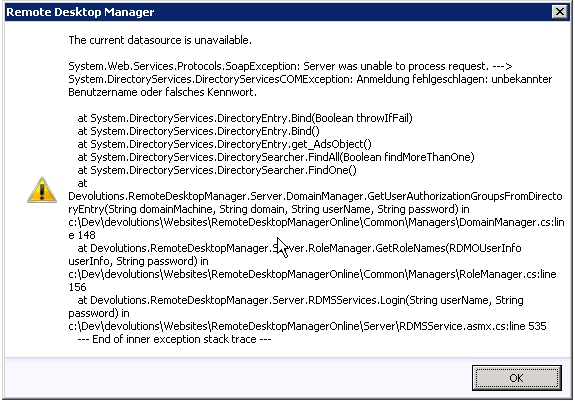
Remote Desktop Manager [ac-license]_2013-06-11_15-04-51.png
What is the translation of the error message? It seems that there user is not able to access the AD to get the groups
David Hervieux
Yes, it says: "Login failed: unknown Username or wrong password"
Which is probably true, because that is a test user. Let me dig around that..
Does it make a difference if you remove the domain name from the user name or the opposite?
David Hervieux
No, that gives the same result.
When you go in the RDMS console, you can disable the Use inherited AD group. This will use a different method to get the direct groups for the user. Do you have the same error when this is unchecked?
David Hervieux
Ok, new observation with different test user:
RDMS 2.0.1.0 : Login with Domain\username ok, but data source information shows no groups
RDMS 2.0.3.0 : Login with Domain\username ok, data source information shows groups
RDMS 2.0.1.0 : Login with username ok, but data source information shows no groups
RDMS 2.0.3.0 : Login with username ok, data source information shows groups
So that looks much better
Do I need to update my client to see that setting, or am I just blind?
I'm not sure exactly in which version this was added but it in the v8.3.1 for sure:
http://remotedesktopmanager.com/Home/Download
David Hervieux
Ok, with the use inherited groups checkbox checked on RDMS 2.0.3.0:
Homer (our account that cannot browse the AD): login box reappeared a few times without an error message, then got the stack trace error message
Same if I remove the domain name.
Testuser (that can browse the AD): AD Roles are listed.
Looks to me like the checkbox makes just the error handling worse :)
After the initial testing looked good, I'll get a couple of users to test RDMS 2.0.3.0
User testing looks good, so 2.0.3.0 seems to have fixed that. Thanks for the support!
First off you guys have created an excellent product. Hats off!!! ;)
The Oracle VirtualBox default path is still listed as "C:\Program Files\Sun\xVM VirtualBox", however, the new path is "C:\Program Files\Oracle\VirtualBox"
Does'nt affect at all since I can still override using the Installation Path screen but hope you make the necessary changes.
Regards,
Faizan Momin
Hi,
I will change that.
Thank you very much
David Hervieux
Hi David,
You are most welcome.
The path for XManager also seems to old "C:\Program Files (x86)\NetSarang\Xmanager Enterprise 3\".
The new path for XManager is "C:\Program Files (x86)\NetSarang\Xmanager Enterprise 4".
Also, I am not find/load XShell. I have tried installing the addon for XShell multiple times but it does'nt seem to work. After restarting the application Addons Manager still shows XShell addon as not installed. Would appreciate if you can help with it.
Regards,
Faizan Momin
Hi,
For the XShell Add-on did you try to install it manually from our website ?
Regards,
edited by asanscartier on 11/27/2013
André Sanscartier
Hi Andre,
Yes I have tried installing it using both the Addons Manager as well as placing the "XshellAddOn.dll" in Application Folder, however, it doesn't seem to work.
Below is more information:
Application Name: Remote Desktop Manager
Type: Binary (Non-Install)
Version: 9.0.7.0 x64
Currently Installed Addons:
- Bitwise SSH Client Addon v1.2.1.1
- FlashFXP v0.2.5.0
- Plug-in for KeePass v2.1.2.0
- SecureCRT v1.8.1.0
- SecureFX v1.6.0.2
- Toad v1.0.0.1
- XManager v1.3.0.1
Addons Installed but not detected:
- XShell v1.0.0.0
Netsarang Version:
- XShell Build 0217
- Xshell.exe: 4.0.00114
- nssock2.dll: 4.0.0018
- nsssh3.dll: 4.0.0031
- nsprofile2.dll: 4.0.0022
- nslicense.dll: 4.0.0019
- nsutil2.dll: 4.0.0040
- nsverchk.exe: 4.0.0009
- Xagent.exe: 4.0.0015
- Xactivator.exe: 4.0.0016
Regards,
Faizan Momin
edited by faizan.momin on 11/27/2013
Hi,
You're right, there is a problem with this add-on. It hasn't been recompiled since a while and it's no longer compatible with RDM.
It's a third party add-on and we have to check what we can do.
Regards,
André Sanscartier
sorry, I confused with another add-on. It works here but I will try to understand why it doesn't work with you.
André Sanscartier
Finally it was a recompilation issue. As the other add-on that I was confused with, this add-on had been forgotten when we changed the way we recompile add-ons.
It is now online and available in the add-on Manager.
Sorry for any inconvenient.
André Sanscartier
Thank You Andre. Actually I am the one who should be thankful that you took time to look into the issue and got it fixed in a days time once you had all the details. I have to hand it to you guys. Your support certainly seems to be upto the mark.
I will download the new addon and let you know how it works out.
Thank You.
Regards,
Faizan Momin
Hi Andre,
I have installed the addon and it is now getting picked up by RDM.
This is probably a configuration issue at my end or maybe I don't know yet how to work with RDM :)
I don't know how to get my XShell sessions listed under RDM.
Under Connection --> General Tab there are 2 options "Local Session" / "Shared Session". Currently its set to "Local Session". And when I click on the browse button nothing seems to happen. However, when I change the radio to "Shared Session" and click on the browse button, explorer window pop's up properly.
At the moment I am not sure which one to select. Or will I need to redefine them again in RDM.
Note: I have changed the Application Path for XShell to "C:\Program Files (x86)\NetSarang\Xmanager Enterprise 4" since my XShell is part of the Suite.
Regards,
Faizan Momin
Hi Andre,
There is one more thing that have noticed. It seems that RDM Binary version is storing data on local system rather than storing data in the folder its running from.
Currently its storing all data in "C:\Users\XXXXXX\AppData\Local\Devolutions\RemoteDesktopManager"
Regards,
Faizan Momin
Hi,
For local data, it has always been stored in AppData\Local\Devolutions\RemoteDesktopManager.
It's a normal behaviour.
Regards,
André Sanscartier
"The Oracle VirtualBox default path is still listed as "C:\Program Files\Sun\xVM VirtualBox", however, the new path is "C:\Program Files\Oracle\VirtualBox"
Does'nt affect at all since I can still override using the Installation Path screen but hope you make the necessary changes."
The 64 Bit version now points to C:\Program Files\Oracle\VirtualBox
It's strange because I have Oracle\VirtualBox listed as the path
David Hervieux