Possible v9 Bug - Phantom Entry/Caching Issue

Hello to my good friends at RDM Support!
I've just upgraded to v9.0.0.0 here (2 users so far - the other 4 are still using 8.4.6.0 until I gain confidence in v9), and have found some issues for you to look at. I will log each in separate forum topic for easier tracking.
The first relates to a Phantom entry when using Intelligent Caching. I have already investigated this one for you, and have resolved the issue, however I wanted to log it so that if there is a code bug you can fix it for future releases.
High-Level Summary
Symtpom - After deleting a Group/Folder using v9.0.0.0, the folder was still visible on my PC, despite vanishing from everybody else's PC (we use a shared SQL Server DB).
Cause - What I've determined is that the entry was still present in my offline.db file, which was presumably why it was still visible for me.
I know that you've dramatically changed the way that Caching and Offline Mode works in v9 to support higher performance and offline read/write use, and I suspect that this bug stems from those new features somehow.
Details
After I deleted the folder and it was still visible, I checked the Shared Logs to verify that it showed me deleting the entry - indeed it did, however the entry was still visible to me.
I tried using F5 to refresh the Data Source - no luck - the entry was still visible.
I tried closing RDM and then opening it up again - the entry was still there.
As I said, I then checked with other users, and for them the entry had successfully vanished.
When I looked at the dbo.Connections table in the SQL DB itself, I couldn't find the entry - it truly did appear to be deleted. But when I used PowerShell and did a Get-RMD-Session, the entry was still listed (presumably this occurs because the PowerShell obtains its data from the client, and would therefore pick up the same connections that are visible in the UI?).
By way of testing, I then created a new folder (verified that others could see it), then deleted it. It successfully vanished from all PC's (mine and others). So this phantom entry problem may only occur when a Group/Folder that existed PRIOR to v9 is deleted - TBC.
Since my PC was the only one affected by the problem, I realised that it was probably a Caching issue, so I started to look into that.
At the time I deleted the entry, my Data Source was configured as follows :
- Offline mode = Read-only (the default - I hadn't changed this since the client upgrade) Note that I wasn't using Offline Mode, I only include this for completeness.
- Caching mode = Intelligent (again, the default - I hadn't changed this setting)
I realised that my offline.db file needed refreshing.
Question : Shouldn't F5 do this? If you are successfully online to the SQL Data Source, a refresh surely should re-initialise the entire offline.db contents? Perhaps this is not the way you've designed it to work with "Intelligent" Caching...
I couldn't think of any other way of forcing the offline.db to be refreshed (considered deleting it, but was worried that would upset things).
So I re-configured my Data Source to DISABLE both Offline Mode and Caching Mode, and the entry vanished successfully. Upon re-enabling them (Read-Only/Intelligent again), however, THE ENTRY RE-APPEARED! It seems that RDM just went back to using the offline.db file that existed previously without refreshing it!
This whole issue raises some very important questions in my mind about your new Caching and Offline Modes :
- Should the Intelligent Caching mode be enabled by default? (Prior to version 9, our settings were to "Allow" Offline Mode, but nobody had used it yet - so presumably the default behaviour in previous versions was stay online only and not build an offline cache of the DB until someone clicked "Go Offline"? Also, this unsolicited building of the offline.db file slows the startup time of v9 RDM noticably)
- Should the UI indicate somewhere whether Caching and/or Offline Mode is being used, and which type/mode? (Like Outlook does with Cached Mode)
- Why is the size of my SQL DB 135 MB, however the size of the offline.db file is only 4 MB? This doesn't give me confidence that the database has cached all entries properly. (I know that the SQL DB contains tracking, logs, possibly attachments (?) and other things that don't get copied to the offline.db file, but our DB is relatively new, so I would expect that the majority of data in the DB is still raw credential and connection data).
- Is there another way to force a full refresh of the contents of the offline.db file?
- What is the difference between "Intelligent" and "Simple" Caching mode? (Nothing on online help yet)
The problem I see with all this is that this will affect ALL of your customers upgrading to v9, even when they aren't intending to use Caching and/or Offline Mode (it's the default setting now in v9)!
Sorry to dump such a monster problem on your lap - as a Programmer myself I know the pain of someone pointing out something of this magnitude!
P.S. - I have tried to replicate this issue since, and have been unsuccessful, unfortunately.
Regards
Des
edited by ceo_rdm on 10/3/2013
All Comments (18)
I will anser the question one/two at a time :-)
CTRL + refresh will clear the client cache and reload everything from the DB.
Stéfane Lavergne
For a new data source the default is: Offline Mode - Disabled, Caching mode - Intelligent.
If the you had "Allow offline" that maps to "Read/Only" offline in v9.
Prior to v9, if allow offline was checked the offline fill was synced on every action (add/edit/delete/refresh). As of v9, this is still the case, but done in a background thread.
"synced" in prior v9 was to write an XML file of the entire session list, in v9 only deltas get updated to cache (Intelligent cache). In all our tests this was faster in v9. Could you please start RDM with the "/Profiler" switch and post the result. This will display cache load times, DB refresh times and UI load times. Should help us diagnose why you are seeing a slow start of RDM.
Stéfane Lavergne
I've started the help topic for Offline Mode & Caching Mode but it's not done yet :-(
Quick overview.
Offline Mode feeds off Caching Mode. So I will start with Caching Mode.
Caching Mode is how we sync changes from the server.
- Disabled - on a client refresh action (edit, refresh, open...) the entire list of sessions is sent over from the server to the client. (slow)
- Simple - client keeps a "cache ID" locally, on a client refresh action the client verifies the cache ID against the server cache ID, in the case where it is different, the entire list of sessions are sent over from the server to the client.
- Intelligent - client keeps a cache version, on client refresh action the client sends to the server the cache version then the server responds with the delta of changes to be applied locally (add, edit, delete)
Offline Mode
- Disabled - no offline use of the data
- Read-Only - session data can be browsed and launched without connecting back to the server (SQL, RDMO, RDMS...)
- Read/Write - session data can be browsed/launched/modified
So even if you have offline mode disabled, the offline file (now a SQLite file, no longer a simple XML) may be still be present due to the Caching Mode specified.
Changed: I had wrongly specified MySQL instead of SQLite as the file structure.
edited by stefane on 10/16/2013
Stéfane Lavergne
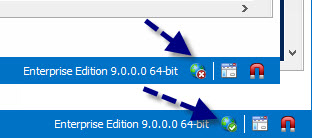
Bottom right corner of RDM we have the offline status.
edited by stefane on 10/4/2013
Stéfane Lavergne
10-4-2013 7-40-56 AM.jpg
Double check your DB file size, maybe the file growth.
You can run disk usage report (SSMS):
Right click on the database
Navigate to Reports > Standard Reports > Disk Usage By Table
[/ol]
The offline file on stores info from Connections table and a few computed values. It is normal that it is smaller than the entire DB.
Stéfane Lavergne
As for the actual bug, thank you fro the detailed explanation. I will have a look and try to reproduce the issue.
Have I missed anything? Let me know.
Best regards,
Stéfane Lavergne
Perfect! Thank you! This gives me the exact tool I wanted on Friday.
A suggesting for future releases :
Allow this "full" refresh to be invoked by keyboard shortcut also, eg - CTRL-F5
Thanks
Des
OK, after a little more testing, I withdraw my comment that Intelligent Caching slows startup speeds, but to clarify why I made that comment in the first place :
- When you run v9 for the first time, it defaults to "Intelligent Caching" mode, and therefore needs to build the initial offline.db file. This initial build does slow load times that first time (as evidenced by the attachments "Intelligent Cache initial build - Test 1.txt" and "Intelligent Cache initial build - Test 2.txt") compared to subsequent load times, after the offline.db has already been built for the first time (see "Intelligent Cache subsequent load - Test 1.txt" and "Intelligent Cache subsequent load - Test 2.txt"). So the real question is - how do those load time compare when RDM is not using offline.db? Well, it turns out that you are right, the load time from the SQL data source when RDM in not using caching at all is slightly slower - see "Profiler with NO Intelligent Cache.txt".
- I believe that my comment may have also been fueled by another problem - slower startup speeds with using the 64-bit client (as per http://forum.devolutions.net/topic7313-bit-a-lot-slower-than-bit-client.aspx). I may have assumed at one point that the slower speed was due to the building of the offline.db file, but once I switched back to the 32-bit client, performance is much better.
So, after all that is said - no further action is required by you or me for now on this particular topic (load times using Intelligent Caching).
Cheers
Des
Intelligent Cache initial build - Test 1.txt
Intelligent Cache initial build - Test 2.txt
Intelligent Cache subsequent load - Test 1.txt
Intelligent Cache subsequent load - Test 2.txt
Profiler with NO Intelligent Cache.txt
Thanks for the great overview of how Offline/Cachine mode works now in the new v9 - very helpful. Hopefully you'll include all those details once you get around to updating help.
I do have one extra question though, which is about delta updates. Your post said :
I don't understand how this can occur with an SQL Data Source. Surely this "delta" intelligence can only work with RDMO or RDMS back-ends?
So, does that mean that "Simple" and "Intelligent" actually do the same thing if we use an SQL Data Source?
Regards
Des
Hmmm - this doesn't work for me as depicted in your screenshots. If I'm in Offline mode, sure enough, I get the "red cross" icon (see Offline.jpg), however if I'm in normal, online mode, there is no "green tick" icon as you seem to get (see Online.jpg). I checked both 64-bit and 32-bit versions - same result.
As a suggestion for future version, perhaps you could include a logo that indicates the status of "Caching" as well? Something to differentiate the three modes - Disabled, Simple, Intelligent.
Regards
Des
Offline.jpg
Online.jpg
Thanks for the great idea - I hadn't thought of checking it that way. I still got a discrepancy, though - see attached.
In SQL - the dbo.Connections table is showing around 16MB, but on disk, the offline.db is only 4MB.
I'm no longer too concerned about this, but I thought I would share.
Regards
Des
DBSizeSQL.jpg
DBSizeNTFS.jpg
Once again, your responses to all the cases I logged on Friday has been superb - fast and helpful! Well done!
Keep up the good work.
Cheers
Des
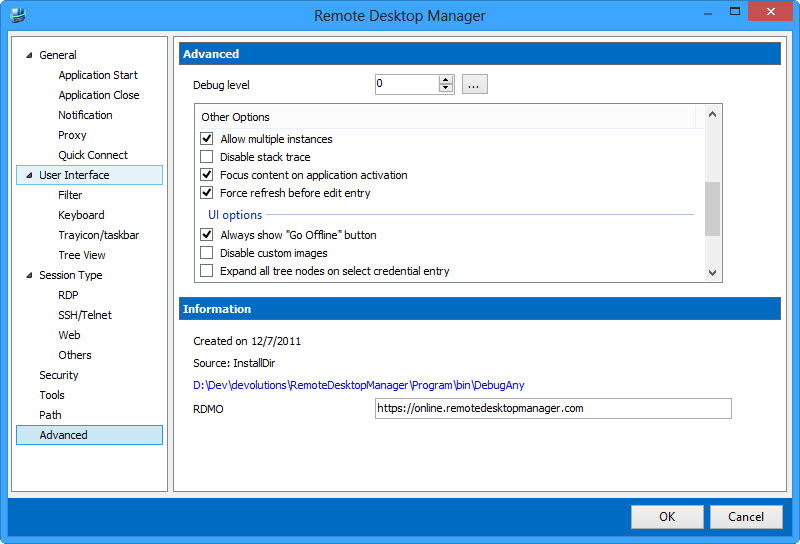
Have a look at the system option (Always show "Go Offline" button)
edited by stefane on 10/9/2013
Stéfane Lavergne
10-9-2013 11-16-48 AM.jpg
No, the Intelligent & Simple cache are very different. Simple cache refreshes all sessions if something changes. Performance degradation will occur if you have a few thousands sessions even a few hundred sessions.
Intelligent is currently available with SQL, MySQL, RDMS & RDMO data sources. The logic is actually in the DB not the server.
We are not sending deltas (fragments) of sessions but rather the delta of the data source. The delta is a combination of new/edits/deletes(removals) since that last refresh. In other words what has changed in the data source since the client last verified.
Deletes(removals)? What is that? Due to security group and such a session may no longer be available for a given user. If ever security has changed the client receives "remove" action for the affected sessions which forces the client to delete the sessions locally.
Note:
RDMS has it's own cache that caches the sessions in memory so it doesn't have to hit the DB every time a client hits the server. A query from the client will be served from memory. When a client call comes in, Same technology as the client but it's on the server.
Stéfane Lavergne
Interesting, we do store more information in SQL but not 4 times as much. I would guess the size differences here are due to the differences in the underlying storage engines (SQL Server vs SQLite)
Stéfane Lavergne
Thanks for the logs. I will investigate further the the "initial build" issue. You will notice that with the initial build files the line:OfflineManager.GetDataSourceSettings : 1280 ms
So it takes 1.2 seconds to get the data source settings from the offline file, but since the offline file does not yet exist it is created. This could be done on a back ground thread make the initial load faster.
Note:ThreadQueue.AddRow : 167 msThe rows are added to the offline file in batches via a background thread.
Stéfane Lavergne
P.S. I'm still working on the online documentation of the Offline mode & Caching modes. I will using most of what I wrote here as a starting point :-)
Stéfane Lavergne
Stefane - Thanks for your thourough replies - all great info!
Des