Need clarifications on the Devolution Send
1 vote

Hi,
enterprise user 2026.3.18.0
I'm a bit confused with the send feature.
From inside the app i see i can send securely a password via a link but here it the problem or i haven't understood it correctly.
I click on the send icon from the password menu
I got the menu i click via email but on the recipient emails i think that the purspose of this was to send to someone with no account, like you know someone asks for the password of something and we need a secure way of sending it. If i enter any email than mine i get
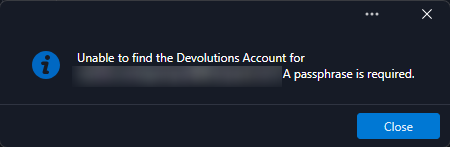
Which for me defeats the purpose of that. If i must use a passphrase i can use any free send secure link service and send the passpharase/pin with SMS. But in other managers like bitwarden you get that. The point is to send it to a email so only that user receives that secure link. Is that by design or something that can be changed?
Also from the send icon from tha main menu
Which is like the free service you havbe on the web, it tries to send the message from my account. I also hava another account for devolutions send which has my picture and another email address. i tried to click on switch account but i get a pop up of login very fast and then dissapears and gets back to the first screen
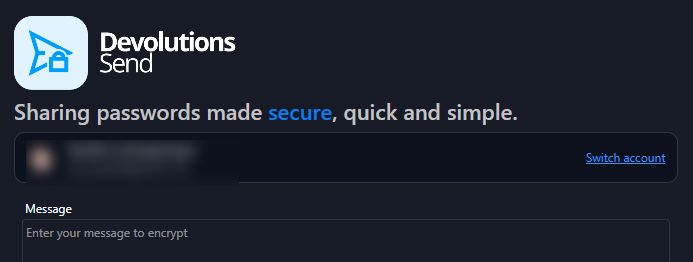

My main issue is the password send which is a feature for the paid customers. And that i believe we must be able to send to any email address without passphrase like other password manager cause i remind again that the purpose of sending to an email address is the 2FA that you need, otherwise you cannot send the passphrase from email with the link, no purpose on that.
Many thanks
-Vassilis
RDM for Windows 11
Purchased Enterprise Edition v2026.x
Recommended Answer
Hi @skoupidaki,
As my colleague Carl pointed out, the send by email feature was designed to actually send an email from our own servers removing the burden on the sender of sending the link through an other communication method or drafting an email themselves. By cryptographic design, it also restricted who could see the link with the receiver's encryption key.
If I understand your request and if I compare with Bitwarden Send, what you're asking is to add a receiver email verification feature to the send by link feature, which we could certainly add. I've created an internal ticket for this request.
Cheers,
Luc Fauvel
All Comments (5)
Hello Vassilis,
Thank you for the clear description and the screenshots.
Requiring a passphrase here is by design. Sending a password by email without one works only when the recipient already has a Devolutions Account under that email address. Remote Desktop Manager looks up that account and uses its key for the message, so no passphrase is needed. When the address has no Devolutions Account, there is no key to use, which is why the passphrase becomes required. No setting changes this in the current version. Our documentation describes it here.
https://docs.devolutions.net/send/in-app/remote-desktop-manager/#add-a-passphrase-optional
So for a recipient without an account, the passphrase has to reach them another way, such as the SMS you mentioned. Once that person has a Devolutions Account under the same email address, the same send works without a passphrase.
For the Devolutions Send button in the ribbon, on a Devolutions Cloud workspace the message is always sent as the user signed in to that workspace. The Switch account link signs you out of your Devolutions Account and opens the sign-in again, but on a Devolutions Cloud workspace it cannot change the sender, so the window still shows the same account.
Best regards,
Carl Marien
Thanks Carl for the nice reply.
Though you understand the point of me asking about that, it is the thing that you skip and you validate the recipient via email. I know this is a great product but i would love to have the same like Bitwarden where you send any text encrypted to any email the user then click on a link where another code is send on his email and then he enter that "passphrase" to reveal the text.
Please be so kind and forward this to your future requests, i'm sure it will benefit many users.
Best Regards,
Vassilis
RDM for Windows 11
Purchased Enterprise Edition v2026.x
Hello,
Thank you for the feedback.
I have forwarded your request to our product team as a feature request. You are asking for Devolutions Send to verify the recipient through their email address, with a one-time code sent to that address, so that a password can be sent to anyone without a separate passphrase.
I can't promise if or when this will be added, but your request is now in front of the team that makes those decisions.
Best regards,
Carl Marien
Hi @skoupidaki,
As my colleague Carl pointed out, the send by email feature was designed to actually send an email from our own servers removing the burden on the sender of sending the link through an other communication method or drafting an email themselves. By cryptographic design, it also restricted who could see the link with the receiver's encryption key.
If I understand your request and if I compare with Bitwarden Send, what you're asking is to add a receiver email verification feature to the send by link feature, which we could certainly add. I've created an internal ticket for this request.
Cheers,
Luc Fauvel
Thank you both for your excellent reply. I'm pretty sure it will benefit many people and a lot of people will enjoy this feature as now we are forcing to use SMS and other stuff.
Again, thanks for making this in the hope-list of Santa 😊
RDM for Windows 11
Purchased Enterprise Edition v2026.x