X Server rendering issues with Oracle product installers

I'm experiencing text rendering issues when running Oracle product installers on a remote RHEL 8 server through SSH X11 forwarding using Remote Desktop Manager's built-in X Server.
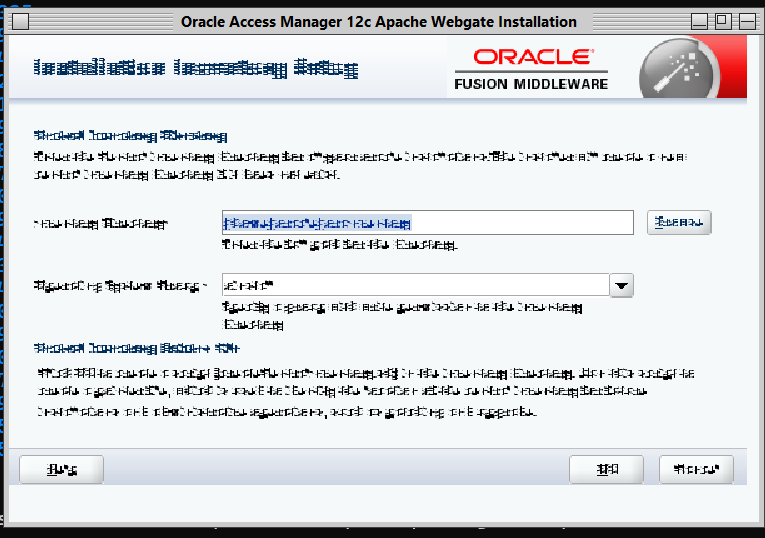
The issue was initially noticed while launching the Oracle Access Manager 12c Apache WebGate installer. The installer window opens, but most of the text is corrupted or incorrectly rendered, making it difficult to read or use the application. The graphical controls themselves appear to work normally.
Environment:
Client OS: Windows
Remote Desktop Manager: Remote Desktop Manager 2026.3.17.0 64-bit (JIT)
Remote OS: Red Hat Enterprise Linux 8
Application: Oracle Access Manager 12c Apache WebGate installer
Connection: SSH with X11 forwarding
X Server: Remote Desktop Manager built-in X Server
Troubleshooting and findings:
After some troubleshooting, I identified the X Server as the source of the problem.
If I disable the X Server integrated into Remote Desktop Manager and configure the SSH session to use VcXsrv, installed separately on my Windows machine, the installer displays correctly.
Both tests use the same Windows machine, the same RHEL 8 server, the same SSH connection and the same Java environment. The only difference is the X Server being used.
Expected behaviour:
Oracle installer GUI applications should render text and graphical elements correctly when using RDM's built-in X Server.
Actual behaviour:
Text rendering is severely corrupted when using RDM's built-in X Server, while the same application works perfectly with VcXsrv.
Could you investigate whether this is a compatibility issue with Java Swing/AWT applications or a rendering problem in the X Server included with Remote Desktop Manager?
I've attached a screenshot showing the rendering issue.
All Comments (7)
Hello,
Thank you for the detailed report.
We reproduced the issue and reported it to our development team.
As a workaround, run this command in the SSH session before you start the installer:
Could you let us know if the installer text displays correctly with this setting?
If it does not help, please send us the output of java -version and the lines Java prints when the installer starts.
Best regards,
Carl Marien
Hello,
Thank you for your response and for reproducing the issue.
It looks like the SSH command mentioned in your message was accidentally omitted. Could you please provide the command so I can test the suggested workaround?
Thanks again for your help.
Best regards,
Hello,
Please run this command in your SSH session before you start the installer:
export _JAVA_OPTIONS="-Dsun.java2d.xrender=True"Then start the installer from the same shell. The text should now display correctly.
Let us know if it works.
Best regards,
Carl Marien
Hello,
Please run this command in your SSH session before you start the installer:
export _JAVA_OPTIONS="-Dsun.java2d.xrender=True"Then start the installer from the same shell. The text should now display correctly.
Let us know if it works.
Best regards,
Hello,
Thank you for the suggestion.
Unfortunately, I tested the command:
export _JAVA_OPTIONS="-Dsun.java2d.xrender=True"
and launched the installer from the same SSH session, but the result is exactly the same. The text is still incorrectly rendered.
Please let me know if you need any additional information or diagnostic output.
Best regards,
$ export _JAVA_OPTIONS="-Dsun.java2d.xrender=True"
$ ./Oracle_Access_Manager_Web_Gates_12.2.1.4.0_for_Apache.bin -prereqConfigLoc /opt/oracle/instaladores/31190532/prereq_metadata/oracle.as.install.idm.prerequisite/prereq/
Picked up _JAVA_OPTIONS: -Dsun.java2d.xrender=True
Launcher log file is /tmp/OraInstall2026-11-13_07-07-51PM/launcher2026-11-13_07-07-51PM.log.
Checking if CPU speed is above 300 MHz. Actual 2494.140 MHz Passed
Checking monitor: must be configured to display at least 256 colors. Actual unknown. Failed <<<<
Checking swap space: must be greater than 512 MB. Actual 4095 MB Passed
Checking if this platform requires a 64-bit JVM. Actual 64 Passed (64-bit not required)
Checking temp space: must be greater than 300 MB. Actual 389 MB Passed
Some system prerequisite checks failed.
You must fulfill these requirements before continuing.
Continue? (yes [y] / no [n]) [n]
y
You have confirmed that the product can be installed on this platform.
Continuing with the installation.
Preparing to launch the Oracle Universal Installer from /tmp/OraInstall2026-11-13_07-07-51PM
Picked up _JAVA_OPTIONS: -Dsun.java2d.xrender=True
WARNING: The version of libXrender.so cannot be detected.
,The pipe line will be enabled, but note that versions less than 0.9.3
may cause hangs and crashes
See the release notes for more details.
XRender pipeline enabled
Xrender: INFO: Jules library not installed.
Hello,
Thank you for testing and for the output. It shows the installer did use the X Render setting, so it draws text in a way our first test did not cover. We have added this to the development ticket.
To help us reproduce it exactly, could you send us:
The Java version the installer uses. You can find it in the launcher log, for example:
grep -i java /tmp/OraInstall2026-11-13_07-07-51PM/launcher2026-11-13_07-07-51PM.logk also fails when you use VcXsrv.Whether the “Checking monitor: must be configured to display at least 256 colors” chec
Until this is fixed, you can keep using VcXsrv for this installer. In the SSH entry’s X11 forwarding settings, choose a custom X server. Another option is to run the installer in silent mode with a response file (-silent -responseFile <file>), which needs no graphical interface.
Best regards,
Carl Marien
Hello,
Thank you for your follow-up.
Please find the requested information below.
1. Java version
The Java version is:
java version "1.8.0_211"
Java(TM) SE Runtime Environment (build 1.8.0_211-b12)
Java HotSpot(TM) 64-Bit Server VM (build 25.211-b12, mixed mode)
Just to clarify, this is the JVM bundled with the Oracle installer itself. The installer extracts it into /tmp when launched, and this is the Java executable I used to obtain the version information. It is not an independently installed system Java version.
2. Launcher log
The installer was launched using the following command:
./Oracle_Access_Manager_Web_Gates_12.2.1.4.0_for_Apache.bin -prereqConfigLoc /opt/oracle/instaladores/31190532/prereq_metadata/oracle.as.install.idm.prerequisite/prereq/The launcher log contains the following output:
Checking if CPU speed is above 300 MHz.   Actual 2494.140 MHz    Passed
Checking monitor: must be configured to display at least 256 colors.   Actual 16777216    Passed
Checking swap space: must be greater than 512 MB.   Actual 4095 MB    Passed
Checking if this platform requires a 64-bit JVM.   Actual 64    Passed (64-bit not required)
Checking temp space: must be greater than 300 MB.   Actual 542 MB    Passed
Preparing to launch the Oracle Universal Installer from /tmp/OraInstall2026-11-16_10-20-09PM
3. Monitor check and VcXsrv
The monitor check passes successfully when using RDM's built-in X Server, reporting 16,777,216 colors.
When using VcXsrv, the same installer works perfectly, with no text rendering issues.
I've attached a screenshot showing the rendering problem with RDM's built-in X Server.
I hope this additional information helps your development team investigate the issue.
Thank you again for your support.
Best regards,
Hello,
Thank you for the details. They confirm that the installer uses its own Java 8 runtime (1.8.0_211), which we had not tested yet.
A fix for how our X Server draws Java text is now being tested by our team. We have added your Java version to the ticket so the test also covers this installer’s runtime. We will let you know when the fix is released, or if we need anything else.
Until then, you can keep using VcXsrv for this installer: in the RDM entry’s X11 forwarding settings, choose a custom X server.
Best regards,
Carl Marien