Alternative alphabet for password hints?
1 vote

Hi!
In the view password dialog, there's a checkbox "Show password hints", which shows the spelling in NATO alphabet.
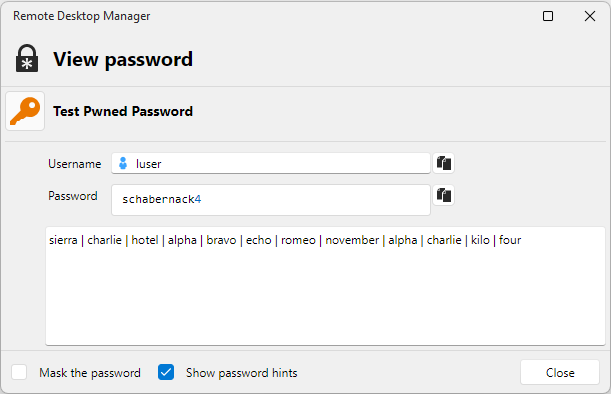
Can we have an option so select or import alternative spelling alphabets? There could also be different default alphabets for different UI languages.
Depending on the country and language, there are many of those. See https://en.wikipedia.org/wiki/Spelling_alphabet#Table_of_spelling_alphabets_by_language
A few more smaller suggestions:
The formatting could be improved.
I'd use capital letters and middle dot instead of vertical bar as the separator for better readability:
romeo | delta | mike
Romeo · Delta · Mike
The font size of the user/password fields could also be bigger. Often when you click "show password" it's because you want to show it to someone not sitting directly in front of the monitor, so a bigger font can help I think.
You can also show the password in the dashboad tab. That could also be made to be a consistent UI with the view password window.
Thank you!
Daniel
All Comments (5)
OK I just noticed the lower case spelling is intentional for lower case letters. Upper case letters are written in all caps. I guess that makes sense. I honestly don't know which one I'd prefer.
Rdm1
ROMEO · delta · mike · one
Romeo · delta · mike · one
upper case Romeo · delta · mike · one
upper case Romeo · lower case delta · lower case mike · one
...?
Hi Daniel,
Thanks for the detailed suggestions, and for the follow-up comment.
You're right about the casing: it's intentional. Lowercase letters are spelled in lowercase and uppercase letters in ALL CAPS, so the case comes through in the hint. We agree it isn't obvious at first glance, though.
The "View password" window could use a refresh, so we'll create a ticket and look at your ideas as part of that work:
- Alternative spelling alphabets, alongside NATO (e.g. DIN 5009 for German), possibly with a default based on the UI language
- Readability, including a larger display mode for showing credentials to someone across the room
- How the hints are formatted, including how upper/lowercase is shown
To help us prioritize, which language/alphabet would you use day to day?
Thanks again for the feedback!
Best regards,
Sébastien Aubin
Product manager - Password Management
Hi Daniel,
Thanks for the suggestions. Here is what's coming in an upcoming version of the "View password" window:
- Spelling alphabet picker: NATO, German (DIN 5009), Italian, Dutch or Swedish, or Automatic (follows the UI language, the current behavior).
- Grid layout: one cell per character with its position, the spelled word and its type (uppercase, lowercase, digit, symbol). The current text layout remains available in the settings menu.
- Large display: enlarges the password, with or without the hints.
These settings are remembered.
Best regards,
Sébastien Aubin
Product manager - Password Management
Hi Sébastien!
Thank you, that sounds great!
I would like to have an option to use the new (2025 GSÖD) Austrian alphabet, and I imagine many other regions use special alphabets or variants for their language. There's at least 4 alphabets commonly used for German. So I think it should be customizable and easily expandable by the user. An XML file or multiple text/CSV files for each alphabet should be simple enough, or maybe just integrate it into the settings file. I don't think a UI editor is necessary.
Thanks!
Hi Daniel, Thanks.
Rather than adding alphabets one by one, we'll make them customizable, as you suggested:
- Per user: a JSON file in the RDM settings folder, one word per character. No UI editor.
- Per team: an administrator can define alphabets in the data source settings (SQL Server and Devolutions Server).
With this, you'll be able to add the 2025 Austrian alphabet.
Best regards,
Sébastien Aubin
Product manager - Password Management