ManageEngine Password Manager Pro missing from My Account Settings in RDM Mac 2026.3
ManageEngine Password Manager Pro missing from My Account Settings in RDM Mac 2026.3

Hi Devolutions Team,
I noticed that the option for ManageEngine Password Manager Pro is missing under 'My Account Settings' in the Remote Desktop Manager for Mac client (version 2026.3).
Key details:
- It was working as expected up until 3 days ago.
- The same setting/integration remains visible and accessible on the Windows client for the same setup.
- I have performed a complete clean re-install on macOS (including clearing preferences, Application Support folders, and cache at ~/Library/Application Support/com.Devolutions.RemoteDesktopManager), but the integration entry is still missing under My Account Settings.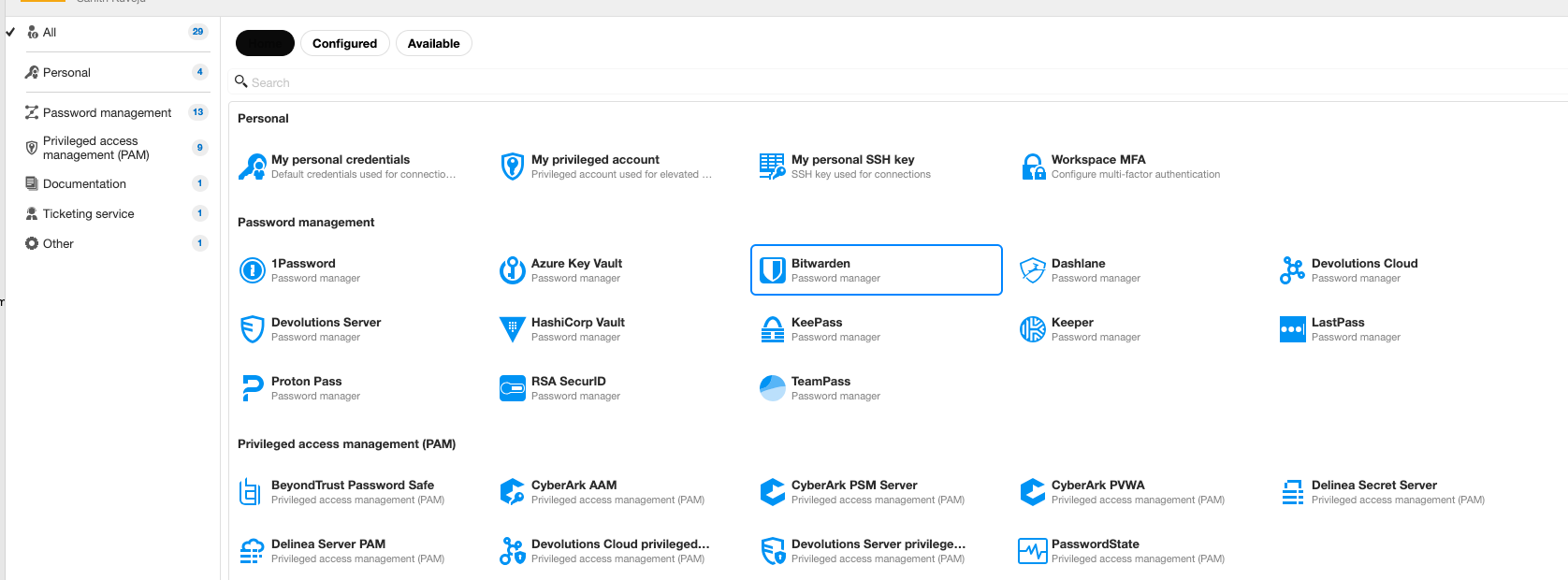
Could you please confirm if this is a known UI regression in the latest macOS build, or if there is a specific configuration step required to restore it?
Thank you!
bb9d028f-414d-49d4-94d4-7bd403863b36.png
All Comments (1)
Hello,
I can confirm that this is not an issue on your side. It seems like some options were lost when we migrated to the new UI. I will open a ticket to bring back everything that was lost. Sorry for the inconvenience.
Best regards,
Maxim Buisson