BUG: Paste two times from Clipboard not working anymore

Dear all,
I use the function "Copy User & password" function and paste two times via Ctrl + V - first time to paste the username and second time to past the password. Since a few versions this doesn't work anymore.
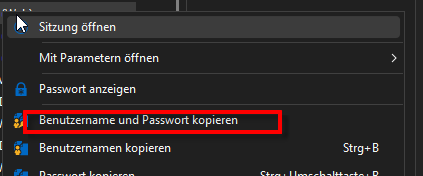
RDM Version 2026.19.0
Best regards
Rainer
All Comments (3)
Hello,
Thank you for contacting us on that matter,
Previously, users could paste the username and password by pressing Ctrl+V twice. With the new behaviour, an additional keyboard shortcut is required to switch between the two values.
The updated procedure is as follows:
Ctrl+V – Paste the username.
Ctrl+Alt+V – Switch to the next value.
Ctrl+V – Paste the password.
This clarification should help prevent confusion and reduce support cases related to the new behavior.
The updated documentation is now available here:
https://docs.devolutions.net/rdm/ribbon-menu-bar/home/clipboard
Best regards,
Tommy Sanders
Hy,
thanks for the feedback.
Now I tried:
Copy username and password
Open Notepad++
Press Ctrl+V => Useranme is pasted
Press Ctrl+V => Password is pasted
That works nut not with Ctrl + Alt + C
But:
Open webpage in RDM
Copy username and password
Press Ctrl+V => nothing ist pasted
I tested it with two pages:
Best regards
Rainer
Chromium-based apps break the copy username and password functionality because they access the clipboard without identifying themselves.
A workaround has been introduced in the latest version of RDM. You can use CTRL+ALT+V to move to the next value and then paste the password.
Note: The next release of RDM will use CTRL+ALT+SHIFT+V. We had to move away from CTRL+ALT+V as it caused issues with certain language-specific keyboard layouts, so the shortcut had to be changed. The key combination is also configurable.
More information here (the documentation still shows the old shortcut, but an update will be pushed once the RDM release is available):
https://docs.devolutions.net/rdm/ribbon-menu-bar/home/clipboard
Stéfane Lavergne