MacOS menubar

Hi.
Something went wrong on last version for MacOS.
(Remote Desktop Manager 2026.3.1.2
Runtime: .NET 10.0.12
Platform: macOS 27.0.1
Workspace: Local data source
Allocated memory: 153 MB
)
What is the worse menu bar on the top in app? This is not OSx style.
How to remove it?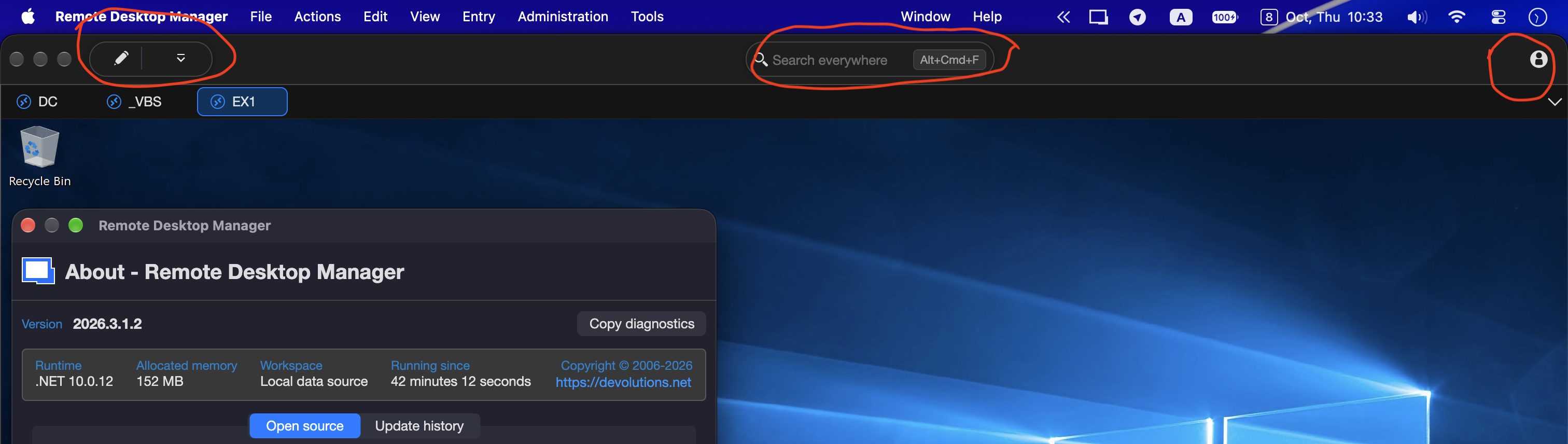
f919bc9b-7e16-411b-a34e-f95350513fb5.png
All Comments (1)
Hello,
Thank you for contacting us on that matter,
This top bar (Edit button, “Search everywhere” and account icon) is part of the new interface introduced in Remote Desktop Manager 2026.3 for macOS. At the moment, there is no option to hide it.
We already have a feature request to add an option to hide this bar, and I have added your feedback to it so the development team knows more users are asking for it. I cannot provide a timeline yet, but I will let you know if it becomes available in a future version.
Note that the View > Show toolbar option does not hide this bar either. This behavior is also known by our team.
There is the link of the feature request if you would like to add a comment : https://forum.devolutions.net/topics/56387/hide-menubar
Best regards,
Tommy Sanders