2026.3.5.0 : Navigation resize broken

Just updated to 2026.3.5.0 this morning.
The 'Navigation' pane to the left won't resize smaller than a certain limit.
At first I thought it was the smaller pane marker at the top, but that will resize to whatever size you want.
The main window just won't go left past a certain position.
We had this problem many moons ago in the macOS version and now it's appearing here.
I'll have to revert to an older build and suffer the 'update' window each time I open the app.
Please fix.
All Comments (3)
Hello,
This most likely changed due to us converting the entire application from winforms to "Avalonia", a cross-platform UI. This will allow us to share more code between our various platforms and avoid doubling the work for our devs.
We'll fix it so there is no minimum width in the upcoming 2026.3.6.0.
Best Regards,
Michaël Beaudin
Sure. I will keep my eyes open.
One suggestion, as I can see you guys have your hands full with all the bugs from that conversion, you might want to program something into the updater to allow us to select a version.
Downgrades are a different thing, but I have another machine where it's on 2026.2.13 and the updater only selects the 'latest & greatest'.
It would be nice if I could just tell it to go to the 'extended maintenance' at 2026.2.19, rather than forcing me to go find the download link and do it manually.
Just food for thought.
Hello,
If you go in File > Settings > Application > Application start up, you can configure what release channel to check for updates: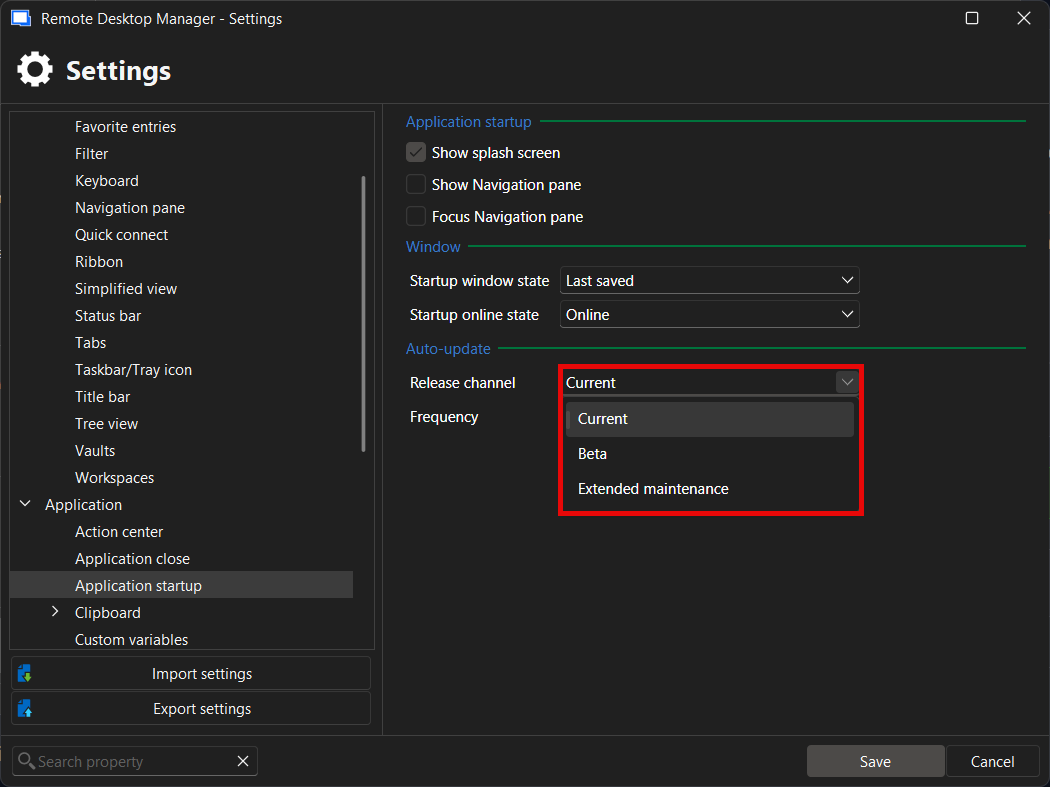
If you wish to only get updates for the extended maintenance, you could change this setting here and it would only tell you there's an update when there's a new extended maintenance version, whether it's a minor one (2026.2.20.0 for example), or a major one (when 2026.3.X eventually becomes the new extended maintenance release). The updater application will update to that specific version and not the one on the current release track.
The extended maintenance version is a recent concept for RDM so I don't believe this setting is available on 2026.1 and prior, but it should be there on 2026.2.
I hope this helps you manage you and your team's future RDM updates in a better way.
Regards,
Hubert Mireault
d8628d75-8bd8-4559-a958-0f7cd979ca45.png